

In software testing, preconditions play a crucial role in ensuring that test cases execute successfully. They serve as the groundwork for a reliable and repeatable testing process. But what exactly are preconditions, and how can you write them effectively? Let’s find out!
What are Preconditions in Test Cases and Why Are They Important?
Understanding Preconditions
A precondition is a specific requirement that must be met before a test case can run. It defines the environment, data, or state of the system needed to execute the test successfully. Without the right preconditions, tests may fail for reasons unrelated to the functionality being tested, such as incorrect configurations or missing data.
Why Preconditions Matter
- Consistency: Preconditions ensure that tests are consistent, providing a reliable setup before each test. This helps make the testing process more predictable and reproducible.
- Accuracy: By defining clear conditions, preconditions prevent false failures that could arise due to setup errors, not functional defects.
- Efficiency: Proper preconditions reduce troubleshooting time. If everything is set up correctly from the start, the focus can stay on testing the actual functionality.
→ Related content: Precondition in Test Case
How to Clearly and Correctly Write Preconditions for Test Cases
Writing effective preconditions isn’t just about listing what should happen before the test. It’s about making the setup clear, specific, and actionable. Here’s how to do it:
Keep It Simple and Clear
Use straightforward, understandable language. Avoid jargon or overly technical terms unless absolutely necessary. Everyone in your team, from developers to testers, should be able to understand the preconditions.
Be Specific
Instead of writing vague statements like “The system is ready,” state exactly what needs to be true. For example:
- Vague: “The system is online.”
- Specific: “The test environment is set up, and the application server is running with the latest version deployed.”
Being specific ensures that anyone executing the test knows exactly what to expect.
Break Down the Setup
If there are multiple setup steps, list them in a clear sequence. This helps the tester understand what needs to happen first, second, and so on.
Good Example
- Vague: “The user must be logged in.”
- Specific: “A valid user account with the username ‘testuser’ and password ‘test123’ exists in the system. The user is logged in to the homepage.”
This is more actionable and leaves no room for ambiguity.
How to Create Preconditions in Test Cases: A Step-by-Step Guide
Now that you understand the importance of preconditions, let’s go over how to create them step by step. This process will help you write clear and actionable preconditions for any test case.
Step 1: Understand the Test’s Requirements
Before defining preconditions, you need to understand the functionality being tested.
- What exactly does the test need to verify?
- What system state or data is required to run the test properly?
Knowing the end goal of the test helps you set up the right conditions.
Step 2: List All Dependencies
Identify all the internal and external systems, data, or configurations that need to be in place.
For example, if you’re testing a payment gateway, the precondition might include making sure the payment gateway is configured and connected. If you’re testing a user login, the precondition could be having a valid user account in the system.
Step 3: Write Clear and Specific Conditions
For each dependency, write a condition that needs to be true before the test can run. These conditions should be as specific as possible.
Instead of saying “The user is logged in,” you could say, “The user is logged in with a valid email and password.”
Step 4: Sequence the Preconditions
If there are multiple setup steps, sequence them in a logical order.
For instance, if the environment needs to be configured first, state that as the first step. If data needs to be entered into the system, specify that it should be done before initiating the test.
Step 5: Double-Check for Completeness
Review your preconditions to ensure that all the necessary setup is included. Make sure nothing is left out that could prevent the test from running.
Ask yourself: “If I were executing this test, would these conditions be clear and sufficient?”
Step 6: Document and Organize
Use a consistent format to document preconditions for all test cases. This helps in creating reusable preconditions and keeping your testing process organized. Consistency is key in maintaining clarity throughout your test cases.
How to Write Effective Test Preconditions with AgileTest
Creating and managing preconditions in AgileTest is simple and helps streamline your testing process. Follow these steps to define and link preconditions to your test cases:
Step 1: Open AgileTest in Your Jira Project
Ensure the AgileTest app is installed and accessible from your project sidebar. Once installed, navigate to your project’s dashboard to access AgileTest.
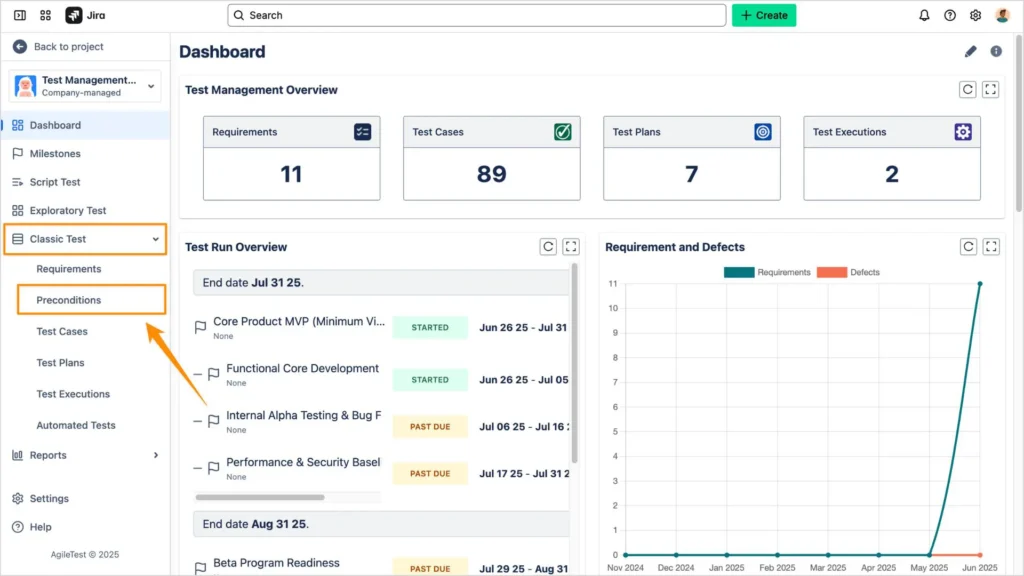
Step 2: Navigate to the Classic Test Feature
In the AgileTest interface, find the Classic Test feature. Here, you’ll find the Preconditions option where you can begin setting up your conditions.
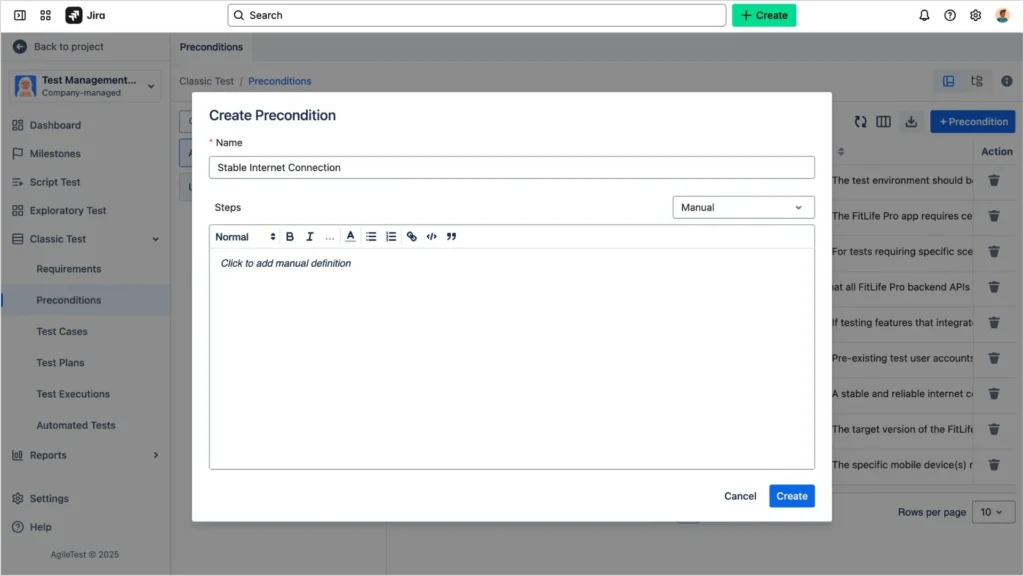
Step 3: Create Your Preconditions
Define the necessary setup or requirements that must be met before running your test. Be clear and specific in your descriptions to avoid ambiguity. This is where you’ll detail what needs to be in place for the test to execute correctly.
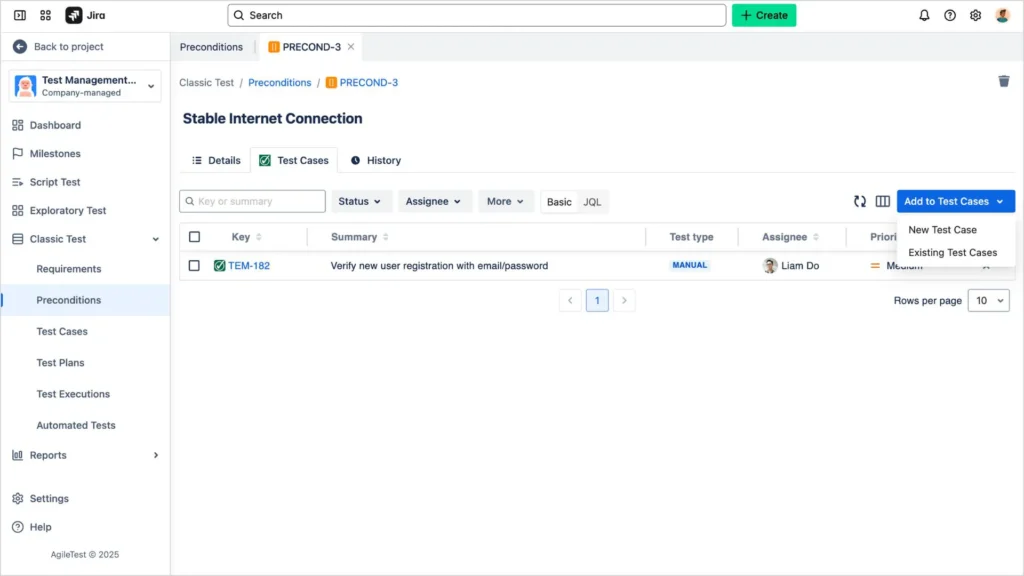
Step 4: Link Preconditions to Test Cases
Once your preconditions are created, link them directly to your test cases. This allows multiple tests to reference and share the same setup, avoiding redundancy and ensuring consistency across your testing process.
Examples of Good Preconditions for Different Testing Scenarios
Let’s take a look at some practical examples of good preconditions across various testing scenarios:
- Login Functionality: “A registered user with email ‘user@example.com’ and password ‘Password123’ exists. The login page is accessible and operational.”
- Payment Processing: “The payment gateway is configured and active, and a valid credit card is linked to the user’s account.”
- Search Feature: “At least one product is available in the ‘Electronics’ category. The search page is live.”
- E-Commerce Checkout: “The user is logged in with a valid account. The cart has at least one item, and the checkout process is accessible.”
These examples help ensure the test runs in the right environment and with the necessary data, providing a clearer path to execution.
The Difference Between Preconditions and Postconditions
It’s essential to understand the distinction between preconditions and postconditions:
- Preconditions define the setup required before a test begins. They ensure that everything is in place for the test to execute.
- Postconditions describe what should happen after the test runs. They verify that the expected results are achieved.
Understanding both helps ensure the test is set up correctly and that you can confirm whether it succeeded. Without clear postconditions, it’s difficult to know if the test passed or failed based on the results.
Example of Precondition and Postcondition
- Precondition: “User account with email ‘user@example.com’ exists in the system.”
- Postcondition: “User is successfully logged in and redirected to the dashboard page.”
Final Thoughts
Preconditions are the foundation for successful testing. By ensuring that all necessary conditions are met before a test runs, you minimize the risk of errors and improve the accuracy of your results. Whether you’re using AgileTest or another tool, clear and consistent preconditions will help streamline your testing process and ensure more reliable outcomes.
Take the time to define your preconditions properly, and your tests will be more structured, efficient, and effective. Remember, preconditions are your test setup; they ensure your test can run successfully.