

When we write test cases, it’s easy to jump straight into the steps and expected results. But there’s an important piece we shouldn’t skip: preconditions. Think of them as the setup that ensures your test runs smoothly. Without clear preconditions, tests can fail for reasons that have nothing to do with what you’re actually testing.
In this article, we’ll break down what preconditions are, how to write them effectively, and why they make such a big difference in real-world testing.
What is a Precondition in Testing?
A precondition is simply something that needs to be true or set up before you run a test. Think of it as the foundation. Just like a house can’t be built without a solid base, a test case can’t be trusted if the starting conditions aren’t right.
Why does this matter? Because a failed test without clear preconditions doesn’t tell you much. Did the feature really break, or did you just forget to set up the right test data? Did the login fail because the feature is broken, or because the user account didn’t exist? Preconditions remove that guesswork.
Everyday example:
Imagine you want to cook pasta. Before you start, you need to have a pot, water, and pasta itself. If you skip the precondition “have pasta in the kitchen,” you can’t complete the cooking process.
Software example:
Say you’re testing a login page. A precondition could be: “The system has a registered user with a valid email and password.” Without that, the test isn’t really testing the login function—it’s failing because there’s no account.
So, in short: preconditions define the starting line for your test case.
How to Write Good Preconditions for Test Cases
Not all preconditions are equally useful. Some are so vague they confuse the tester, while others are overloaded with unnecessary detail. Writing good preconditions means making them clear, specific, and easy to follow.
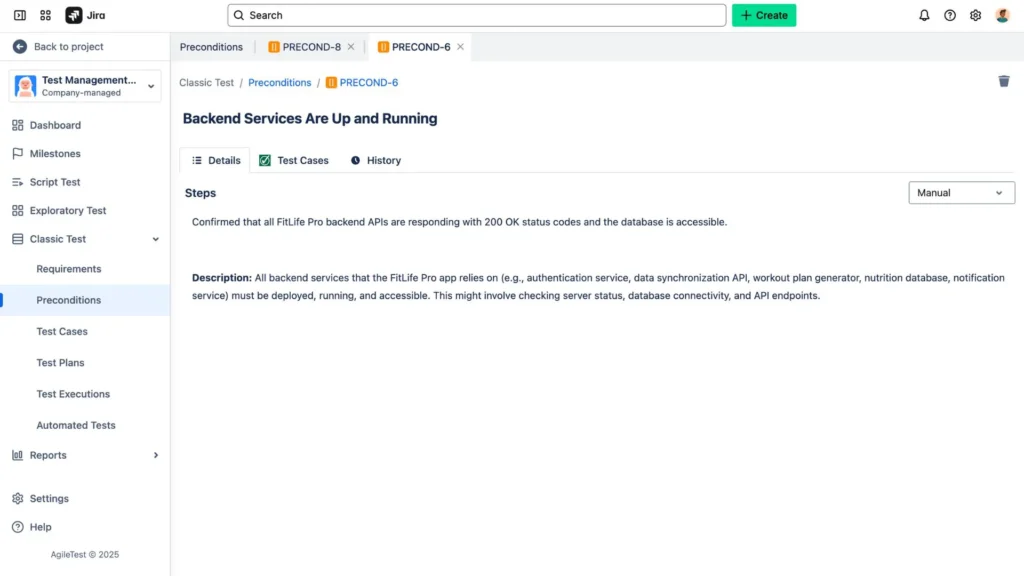
Here are some guidelines:
- Keep them simple. Write in plain, everyday language. A precondition should be readable by anyone on the team, not just senior testers.
- Be specific, not vague.
For example:- Vague: “User must have access”
- Clear: “A registered user account with a valid email and password exists in the system.”
That extra clarity saves time later when someone else is running the test.
- Use a checklist style. If there are multiple preconditions, list them as short, separate points. This makes them easier to scan and less likely to be missed.
- Stay focused. Don’t add unnecessary details. If the precondition isn’t critical to the test’s success, leave it out.
Think of preconditions as instructions you’d give a friend borrowing your car. Saying “make sure the car has gas” is useful. Saying “the car is blue, with leather seats” isn’t—it doesn’t affect whether they can drive it.
Key Preconditions That Are Essential for Successful Test Execution
Preconditions can cover a variety of areas. The type of precondition you write depends on what your test case is about, but most fall into a few broad categories:
User-related conditions
These ensure the right type of user is available before running the test.
- Example 1: A registered user account with valid email and password exists in the system. (needed for login tests)
- Example 2: An “Admin” role user exists with permissions to create new projects. (needed for testing admin-only features)
👉 Without these preconditions, your test might fail simply because the user doesn’t exist or lacks permissions.
System-related conditions
These confirm that the system itself is in the correct state before execution.
- Example 1: The application server is running and accessible.
- Example 2: Feature flag “Enable Payment Gateway” is turned ON in the environment.
👉 Imagine testing payment processing while the payment gateway is disabled—you’d get misleading failures.
Data-related conditions
Many tests depend on having existing data to work with.
- Example 1: At least one customer record exists in the database. (needed for search or reporting tests)
- Example 2: An order with status “Pending” exists for the test user. (needed for testing order cancellation)
👉 Without this setup, the test case can’t even start, since the “test subject” (like the order or record) doesn’t exist.
Environment-related conditions
These deal with where the test is executed.
- Example 1: The QA environment is available and accessible via VPN.
- Example 2: Version 2.1.0 of the mobile app is deployed on the test device.
👉 If you’re testing on the wrong environment or wrong version, you won’t get accurate results.
By thinking across these categories, you make sure no critical setup is missed. That way, your test cases become more reliable, repeatable, and trustworthy.
Why You Should Reuse Preconditions
A common mistake in test case writing is repeating the same preconditions again and again. For example, almost every test in a login suite might start with “user must be registered.” Instead of rewriting that 10 or 20 times, it’s better to reuse preconditions.
Here’s why:
- Saves time. Writing once and reusing across tests cuts down repetitive work.
- Keeps things consistent. If a precondition is reused, every test starts from the same baseline, reducing human error.
- Simplifies maintenance. If something changes—say, the login process now requires two-factor authentication—you only need to update the precondition once, not in every single test case.
Think of reusable preconditions like shared templates. Instead of writing “prepare ingredients” in every recipe, you create one reusable instruction and link it wherever needed.
Example in practice:
Rather than writing “user must be logged in” in 20 test cases, create one reusable precondition called “User is logged in with valid credentials.” Any test that depends on login can reference that precondition.
Using Preconditions in Test Cases in Jira
In Agile environments, most teams use Jira to manage their projects, and many also manage testing there using tools like AgileTest. Jira provides a handy way to organize and link preconditions so they can be reused effectively.
Why it’s useful
- Jira test management apps often have a dedicated Precondition field. This makes it easy to document the setup clearly.
- Preconditions can be linked to multiple test cases, so you don’t need to rewrite the same thing dozens of times.
- They’re visible to both testers and non-testers, which helps improve communication across the team.
Using Preconditions in Jira with AgileTest
Here’s how you can create and manage Preconditions in AgileTest:
- Open AgileTest in your Jira project. Make sure the app is installed and accessible from your project sidebar.
- Navigate to the Classic Test feature. From there, select the Preconditions option.
- Create your preconditions. Define the setup or requirements needed before test execution. Keep the description clear and specific.
- Link preconditions to test cases. Connect them directly so multiple tests can share the same setup without duplication.
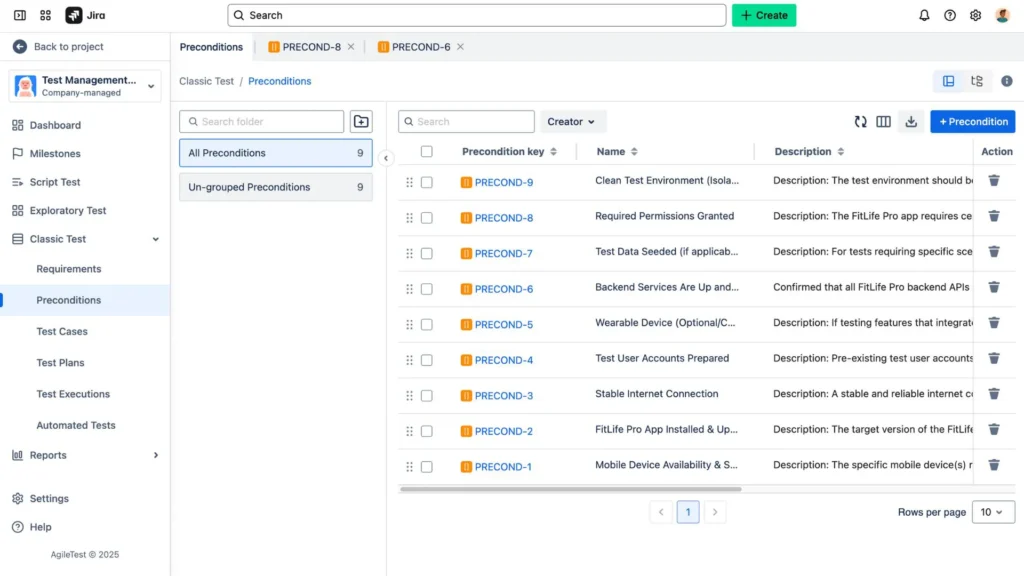
→ Learn more about this feature: Preconditions in AgileTest
Best practices for Jira
- Write preconditions in simple, human-friendly language. Remember, not everyone looking at the test case will be technical.
- Treat preconditions as shared assets. If something changes in the system, update the precondition in Jira so all linked test cases remain accurate.
- Avoid clutter. Keep each precondition focused on the essential state needed before the test.
When used well in Jira, preconditions act like a “starting checklist” for testing. They reduce confusion, ensure consistency, and save teams from the headache of duplicated work.
Final Thoughts
Preconditions may feel like a small detail, but they’re what make test cases strong, reliable, and repeatable. They help testers start from the right place, reduce false failures, and save time when reused effectively.
The next time you write a test case, don’t just think about the steps—pause and ask yourself: What needs to be true before this test can even run? That’s your precondition.
And if you’re working in Jira or similar tools, make the most of preconditions by reusing them across multiple test cases. It’s a small habit that pays off with smoother test execution and less maintenance down the line.In short: set up right, test smart, and save yourself (and your team) a lot of headaches.