
Exploratory Testing for Jira is useful when teams need to validate how users actually experience a product. Some issues only appear when testers follow real user behavior, navigation habits, and unexpected actions rather than strict predefined steps.
Your flow may technically work, but users may still feel confused by too many steps, unclear messages, or complex navigation. These are the kinds of problems that traditional testing may miss.
In this article, we’ll explore why this happens, the challenge of running exploratory testing in Jira, and how AgileTest helps teams manage it more effectively.

1. Traditional Test Cases Are Not Always Enough
Traditional test cases are important for validating expected functionality, but they are not always the best way to evaluate real user experience. They usually follow fixed steps with expected results, which means testers focus on whether the feature works rather than how the journey feels.
Several reasons why traditional test cases can be less user-driven include:
- Focus on expected behavior: Test cases check what should happen, but not always what users might unexpectedly do.
- Limited user perspective: Real users do not always follow ideal paths or behave logically.
- Fast product changes: In Agile teams, flows can change quickly while old test cases may no longer reflect the latest experience.
- Pass/fail mindset: A feature may technically pass testing while still feeling confusing or inefficient to users.
For example, a checkout flow may pass all functional tests because payment succeeds. However, users may still face too many steps, unclear shipping options, or confusing error messages during payments.
2. Exploratory Testing Helps — But Jira Has Gaps
Exploratory testing allows testers to freely navigate the product, think like users, and investigate friction points in real time. It is especially useful for validating UX flows, usability, and unexpected scenarios.
Learn more: Ad-Hoc vs. Exploratory Testing: What are the differences?
However, managing exploratory testing directly in Jira can be difficult because Jira was not originally built for this workflow. Teams often face challenges, including:
Manual Tracking and Storing of Findings
During exploratory testing, testers need to capture observations quickly while they are actively using the product. Unfortunately, Jira does not natively provide a dedicated exploratory testing workflow. Therefore, many teams rely on separate notes, spreadsheets, screenshots, folders, or chat messages to record findings.
This creates a disconnected process where testers must switch between tools while testing. As a result, important details can be missed, duplicated, or forgotten.
For example, testers may create a bug in Jira, but keep the reproduction steps, screenshots, or session notes in other documents. Later, when other developers review the issue, they may need to search across multiple sources to understand the full context.
Difficulty in Managing Test Results
Exploratory testing is fast and adaptive, but the results still need to be organized after execution. In Jira, findings are usually logged as separate issues without a clear connection to the sessions where they were discovered.
This makes it difficult for QA leads or managers to answer common questions such as:
- Which areas of the product were explored?
- How many issues were found during this session?
- What was tested for the current release milestone?
- Which sessions still need follow-up or retesting?
For instance, testers may log several defects in Jira, but without linking them to a specific session, there is no easy way to review the full testing effort. This reduces visibility, makes reporting harder, and creates uncertainty around overall test coverage.
Read more: A More Effective Approach to Managing Exploratory Testing
3. Bringing Exploratory Testing into Jira Workflows
These aforementioned gaps highlight the need for a better integration between exploratory testing and Jira workflows. Specifically, this integration should maintain both the flexibility of exploratory testing and the structured tracking that Jira excels at.
To overcome these challenges, teams can use AgileTest, which helps integrate exploratory testing into Jira in a way that works for both structured and flexible testing.
Let’s use the Login UI Check scenario and see how teams can run a more practical exploratory session.
Step 1: Create Your Exploratory Session
To get started with exploratory testing in Jira using AgileTest, the first step is to create an exploratory test session.
You can fill in the basic information for your newly created section. To ensure your exploratory testing is aligned with the overall project goals, link the test session to an existing milestone.
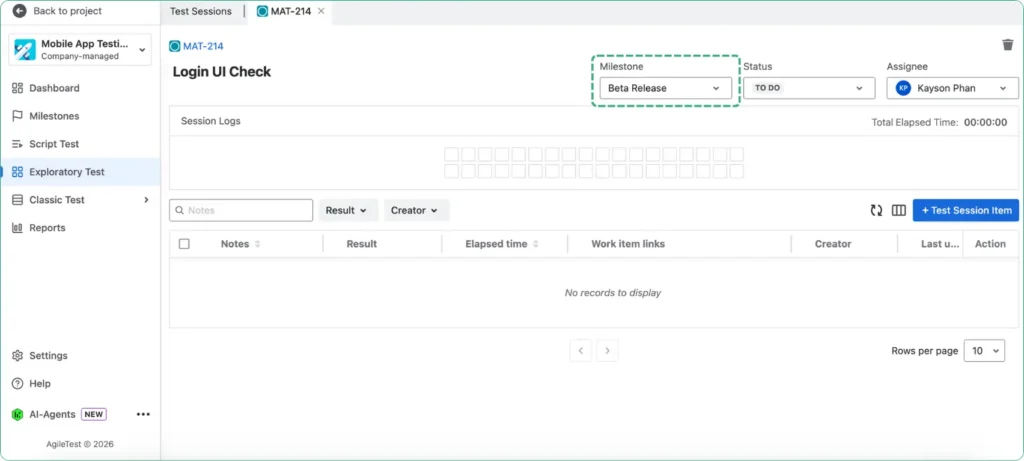
Linking the session to a milestone allows you to track your test results in the context of a project or release plan. It ensures that your testing aligns with key project goals and helps monitor progress once the milestone is reached.
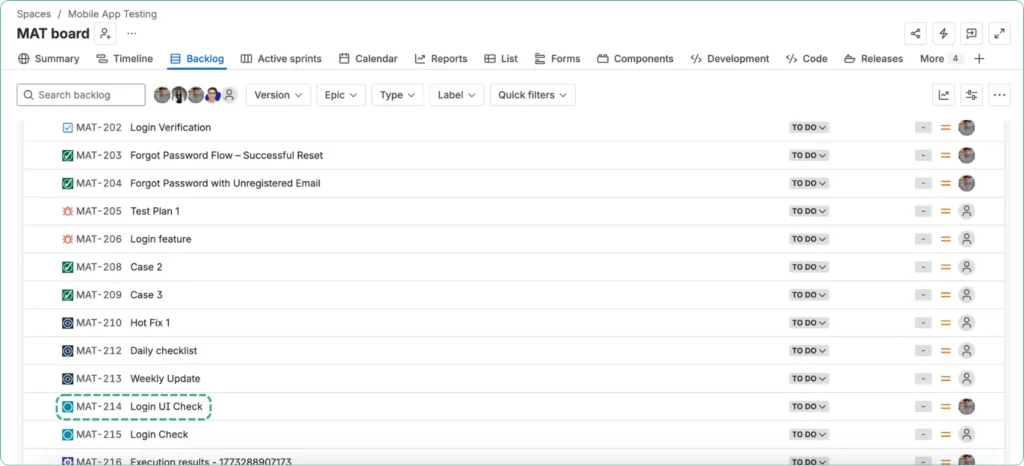
Then, you can see your created test session appear directly on your Jira board. You can gain better visibility, make it easier to track progress, and keep activities connected with your existing Jira workflow.
Step 2: Record Your Testing Notes
Once your exploratory session is ready, you can begin testing the application freely based on your experience, intuition, and test objectives.
Instead of only verifying if pages load correctly, focus on moments where users may hesitate or feel confused in the login process. You can consider these questions, such as
- Is it clear where users should enter credentials?
- Is the login button easy to find and responsive?
- Are validation messages clear when fields are empty or incorrect?
- Is the password reset flow easy to understand?
- Does the login page display properly on mobile devices?
- Can users navigate fields smoothly with keyboard actions like Tab or Enter?
- …
As you navigate through the product, record every important observation directly inside the session.
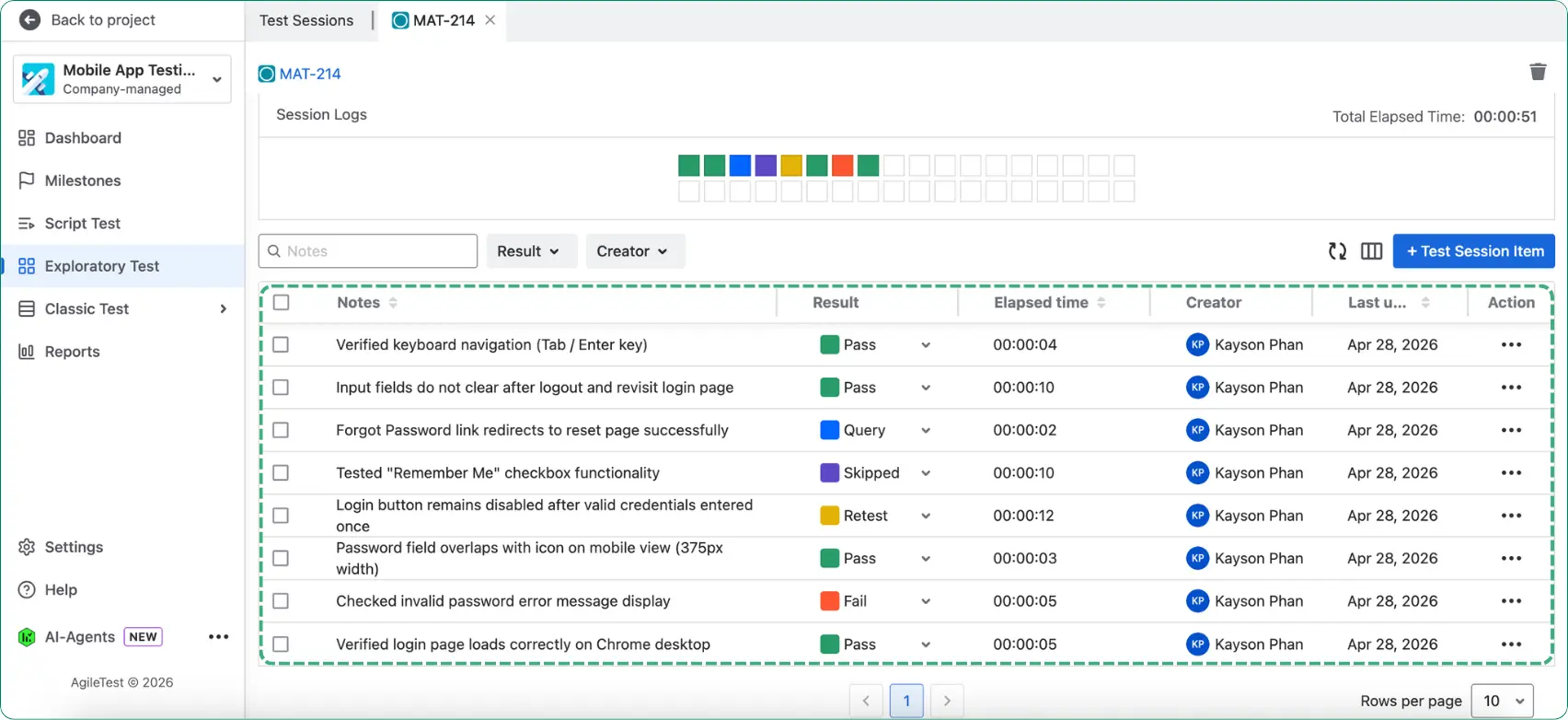
For each finding, you can:
- Add notes to record which feature, function, or scenario has been tested.
- Assign a test status to each session item, such as Pass, Fail, Query, or Retest, to keep results clearly tracked.
- Track the time spent on each activity to compare your planned session time with the actual time used.
This helps you stay organized during sessions while giving a clear view of progress and testing outcomes in real time.
Step 3: Attach Your Evidence and Link Issues
When a usability issue is discovered during the Login UI Check session, the next step is to capture enough context so the team can act on it quickly.
For each finding, you can:
- Attach screenshots or files to clearly show the UI issue and reduce back-and-forth with developers.
- Create or link Jira bugs, tasks, or stories directly from the finding so follow-up work starts immediately.
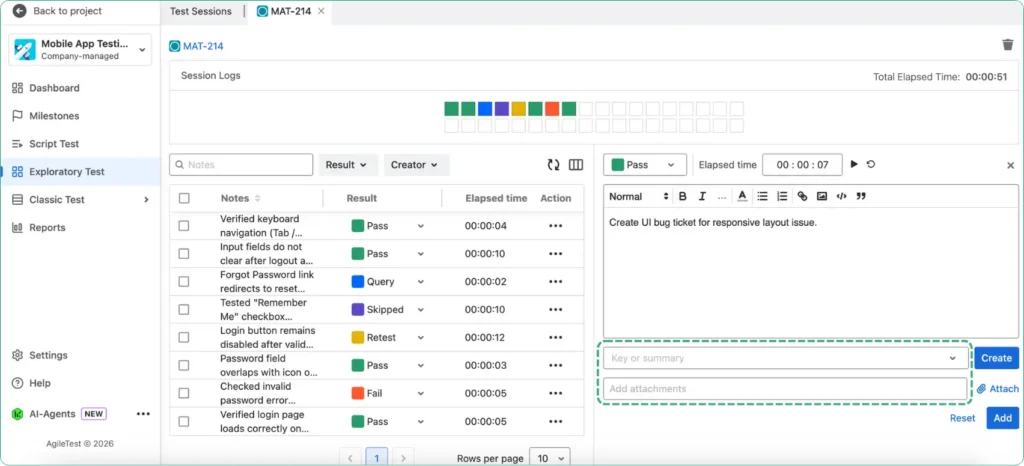
Instead of scattered screenshots, chat messages, and separate bug tickets, your team gets one connected record of what happened, where it happened, and what needs to be fixed.
Step 4: Review Your Results
Once the exploratory session is completed, the next step is to review the recorded results.
First, select the same milestone that was linked to your test session in Step 1. After choosing the correct milestone, AgileTest will display all exploratory test sessions associated with that milestone.
From here, teams can review:
- Which parts of the login flow caused the most friction?
- How many usability or UI issues were found?
- Which findings were converted into Jira bugs or tasks?
- Which sessions still need retesting after fixes?
For example, if several findings relate to unclear error messages or mobile layout problems, the team can prioritize those improvements before release.
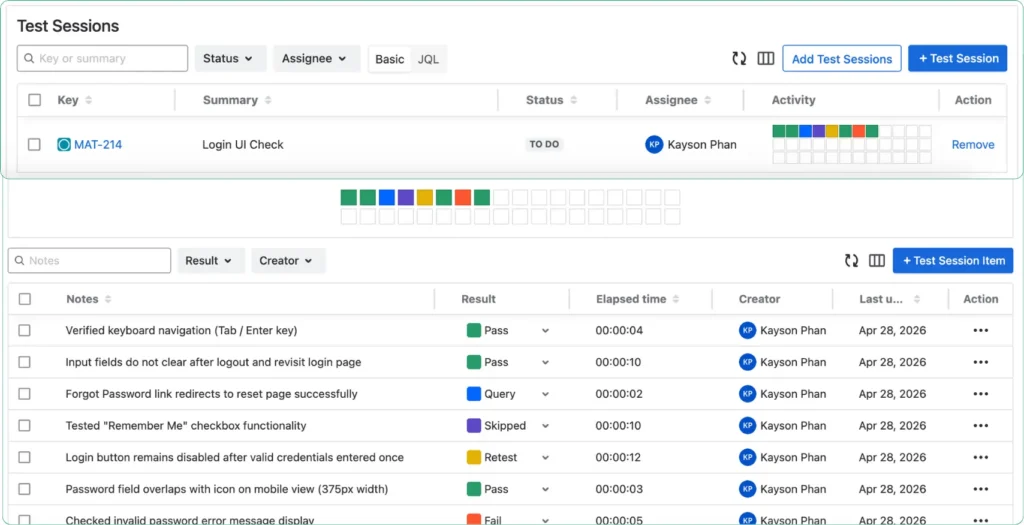
This makes exploratory testing a practical way to improve the real login experience while staying fully connected to Jira workflows.
Final thoughts
Exploratory testing helps QA teams uncover real-world issues, usability gaps, and unexpected behaviors that scripted testing may miss. It gives testers the flexibility to adapt during execution, provide faster feedback, and expand coverage in fast-moving Agile projects.
With AgileTest in Jira, teams can run exploratory sessions, capture findings, link defects, and review results in one connected workspace. This makes exploratory testing easier to manage, improves visibility for the whole team, and keeps the speed and flexibility needed for modern software delivery.
AgileTest is a Jira test management tool that helps teams run exploratory testing and manage test cases. Try it today.