
Regression testing helps QA teams confirm that new changes, bug fixes, or improvements do not break existing product functionality. In Jira, this process is especially important because requirements, user stories, bugs, releases, and development work are already managed in one place.
Why regression testing becomes hard to manage
As a product grows, the number of features, test cases, and release changes also grows. Without a clear regression process, QA teams may find it difficult to decide which test cases should be rerun, which failed cases need attention, and whether key requirements are still properly covered.
Many teams start regression testing with spreadsheets or scattered Jira issues. This may work at first, but it becomes harder to maintain when multiple testers, releases, environments, and defect cycles are involved. Failed test cases can be missed, outdated test cases may remain in the suite, and managers may not have a clear view of release readiness.
With that said, regression testing needs more than a checklist. It needs a structured way to plan the scope, execute tests, capture results, retest failures, and confirm that important requirements are still protected.
A structured approach to regression testing in Jira
A clear regression workflow should start with the requirements or product areas that need to be protected. This helps the team focus on high-risk changes, critical workflows, and features that must stay stable before release.
After defining the scope, teams can create reusable test cases and organize them into a regression suite. For each sprint, release, or environment, they can add the right test cases to a Test Plan, then create a Test Execution to run and track the results.
When a test fails, the team can create or link a Jira defect directly from the result. After the defect is fixed, testers can return to the same Test Plan and create a follow-up Test Execution for non-passed cases or the full regression scope.
Before release, teams should review coverage, traceability, execution results, and linked defects to confirm whether the product is ready. AgileTest supports this workflow in Jira by connecting requirements, test cases, Test Plans, Test Executions, Jira defects, and reports in one process.
→ Discover AgileTest – Test Management for Jira
Step-by-step guide: Run a regression cycle in Jira
Step 1: Define the requirements that need regression coverage
Start by identifying the Jira requirements, user stories, or product areas that should be protected during regression testing. Focus on business-critical features, recently changed areas, frequently used workflows, and past defects that may affect the release.
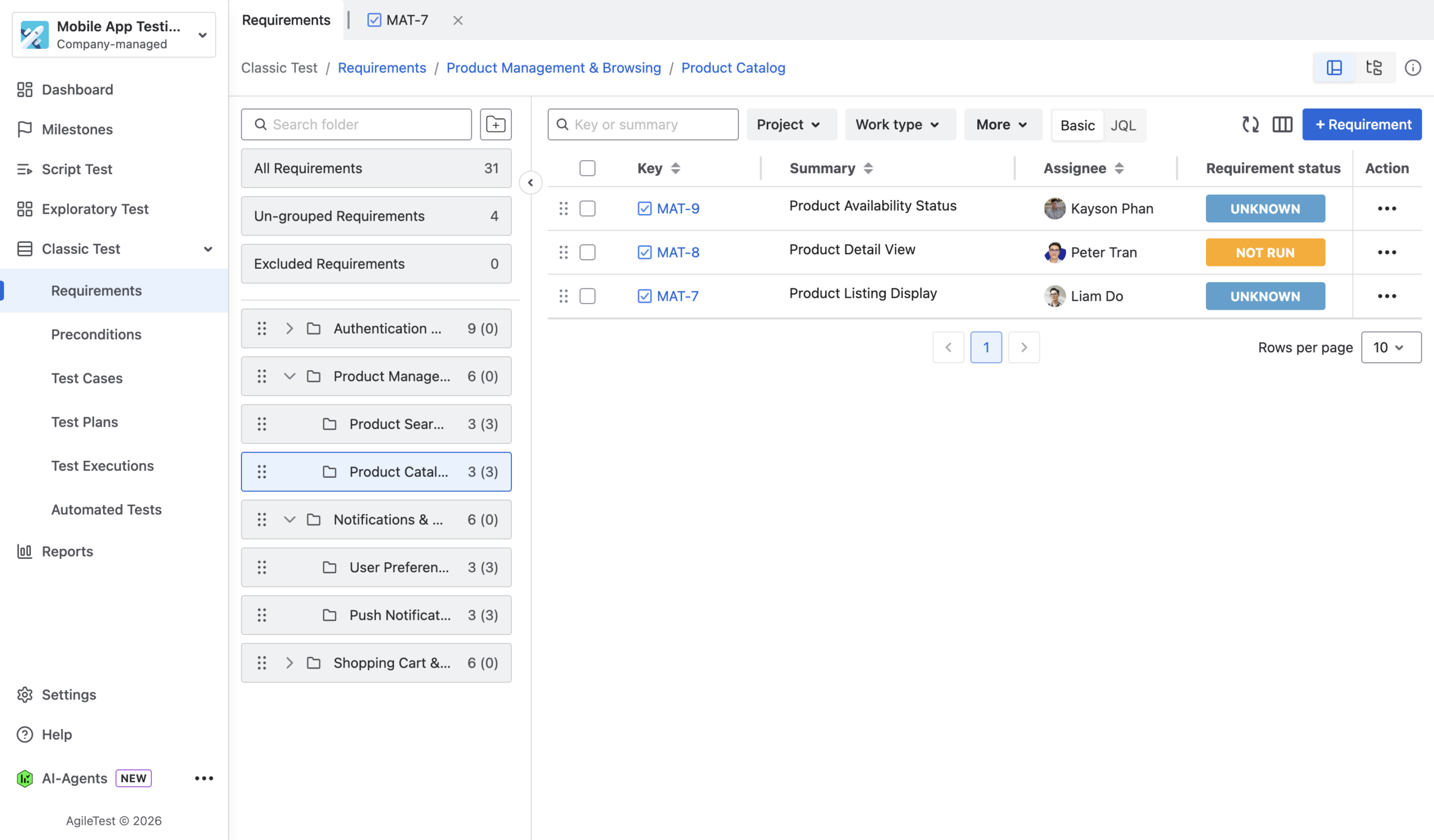
This step matters because regression testing should begin with product risk and release priorities. When the requirements are clear, the team can build a regression scope that protects the most important parts of the product instead of simply rerunning random test cases.
If a requirement is unclear, AgileTest’s AI Agent capability can help improve the requirement details before test cases are created or linked.
Step 2: Create reusable test cases and organize them into a regression suite
Once the requirements are defined, create or select reusable test cases that validate those requirements.
In AgileTest, teams can use folders to organize these test cases into a regression suite by module, feature area, or product flow.
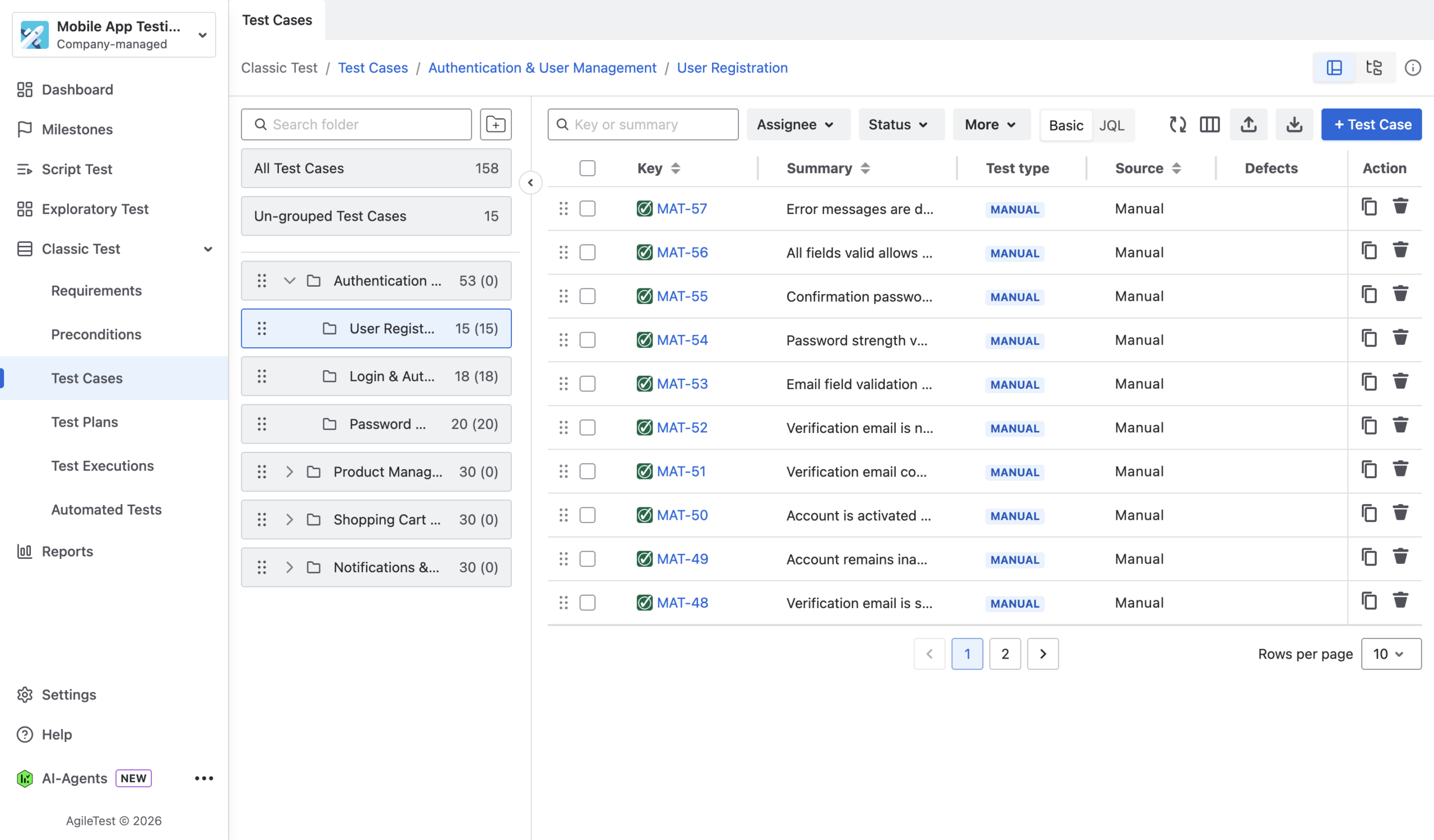
Teams can also use AgileTest’s integrated AI to generate draft test cases from requirement details, then review and refine them to match the real product behavior.
This step matters because a reusable regression suite helps QA teams save time across future releases. Instead of rebuilding the scope from scratch, the team can maintain a stable set of test cases and update them as the product changes.
Step 3: Create a dedicated regression Test Plan
Next, create a Test Plan for the regression scope. The Test Plan acts as the container for the test cases that will be included in a specific regression cycle.
The Test Plan can be based on a sprint, release, module, environment, or testing goal. For example:
- Regression Test Plan – Sprint 24
- Regression Test Plan – Release 2.5
- Regression Test Plan – Payment Module
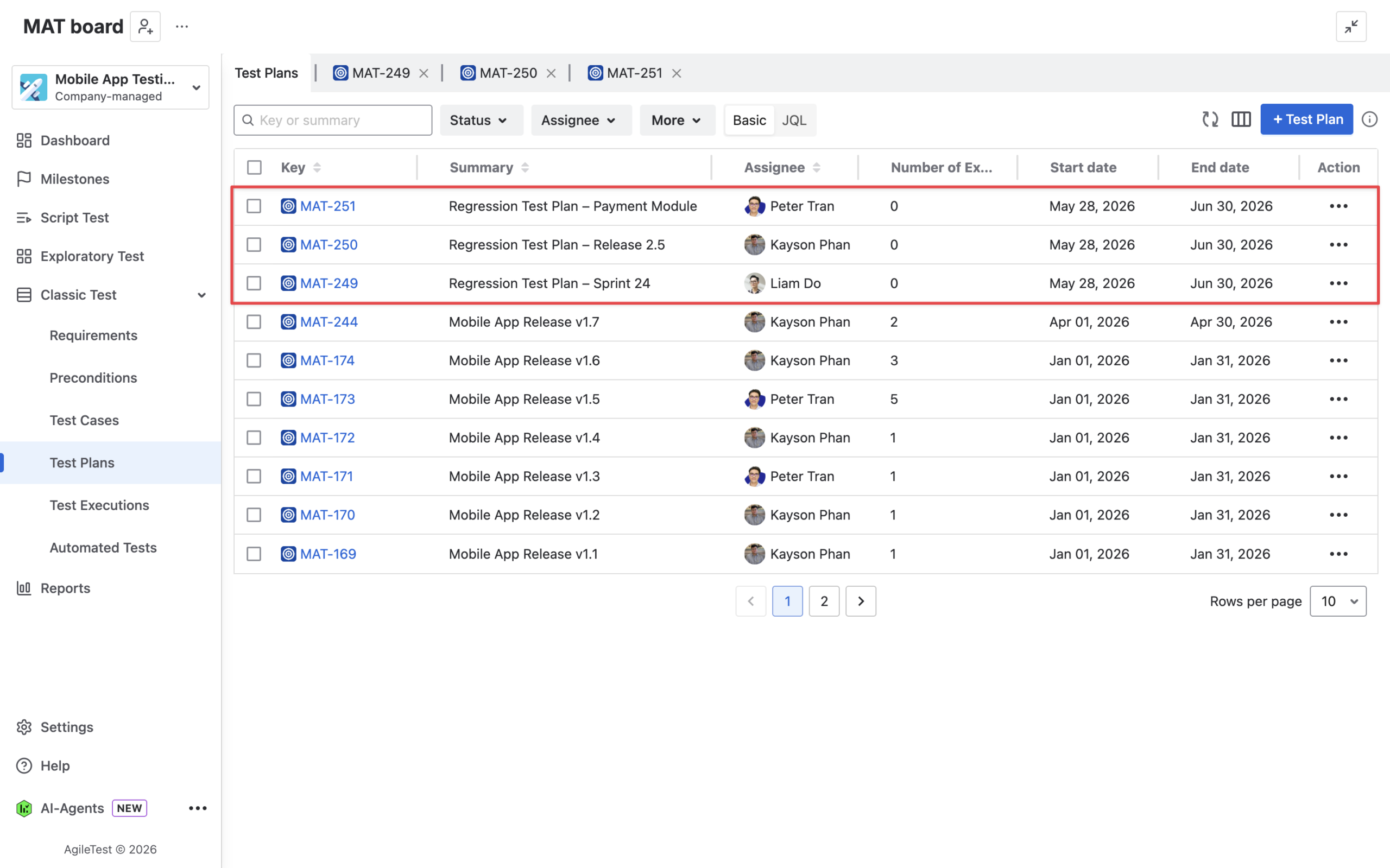
Add the selected regression test cases from your regression suite to the Test Plan. This gives the team a clear testing scope and helps everyone understand what needs to be executed.
The regression suite may contain many reusable test cases, but not all of them need to be run in every cycle. The Test Plan lets the team choose the right scope for each sprint, release, or product change.
Step 4: Create a Test Execution from the Test Plan
After the Test Plan is ready, create a Test Execution from it. The Test Execution is where testers run the selected regression test cases and record the actual results.
You can create different executions for different rounds, environments, or release stages, such as
- Regression Execution – Release 2.5 – Staging
- Regression Execution – Release 2.5 – UAT
- Regression Execution – Sprint 24 – Final Check.
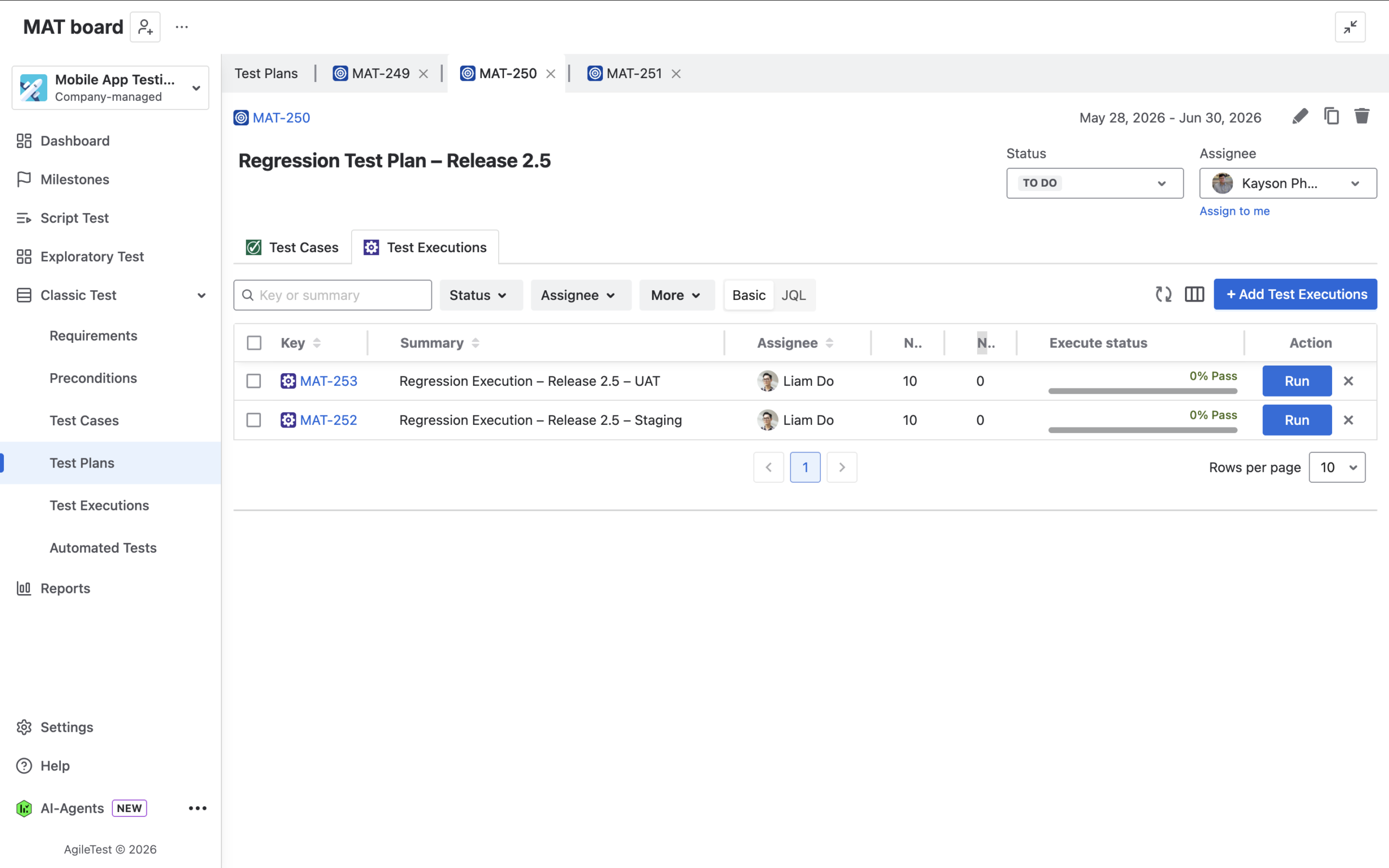
The Test Plan defines what should be tested, while the Test Execution captures what actually happened during a specific regression run. This separation makes it easier to reuse the same scope while keeping each execution result clear and trackable.
Step 5: Execute tests, record results, and create Jira defects
Run each test case in the Test Execution and update the result based on the actual outcome. Depending on the result, testers can mark cases as passed, failed, blocked, skipped, retest, or not run.
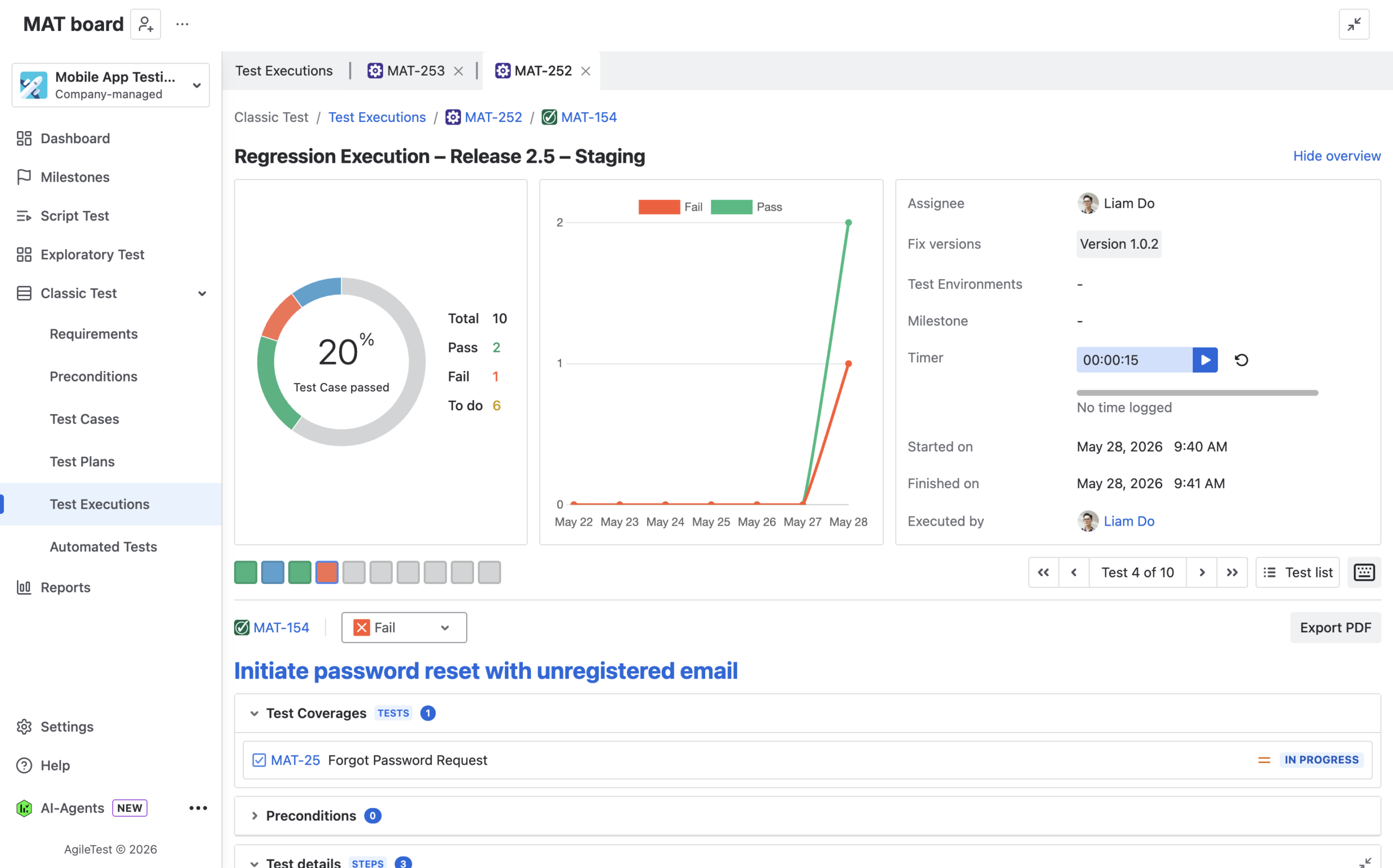
When a regression test fails, create a new Jira defect or link the test result to an existing defect. Add enough context from the failed execution so developers can understand what happened and reproduce the issue.
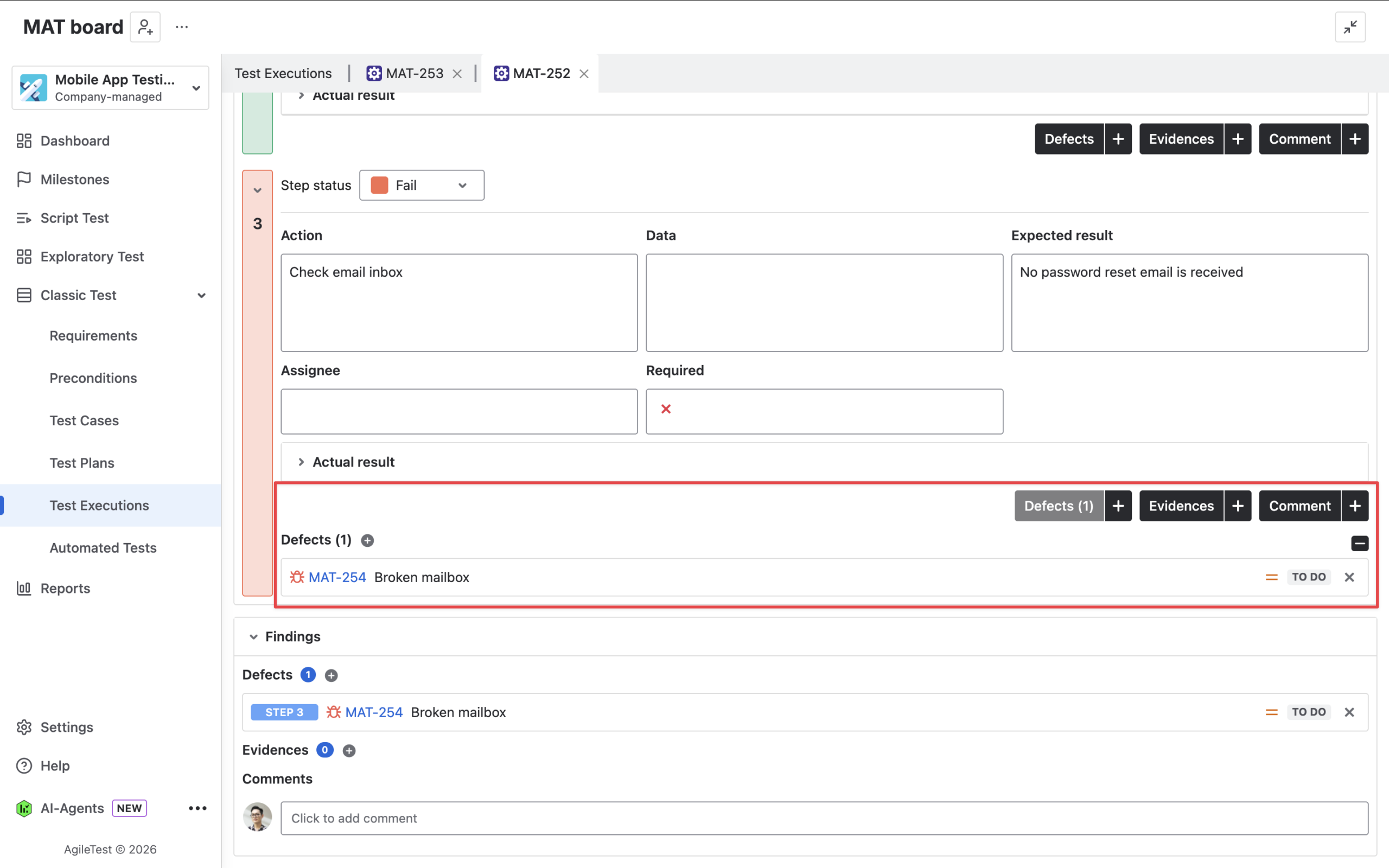
Regression testing should lead to clear action. By recording results and connecting failures with Jira defects, QA and development teams can track issues, fix them, and keep the full testing history visible in Jira.
Step 6: Create a follow-up Test Execution from the Test Plan
After the related Jira defects are fixed, go back to the same regression Test Plan and create a new follow-up Test Execution. This keeps the retest or second regression round connected to the original regression scope.
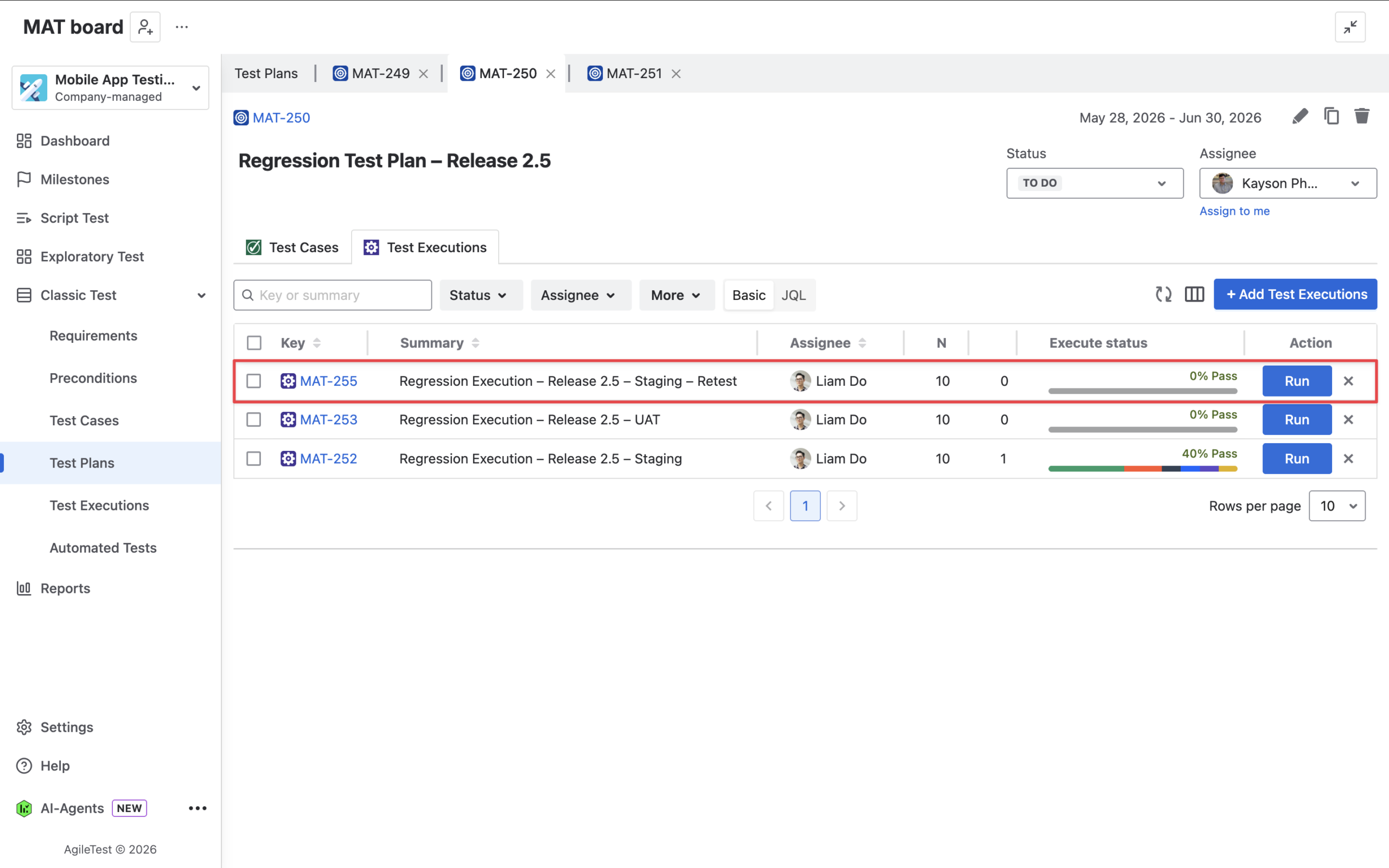
If most cases passed in the first run, create a new execution for only the not-passed cases.
If the fixes may have affected multiple product areas, create a new execution from the whole Test Plan to validate the full scope again.
Use a clear name so the team can quickly understand the purpose, release, environment, and testing round.
Regression testing often happens in multiple rounds. A focused rerun saves time, while a full rerun gives stronger confidence when defect fixes or code changes may introduce new risks.
Step 7: Review coverage, traceability, and release readiness
Before closing the regression cycle, review the execution results, linked Jira defects, and requirement coverage. Use coverage or traceability reports to check whether important requirements are tested, which areas passed, and which areas still have unresolved issues.
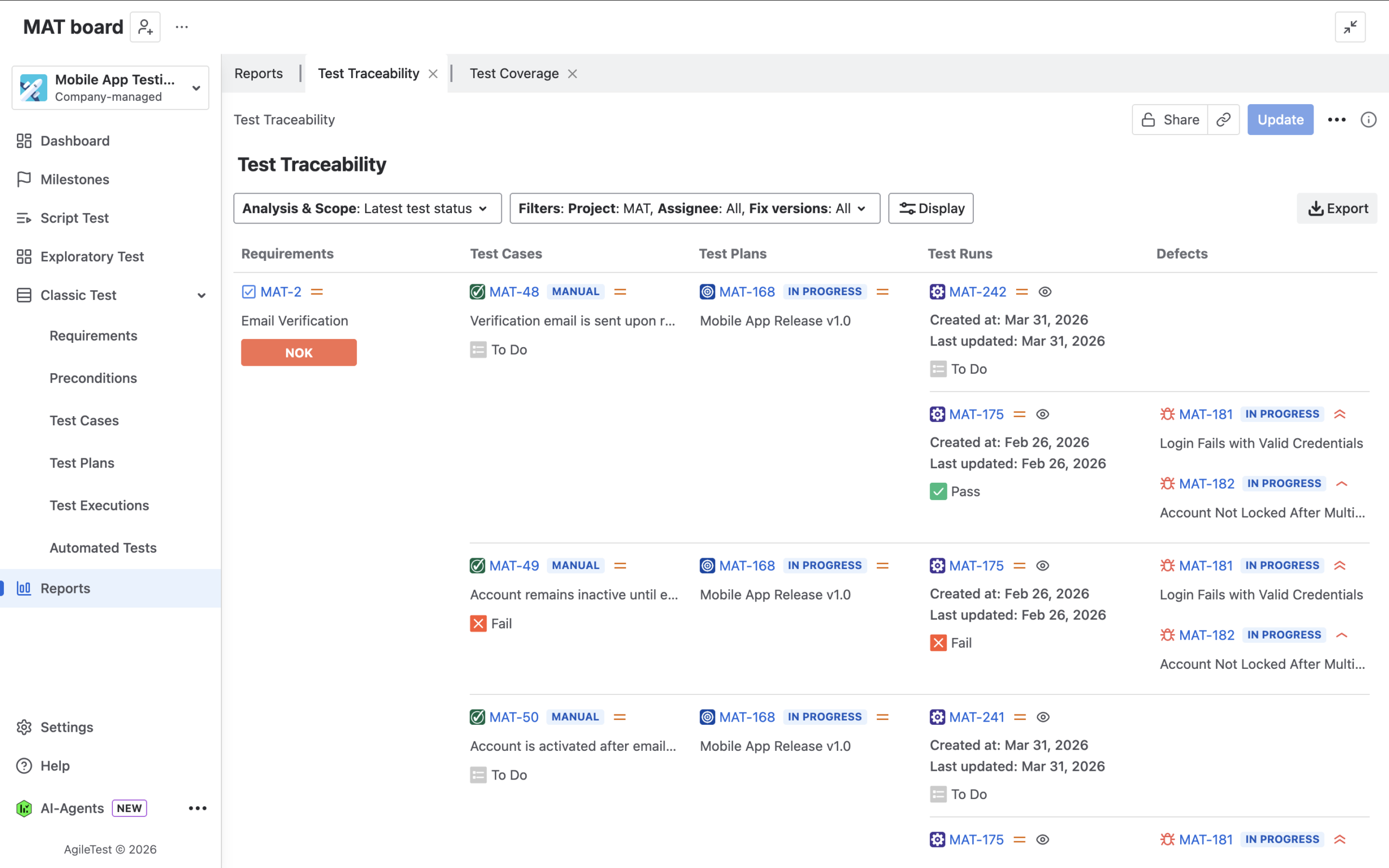
The team should confirm:
- Are all critical requirements covered by regression tests?
- Are there any failed, blocked, or not-run cases left?
- Are linked Jira defects fixed or still open?
- Is another regression round needed before release?
This step matters because the final goal of regression testing is release confidence. Reports help QA leads, product owners, and release managers turn test execution data into a clear decision: release, delay, or continue testing.
Alternative: Use Script Test for lightweight regression checks
For teams that need a faster and simpler regression workflow, AgileTest’s Script Test feature can also be useful. Instead of creating a full Test Plan and detailed Test Cases, teams can create a checklist-style script for quick regression, smoke testing, or sanity testing.
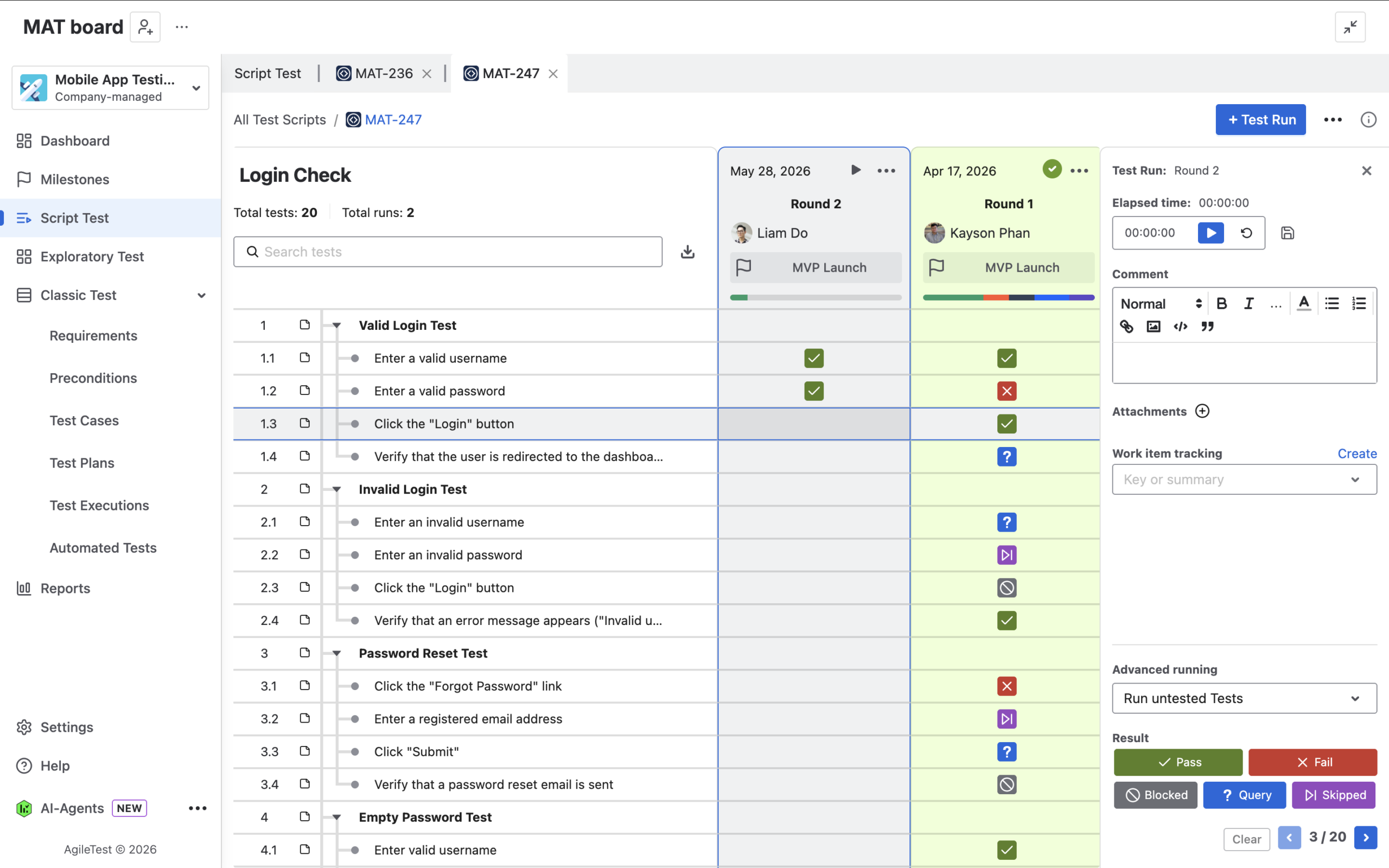
This is helpful when the testing scope is small, the team needs to validate a few important flows quickly, or product owners and non-QA users need an easy way to confirm basic functionality.
For example, a Script Test can include quick checks such as:
- Login works successfully
- User can create and edit an item
- Payment flow completes without error
- Notification email is received
- Report data is displayed correctly
Script Test is not always a replacement for a full regression suite, especially for larger releases or complex projects. However, it is a practical option for lightweight regression checks when speed and simplicity are more important than detailed test case structure.
Best practices for better regression testing
A good regression process should be repeatable, easy to maintain, and focused on release risk. The goal is not to test everything every time, but to make sure the most important areas are covered with clear results.
- Include critical, high-risk, and frequently used workflows in your regression suite instead of trying to rerun every test case every time.
- Name Test Plans and Test Executions by release, sprint, module, environment, or testing round so the team can easily find and compare them later.
- Review and update regression test cases regularly to remove outdated steps, reflect product changes, and add cases for recurring defects.
- Connect failed regression results with Jira defects and include enough evidence, such as screenshots, logs, environment details, and tester notes.
- Create focused follow-up executions for not-passed cases after fixes, but run the full regression scope again when the change is high-risk or affects multiple areas.
- Review coverage, traceability, execution results, and defect status before making a release decision.
Make regression testing repeatable and visible
Regression testing is essential for keeping software stable as teams continue to deliver new changes. Without a structured process, it can become time-consuming, inconsistent, and difficult to track.
With AgileTest, teams can manage regression testing directly in Jira by preparing reusable test cases, organizing them into Test Plans, running Test Executions, tracking failures, linking defects, rerunning fixed cases, and reviewing coverage before release.
For full regression cycles, Test Plans and Test Executions provide the most structured workflow. For faster checks, Script Test gives teams a lightweight way to validate key flows. Together, these options help QA teams choose the right level of regression testing for each sprint, release, or product change.