
Choosing a new tool for your team is a big deal. It’s a moment filled with promise and potential. We see a slick new automation framework or a powerful performance analysis suite and imagine a future with faster release cycles, fewer bugs, and happier developers. But we’ve also seen the other side: the expensive tool that sits on a digital shelf, the open-source project that’s too complex to maintain, or the custom solution that becomes a permanent drain on engineering resources.
The difference between a tool that transforms your team and one that becomes a burden lies in the selection process. A new tool isn’t just a purchase; it’s a long-term investment. It’s a commitment that will likely span multiple projects and affect many people across your organization. To make this commitment wisely, you need to look beyond the feature list and approach the decision from multiple viewpoints, culminating in a clear-eyed evaluation of its most important metric: the Return on Investment (ROI).
This is a guide to navigating that process. It’s about how to listen to the right people to ensure a tool is a good fit, and then how to do the math to prove it’s a sound investment for the business.
The Roundtable: Why Every Voice Matters in a Tool Decision
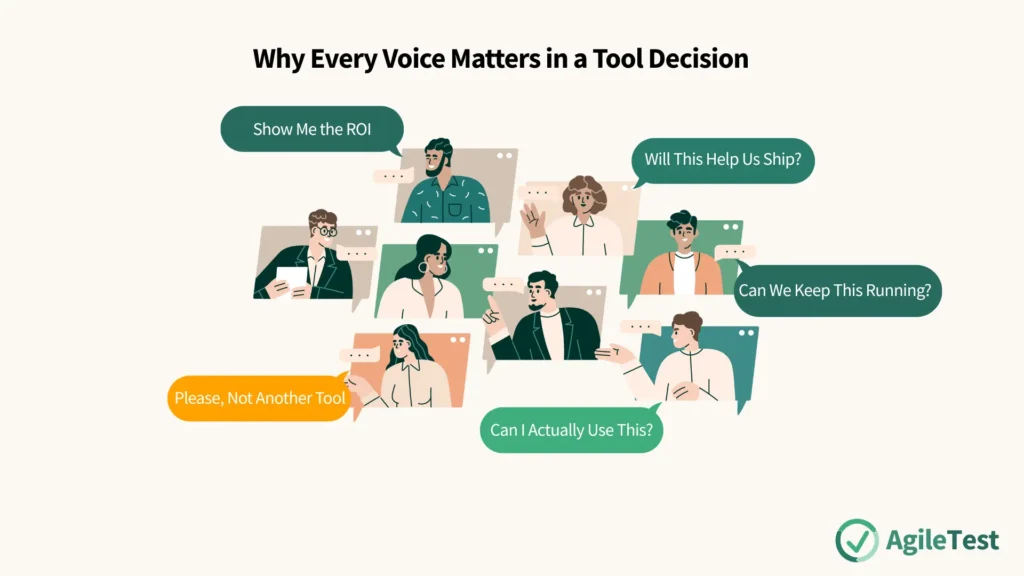
Before you can even think about ROI, you must understand that a tool means different things to different people. A successful selection process begins by bringing these diverse perspectives to the table. Think of it as a roundtable discussion where each key stakeholder group gets a voice. The person responsible for the tool—the tool owner—must act as the facilitator, ensuring every viewpoint is heard and considered.
Read our article to discover about the test project stakeholders: Who Cares About Your Tests? A Guide to Project’s Stakeholders
The Senior Management View: “Show Me the ROI”
For senior leadership, the conversation begins and ends with one question: will this investment pay off? They need to see a positive ROI. This means the tool must demonstrably save the company more money than it costs, or generate value that far exceeds its price tag. They aren’t interested in the technical minutiae; they want to see a clear business case. Any proposal for a new tool must be framed in the language of business value, efficiency gains, and risk reduction.
The Support and Operations View: “Please, Not Another Tool”
Your IT support, operations, and SRE teams are the guardians of your organization’s technical ecosystem. Their perspective is one of stability and manageability. They prefer a limited, but necessary number of tools used across the organization. Every new tool adds to their workload. Maintaining a larger number of tools, keeping track of their licenses, and managing the tool stack should not be cost or time-consuming. They will favor solutions that are reliable, easy to maintain, and ideally, fit within the existing support structure. A tool that requires bespoke maintenance is a red flag for them.
The Project Lead’s View: “Will This Help Us Ship?”
Project leads, scrum masters, and development managers live in the world of deadlines and deliverables. For them, the tool must add measurable value to the project or organization. They want to know if it will help them meet their goals. Will it shorten the test cycle? Will it help the team find critical defects earlier? Will it provide clearer progress reports? The value must be tangible and directly contribute to the project’s success. A tool that is technically impressive but doesn’t solve a real project-level problem is just a distraction.
The End User’s View: “Can I Actually Use This?”
This is perhaps the most critical perspective of all. The people who will use the tool every day—your developers, testers, and QA engineers—have one primary concern: usability is very important. If a tool is clunky, confusing, or has a steep learning curve, users will resist it and eventually abandon it. Good usability includes:
- Support for given tasks: Does it make my core tasks easier, or does it add unnecessary steps?
- Learnability: How quickly can a new team member become proficient with it?
- Operability: Is it reliable? Is it fast? Is it pleasant to work with day in and day out?
No matter how powerful a tool’s features are, if it fails the usability test, it will fail as an investment.
The Maintainer’s View: “Can We Keep This Running?”
Closely related to the operations view is the perspective of the operational staff members who might be responsible for the tool’s upkeep. For them, maintainability is important. They want to know how easy it is to perform upgrades, apply patches, manage user accounts, and troubleshoot problems. A tool that is a “black box” with poor documentation and difficult maintenance procedures represents a significant long-term headache.
Explore black-box and white-box testing techniques with this article: Test Management in Different Test Types
By systematically gathering these different perspectives, you build a rich, multi-dimensional picture of what a “good” tool looks like for your organization. This collaborative analysis is the essential foundation for the next, more quantitative step.
The Bottom Line: Calculating the Return on Investment (ROI)
With a clear understanding of your stakeholder needs, it’s time to address senior management’s primary concern: proving the tool’s financial worth. All tools introduced into the test process should also ensure a positive ROI to the organization. This isn’t just a suggestion; it’s a responsibility. The test manager, or sometimes the entire development team in an Agile context, must be ready to analyze the numbers.
The foundation of any ROI calculation is a cost-benefit analysis. This analysis must be comprehensive, taking into account not just the obvious upfront price tag, but all the associated costs over the tool’s lifetime.
Deconstructing the Costs: The Tip of the Iceberg and What Lies Beneath
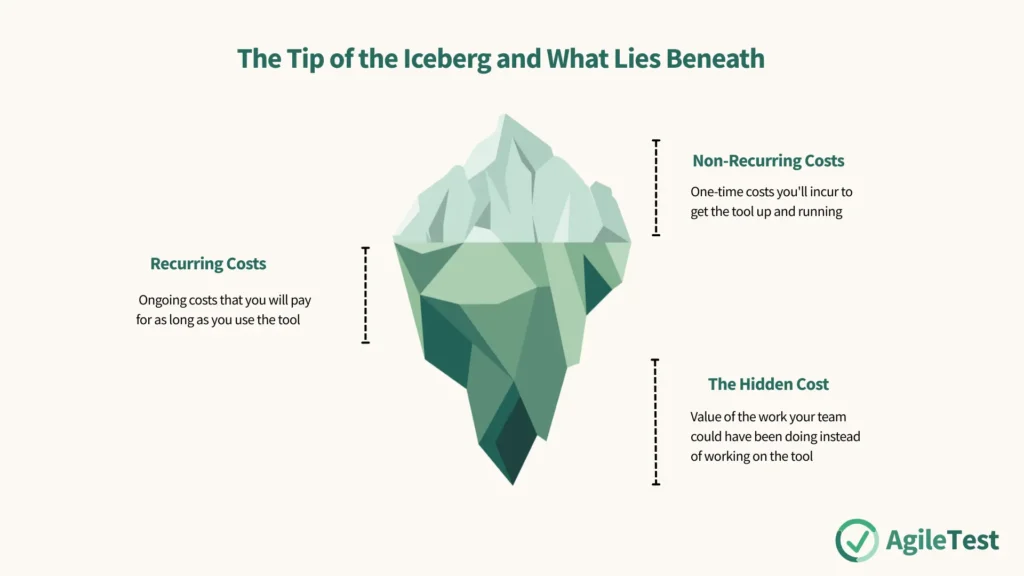
The true cost of a tool is like an iceberg. The initial purchase price is the small part you see above the water, while the vast majority of the cost lies hidden below the surface. A thorough analysis must account for both.
Non-Recurring Costs (The Upfront Investment)
These are the one-time costs you’ll incur to get the tool up and running.
- Evaluation & Selection: The time your team spends defining requirements, evaluating different tools, and running a proof-of-concept (PoC).
- Acquisition: The actual act of purchasing a license, or the internal development cost if you’re building a custom tool.
- Implementation & Integration: The significant effort required to install the tool, configure it, adapt it to your needs, and integrate it into your existing tool landscape.
- Initial Setup: The work needed to define usage guidelines, create templates, and prepare the tool for your team.
- Initial Training: The cost of formal training sessions to get everyone up to speed.
- Supporting Infrastructure: The cost of any new hardware or supporting software licenses needed to run the tool.
Recurring Costs (The Gift That Keeps on Giving)
These are the ongoing costs that you will pay for as long as you use the tool.
- Licensing & Support Fees: For commercial tools, these are typically annual fees that can be a significant portion of the initial purchase price.
- Maintenance Costs: This is the cost of your internal staff’s time spent administering the tool, performing upgrades, managing users, and troubleshooting issues. This is a major cost for open-source tools.
- Ongoing Training Costs: The cost to train new hires or to retrain the team when major new features are released.
- Porting & Migration Costs: The effort required to move the tool or its data to new environments as your infrastructure evolves.
The Hidden Cost: Opportunity Cost
This is the most frequently overlooked cost, but it’s critically important. Opportunity cost is the value of the work your team could have been doing instead of working on the tool. The time spent evaluating, administering, training, and even using the tool is time that could have been spent on actual testing, development, or other value-adding activities. This means that you may need more test resources in the short term, as the team must balance learning a new tool with their existing responsibilities.
Apply AgileTest with various features, from test scripts, test cases, etc, to test management that helps your team automate the testing process.
Quantifying the Benefits: What Do We Gain?
Once you have a clear picture of the total cost, you need to quantify the “return” side of the equation. What tangible benefits will this tool provide? The benefits will vary, but they often fall into these categories:
- Efficiency Gains: The most common benefit is the reduction of manual repetitive work. Automating a regression suite, for example, frees up hundreds of hours of manual testing time. This directly leads to a speed-up of test cycle-time and a saving of test execution costs.
- Effectiveness Gains: A good tool can help you do things you couldn’t do before, leading to increased coverage for certain test types. A performance testing tool allows you to simulate thousands of users, a level of coverage impossible to achieve manually. This also leads to a reduction in human error, as automated checks are more consistent than manual ones.
- Information Gains: Tools can provide quicker access to information about tests. Centralized dashboards, automated reports, and clear traceability from requirements to defects give the entire team better visibility into the state of quality, enabling faster and smarter decisions.
Try AgileTest’s exploratory testing feature, a powerful technique that can significantly enhance the development lifecycle of software projects.
Being Realistic: The Risks to Your ROI
Even the best-laid plans can go awry. A credible ROI analysis must also consider the risks that could prevent you from realizing the expected benefits.
- Immaturity of the Organization: If your team’s processes are chaotic and undefined, a new tool won’t fix them. It will likely just add to the chaos, leading to inefficient use of the tool.
- Vendor Risk: For commercial tools, changes in the maintenance policy of the vendor could suddenly increase your costs or reduce the level of support you receive.
- Unexpected Costs & Underwhelming Benefits: The two biggest risks are simple: you might discover that the total cost of ownership is higher than expected, or that the tool simply doesn’t deliver the lower benefit than expected. A thorough PoC can help mitigate this, but it remains a risk.
The Big Picture: A Strategic Approach to Your Toolchain
It’s important to remember that a test organization rarely uses a single tool. You have a tool for version control, another for CI/CD, another for defect tracking, and several for different types of testing. The total ROI for an organization is usually a mix of the ROI of all tools that are used for testing.
This means that your tools need to play well together. They need to share information and work cooperatively to create a seamless, efficient workflow. A collection of best-in-class tools that don’t integrate is often less effective than a suite of “good enough” tools that work together perfectly.
This is why it is so advisable to have a long-term, comprehensive strategy for test tools. This strategy shouldn’t be a static document but a living plan that considers the risks, costs, and benefits of your entire testing ecosystem. It helps you make informed decisions about when to add a new tool, when to retire an old one, and how to ensure your entire toolchain is pulling in the same direction.
Refer to our guide here to make an informed decision for your tools: Tool Decision Blueprint: Avoid Hidden Traps, Gain Strategic Confidence
Choosing a tool is a journey that starts with people and ends with a business case. By listening to the needs of every stakeholder and then rigorously evaluating the true costs and benefits, you can move beyond wishful thinking. You can select tools that are not just technically impressive, but are usable, maintainable, and, most importantly, deliver a clear and positive return on your investment.