
Picture this: you’re halfway through a release cycle. The project plan says everything is “green.” Tasks are being marked as complete. But on the ground, things feel… chaotic. The test environment is flaky, a key feature feels buggy, and developers and testers are pulling in different directions. This disconnect between the plan and reality is where projects go off the rails.
How do you prevent this? By using the right navigation tools. In the world of software testing, those tools are Test Monitoring and Test Control.
Think of your test plan as the map for a road trip. It shows your destination and the route you intend to take.
- Test Monitoring is your GPS. It’s the ongoing process of looking at your dashboard—speed, fuel, location—to see exactly where you are on that map and if you’re still on track.
- Test Control is your steering wheel and pedals. It’s the series of actions you take based on what the GPS tells you. If you hit unexpected traffic, you take a detour. If you’re running low on fuel, you find the nearest gas station.
For developers and testers, mastering these two activities is what separates a stressful, reactive testing process from a calm, proactive one. This guide will walk you through how to set up a framework for success, what to look for while monitoring, and how to take decisive control to steer your project to a quality release.
=> Related Content: Mastering Test Planning: Your Guide from Chaos to Clarity
The Foundation: Building Your Monitoring Framework
You can’t control what you can’t see. Before you can effectively monitor progress, you need to set up a framework to track what matters. This isn’t about creating complex, bureaucratic reports; it’s about defining clear, simple measures that give you real insight into the health of your testing efforts. This framework connects the day-to-day work back to the strategic goals of the project.
For a small, simple project, this might be as easy as a checklist. But for most projects, you’ll need to define more detailed objectives to truly understand your progress. Your monitoring framework should be built on two key ingredients:
1. Measures (The “What” to Track)
Measures, or metrics, are the specific data points you collect. The trick is to choose metrics that tell a story, not just count things. While “number of test cases executed” is a start, it doesn’t tell you if you’re testing the right things or if the quality is actually improving. A good set of measures provides a multi-dimensional view of your progress.
Consider tracking metrics like:

- Test Coverage: What percentage of requirements, user stories, or code branches have been tested? This answers, “Are we testing all the important stuff?”
- Test Pass/Fail Rate: What is the ratio of passing tests to failing tests? A sudden spike in failures can indicate a problematic new build.
- Defect Density: How many defects are being found per feature or module? This helps pinpoint quality hotspots in the application.
- Defect Severity and Priority: It’s not just how many defects you find, but how critical they are. Tracking the number of open “Blocker” or “Critical” defects is essential.
- Defect Resolution Time: How long does it take for a reported defect to get fixed and verified? Long resolution times can indicate bottlenecks in the development process.
- Schedule Adherence: Are we completing testing activities according to the schedule in the test plan?
2. Targets (The “What Does Good Look Like?”)
Measures are just numbers without context. Targets are the goals you set for your measures, which are derived directly from your test objectives and plan. They define what “done” or “good enough” looks like.
For example:
- Measure: Requirements Coverage
- Target: Achieve 95% coverage of all high-priority requirements.
- Measure: Open Critical Defects
- Target: Zero open critical defects at the time of release.
- Measure: Test Pass Rate
- Target: A 98% pass rate for the regression test suite.
The most important part of this framework is to make the information understandable and relevant to all stakeholders. A project manager or product owner might not care about the raw number of test cases, but they will care about a dashboard showing “Percentage of Features Ready for Release” or “Risk Level of Untested Features.” Translate your technical metrics into business-impact language.
Test Monitoring: Keeping Your Eyes on the Road 👀
With your framework in place, you can begin Test Monitoring. This is the ongoing activity of gathering, recording, and analyzing the data to track the status of your testing. It’s a continuous pulse-check, not a one-time status report. Monitoring is about observation and detection—spotting problems before they spiral out of control.
The core activities of test monitoring include:
Collecting and Recording Test Results
This is the fundamental data input. Every time a developer runs a unit test or a tester executes a manual or automated test case, the result (pass, fail, blocked, skipped) must be recorded. This data feeds all other monitoring activities. Modern test management tools and CI/CD pipelines can automate much of this collection, giving you a real-time view of test execution.
Identifying Deviations from Planned Testing
This is where monitoring becomes powerful. You are constantly comparing the data you’re collecting against the targets and schedule in your test plan. A deviation is any significant difference between what you planned and what is actually happening.
For example, you might identify deviations like:
- The test execution is 20% behind schedule.
- You expected to find around 10 defects in a new feature, but you’ve already found 50.
- The regression suite, which normally takes 1 hour to run, is now taking 3 hours.
- No defects have been found in a complex new module, which is suspicious.
Identifying and Analyzing New Risks
Testing is a process of discovery. As you test, you will inevitably uncover problems or potential issues that were not anticipated during the initial planning. Test monitoring involves being alert for these newly identified risks.
Perhaps you notice that a specific API call is unexpectedly slow under light load—a new performance risk. Or maybe you discover that an error message leaks sensitive system information—a new security risk. When these are found, they need to be captured, analyzed for their potential impact, and flagged for the team to address.
Monitoring Changes for Identified Risks
Your test plan was likely built around mitigating known product risks. Monitoring involves checking if your mitigation strategies are working. If you identified a risk of data corruption and designed specific tests to catch it, are those tests being run? Are they passing? Is the risk level decreasing as you test? Monitoring keeps these high-priority risks front and center.
Test Control: Taking the Wheel and Making Adjustments ⚙️
If monitoring is about seeing, Test Control is about acting. It is the set of activities you perform in response to the information gathered during monitoring. Test control is what ensures your project stays on track to meet its objectives, even when things go wrong. It involves making deliberate decisions and adjustments to guide the testing effort.
This activity involves:
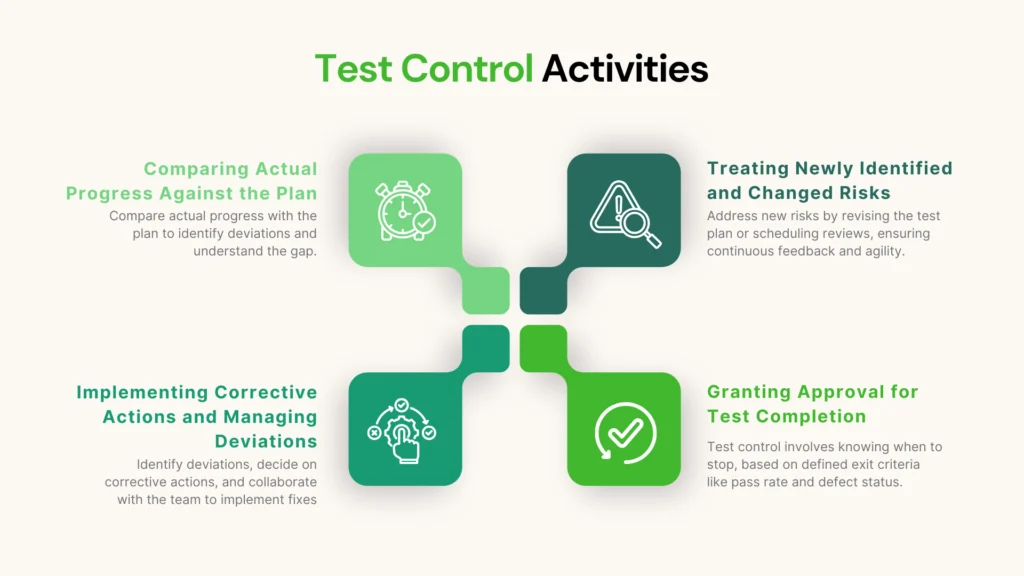
Comparing Actual Progress Against the Plan
The trigger for any control action is a deviation identified during monitoring. You see that you’re off course. The first step is to understand the gap between your actual progress and your test plan.
Implementing Corrective Actions and Managing Deviations
This is the heart of test control. Based on the deviation, you need to decide on and implement a corrective action. This requires smart decision-making and collaboration between developers, testers, and managers.
Let’s look at some common scenarios and potential control actions:
- Scenario: Monitoring shows that testing is falling behind schedule because the test environment is constantly down.
- Control Action: You could pause non-essential testing and form a task force of developers and operations to stabilize the environment. Alternatively, you could re-prioritize the test execution plan to focus on tests that can be run on a local or more stable environment first.
- Scenario: Monitoring reveals an extremely high defect density in a new user authentication module.
- Control Action: You might decide to halt further feature testing on that module and implement a “bug-fixing swarm,” where multiple developers focus solely on fixing the auth defects. You would also allocate more testing time to that module once it’s stabilized.
- Scenario: Monitoring shows that automated regression tests are failing intermittently, making the results unreliable.
- Control Action: You could dedicate a developer-tester pair to investigate and fix the “flakiness” in the test suite. In the short term, you might disable the unreliable tests from the main pipeline to prevent false alarms, while tracking their repair as a high-priority technical task.
Treating Newly Identified and Changed Risks
The new risks you discovered during monitoring now require a control decision. What are you going to do about them?
- For the new performance risk you found, the control action might be to revisit the test planning activities. You might need to amend the test plan to add a new section for performance testing, allocate time for it, and assign a team member to run the tests.
- For the new security risk, the control action could be to schedule an immediate security review of the affected code and create new test cases to verify the fix.
This feedback loop from monitoring back to planning is what makes the process so agile and effective.
Granting Approval for Test Completion
Finally, test control is not just about reacting to problems; it’s also about knowing when to stop. Your test plan defined exit criteria—the conditions that must be met to consider testing complete (e.g., “98% of tests passed and no open critical defects”).
Test control involves formally checking the current status against these exit criteria. When the criteria are met, the test manager or team can officially grant or obtain approval to conclude the testing phase for that scope (be it a sprint, a release, or a project). This provides a clear, data-driven end-point to the testing effort, preventing the dreaded “endless testing” cycle.
A Day in the Life: Monitoring & Control in an Agile Sprint
Let’s see how this works in a typical two-week sprint:
- Sprint Day 3:
- Monitoring: The CI/CD pipeline shows a 50% failure rate on unit tests for a new feature. The team’s burndown chart for testing tasks hasn’t moved in a day.
- Control: During the daily stand-up, the team discusses this deviation. The control action is that the developer of the feature will pair with another developer to fix the failing tests immediately, blocking any new work until the build is green.
- Sprint Day 7:
- Monitoring: While doing exploratory testing, a tester discovers that the application crashes on a specific model of Android phone. This was an unanticipated risk.
- Control: The tester logs the bug and alerts the Product Owner. The control action is a team discussion. They decide the risk is high enough to warrant delaying a less important story in the sprint. A developer is assigned to investigate and fix the crash, and the test plan is updated to include this specific device in the regression checks.
- Sprint Day 10 (Last Day):
- Monitoring: The team reviews their testing dashboard. The exit criteria for the sprint were: “100% of user story acceptance criteria tested,” “95% test pass rate,” and “zero open blocker defects.” The dashboard shows 100% coverage, a 97% pass rate, and zero blockers.
- Control: The team holds a brief “test completion” huddle. They agree that the exit criteria have been met. The lead tester formally gives the “go-ahead” in the project management software, and the team obtains approval from the Product Owner to release the features.
Conclusion: From Scorekeeper to Strategic Partner
Test Monitoring and Test Control are the paired activities that breathe life into your test plan. They transform it from a static document into a dynamic guide that helps you navigate the realities of software development.
- Monitoring provides the visibility to know where you stand.
- Control provides the agility to respond effectively and intelligently.
By embracing this continuous loop of measuring, evaluating, and acting, you move your role beyond that of a simple scorekeeper who just reports “pass” or “fail.” You become a strategic partner who provides crucial, real-time feedback that helps the entire team make better decisions. This proactive approach reduces end-of-cycle chaos, builds confidence in the product, and ultimately steers your project to a successful, high-quality destination.