

In modern software development, managing the testing process effectively is paramount for delivering high-quality products efficiently. While spreadsheets and documents might suffice for the smallest projects, complexity quickly necessitates a dedicated Test Management Tool (TMT). A TMT centralizes test artifacts, streamlines workflows, enhances visibility, and facilitates collaboration.
However, the market is saturated with options, ranging from simple SaaS solutions to complex enterprise platforms. Choosing the right tool – one that integrates seamlessly into your team’s workflow and genuinely improves productivity – requires careful evaluation.
This guide provides a detailed breakdown of factors developers and testers should consider when selecting a TMT.
Why Bother with a Dedicated Test Management Tool?
Before diving into selection criteria, let’s briefly reiterate the value proposition of a robust TMT:
- Centralized Repository: A single source of truth for requirements, test cases, test plans, execution results, and defects. Eliminates scattered documents and versioning chaos.
- Traceability: Easily map requirements to test cases, executions, and defects. Crucial for coverage analysis, impact assessment, and compliance/auditing.
- Process Standardization: Enforces consistent workflows for test case design, execution, and defect reporting.
- Efficiency Gains: Streamlines test execution tracking, facilitates test case reuse, and often integrates automation results.
- Enhanced Visibility & Reporting: Provides real-time dashboards and customizable reports on test progress, coverage, defect trends, and overall quality posture.
- Improved Collaboration: Offers a shared platform for testers, developers, BAs, and product managers to interact regarding test assets and defects.

Key Criteria for Evaluating Test Management Tools
Selecting a TMT isn’t just about features; it’s about how well it aligns with your team’s specific needs, existing toolchain, and development methodology (Agile, Waterfall, Hybrid).
1. Core Functionality & Feature Depth
Requirements Management
- Can it import/link requirements from external sources (e.g., Jira, Azure DevOps Boards, dedicated RM tools)?
- Does it support requirement versioning?
- How intuitive is linking requirements to test cases?
Test Case Design
- Rich text editor with formatting options (tables, code snippets, embedding images).
- Support for attachments.
- Parameterization/Data-Driven Testing support (defining datasets for a single test case).
- Test case versioning and history tracking.
- Features for modularity and reusability (e.g., shared steps, test case libraries, call-test functionality).
- Custom fields for specific project needs (e.g., environment, test type, component).
Test Planning & Execution
- Ability to create test cycles/runs based on releases, sprints, or custom criteria.
- Assigning tests to specific testers and environments.
- Bulk editing/updating of test statuses.
- Tracking execution time per test case.
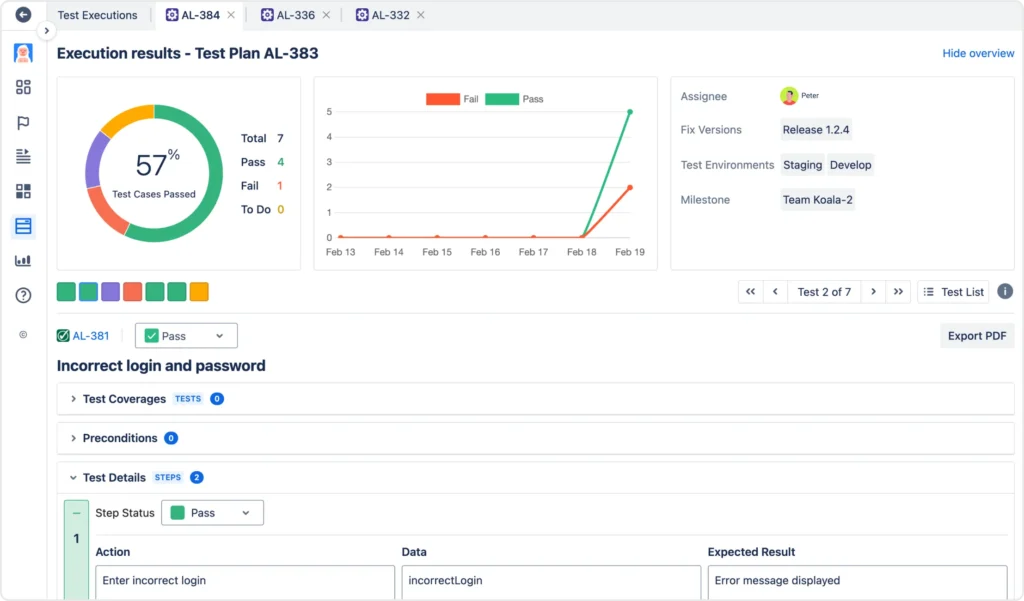
- Support for different execution statuses (Pass, Fail, Blocked, In Progress, Skipped, etc.) and customization of statuses.
- Recording actual results alongside expected results.
Defect Management
- Integration vs. Built-in: Does it have its own defect module, or does it rely solely on integration with external bug trackers (Jira, Azure DevOps, Bugzilla, GitHub Issues, etc.)? Deep, bi-directional integration is often preferred.
- Integration Quality: How seamless is defect creation from a failed test run? Does it automatically populate relevant details (test case ID, steps, environment)? Does defect status update automatically reflect back in the TMT upon resolution in the bug tracker?
Reporting & Analytics
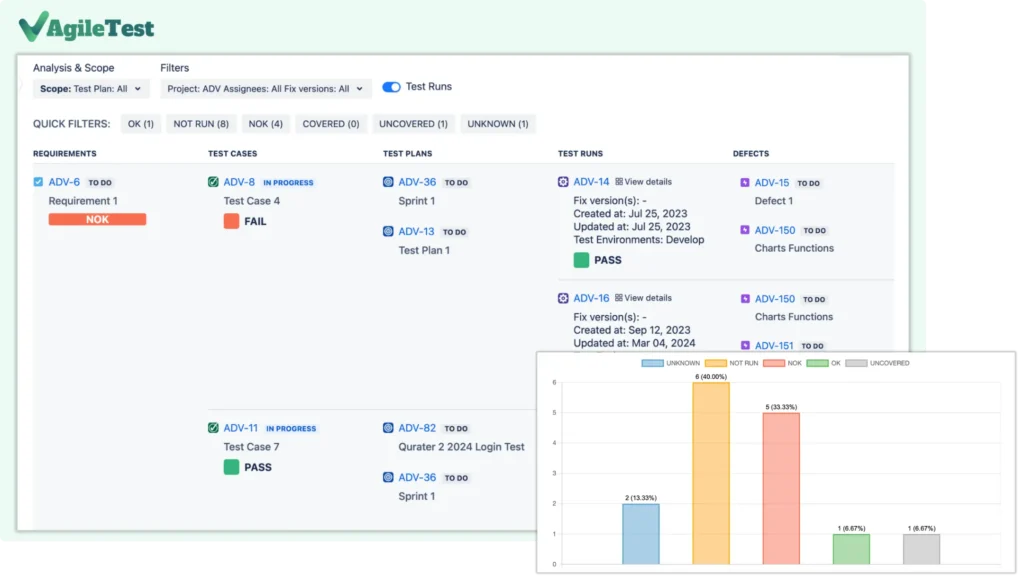
- Standard reports (Execution progress, Requirements coverage, Defect summary).
- Customizable dashboards and report builders.
- Traceability matrix generation.
- Export options (CSV, Excel, PDF).
- Metrics tracking over time (trend analysis).
- API access for pulling data into external BI tools.
Collaboration Features
- Commenting on test cases, executions, and defects.
- Notifications and @mentions.
- Clear assignment and ownership tracking.
2. Integration Capabilities (Crucial for Devs & Testers)
This is often a make-or-break area for technical teams. The TMT must fit into your existing ecosystem.
Bug Tracker Integration
As mentioned, deep, bi-directional sync with tools like Jira or Azure DevOps is critical. Check the quality and reliability of the specific plugin/connector. Can you link existing bugs easily?
Automation Framework Integration
- Does it provide APIs (REST is common) to push automated test results directly from your test framework (Selenium, Cypress, Playwright, Pytest, JUnit, NUnit, etc.)?
- Does it support parsing standard report formats (e.g., JUnit XML, TestNG XML)?
- Can automation results be mapped back to test cases defined in the TMT?
- Can automated tests be triggered from the TMT (less common, but sometimes useful)?
CI/CD Integration
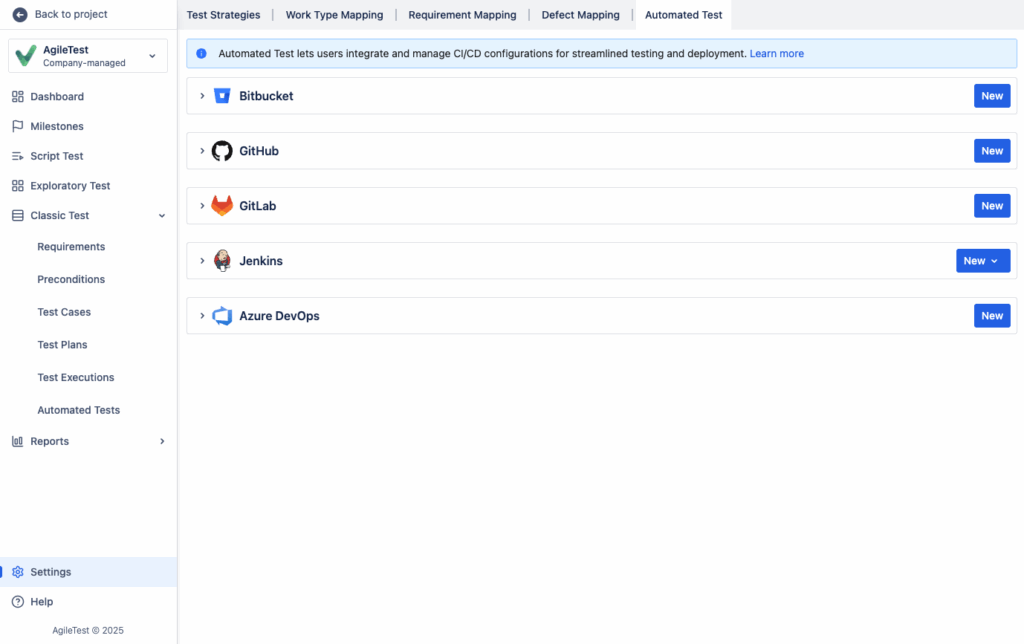
Can build/pipeline tools (Jenkins, GitLab CI, GitHub Actions, Azure Pipelines) interact with the TMT via API to report results or create test runs automatically?
Source Control Integration
Less common, but some tools might offer links to code repositories.
Requirements Management Tool Integration
If using a dedicated RM tool (e.g., Jama Connect, DOORS NG), ensure seamless linking.
Communication Tool Integration
Notifications pushed to Slack, Microsoft Teams, etc.
3. Usability & User Experience (UX)
A powerful tool is useless if the team finds it cumbersome.
Learning Curve
How intuitive is the interface? Is comprehensive documentation and training available?
UI Responsiveness & Design
Is the interface clean, fast, and modern? Slow or clunky UIs kill productivity.
Configuration & Customization
How easy is it to set up projects, users, roles, permissions, and custom fields/workflows? Overly complex configuration can be a burden.
Bulk Operations
Can you easily perform actions on multiple test cases or executions simultaneously?
4. Technical & Operational Aspects
Deployment Model
- SaaS (Cloud): Vendor handles hosting, maintenance, upgrades. Consider data residency (where is your data stored?), security certifications (SOC2, ISO 27001), and vendor uptime SLAs.
- On-Premise/Self-Hosted: Your team manages installation, infrastructure, maintenance, and upgrades. Offers more control over data but requires internal resources and expertise.
Scalability & Performance
Can the tool handle your projected number of users, test cases, projects, and execution results without performance degradation? Check vendor case studies or technical specifications.
Security
Role-based access control (RBAC), authentication options (SSO, SAML, LDAP integration), data encryption (at rest and in transit).
API Quality & Documentation
For automation and custom integrations, a well-documented, stable, and comprehensive API is essential. Check rate limits and authentication methods.
Vendor Support & Community
What are the support channels (email, phone, portal)? What are the guaranteed response times (SLAs)? Is there an active user community forum for peer support? How frequently is the tool updated?
5. Cost & Licensing Model
Pricing Structure
Per-user/per-month is common for SaaS. On-premise might involve software license models plus annual maintenance fees. Some tools tier features based on the plan. Are there separate costs for integrations?
Total Cost of Ownership (TCO)
Factor in not just the license cost but also potential total cost of ownership for setup, configuration, training, integration development, and ongoing maintenance (especially for on-premise).
Trial Period / Free Tier
Does the vendor offer a free trial or a limited free tier adequate for initial evaluation and Proof of Concept (POC)? Ensure the trial allows testing critical integrations.
The Selection Process: A Step-by-Step Approach
1. Define Your Needs & Priorities
Gather input from developers, testers, BAs, and managers. Document your “must-have” vs. “nice-to-have” features. Pay special attention to required integrations. What are your biggest pain points with the current process (or lack thereof)?
2. Research & Shortlist
Based on your criteria, research available tools. Use comparison websites (like G2, Capterra), read reviews, and check vendor websites. Create a shortlist of 3-5 promising candidates.

3. Conduct Proof of Concepts (POCs) / Trials
This is the most critical step. Sign up for trials of your shortlisted tools. Do not just click around the UI. Assign a small team (including developers and testers) to perform real tasks:
- Import/create requirements.
- Write a small set of representative test cases.
- Configure the integration with your primary bug tracker (e.g., Jira).
- Crucially: Attempt to push automated test results via API or a supported integration.
- Create a test cycle, execute tests (manually), and log defects.
- Generate key reports (traceability, execution summary).
- Evaluate the usability and performance with these real-world tasks.
4. Gather Team Feedback
Collect structured feedback from everyone involved in the POCs. Use a scorecard based on your prioritized criteria.
5. Evaluate TCO & Vendor
Compare the costs, review vendor support responsiveness during the trial, and check their security posture and roadmap.
6. Make the Decision & Plan Implementation
Select the tool that best meets your prioritized needs and integrates most effectively. Plan for data migration (if needed), configuration, team training, and rollout.
Popular Examples (Illustrative, Not Exhaustive Recommendations)
Teams often evaluate tools like:
- Integrated with Atlassian Ecosystem: AgileTest, Zephyr Scale/Squad, Xray.
- Standalone/Integrates Broadly: TestRail, qTest (Tricentis), PractiTest, Qase, BrowserStack Test Management.
- Part of Larger ALM Suites: Azure Test Plans (Microsoft), Micro Focus ALM/Octane.
- Open Source Options: TestLink (older, may lack modern integrations), Kiwi TCMS. Evaluate open-source options carefully regarding support, feature velocity, and integration ease.
Conclusion
Choosing the right Test Management Tool is a strategic decision that significantly impacts the efficiency and effectiveness of your development and testing teams. Don’t rely solely on feature checklists or marketing hype. Prioritize deep integration capabilities (especially with bug tracking and automation frameworks), usability, and robust reporting. Invest time in thorough Proof of Concepts involving both developers and testers performing realistic tasks within your specific environment.
The best TMT is the one that fits seamlessly into your workflow, enhances collaboration, provides actionable insights, and ultimately helps your team deliver higher-quality software faster.
When evaluating tools based on flexibility, consider AgileTest. It’s designed to accommodate a wide range of testing strategies within a single platform.
Whether your team employs traditional, plan-driven test management with comprehensive test case documentation and traceability, operates within an Agile framework requiring tight integration with issue trackers and automated test reporting, or incorporates exploratory testing sessions needing adaptable ways to track charters and findings, AgileTest aims to provide the necessary support.
Its customizable structure and straightforward integrations allow teams to tailor its use to their specific workflow, rather than forcing adherence to a single rigid methodology