

Hey there, testing enthusiasts! If you’ve ever pushed a code change and then crossed your fingers hoping nothing else broke, you’re not alone. That’s where regression testing comes in—like a trusty safety harness keeping your software from falling off a cliff.
As an engineer who’s been in the trenches, I know how critical it is to keep an app running smoothly, even as we tweak, fix, and upgrade it.
In this article, I’m going to walk you through regression testing like we’re chatting over a workbench—covering what it is, why it’s a big deal, different ways to tackle it, automation tricks to save your sanity, and how to pick the right tests to run when time’s tight. No fluff, just practical stuff you can use. Let’s dive in and get those bugs under control!
What’s Regression Testing All About?
Imagine you’ve built a cool little robot. It walks, talks, and picks up objects perfectly. Then you add a new feature—say, a laser pointer—and suddenly it stops walking. What happened? That’s the kind of surprise regression testing is here to prevent.
In software terms, regression testing is the process of checking that new changes—like bug fixes, feature additions, or performance tweaks—haven’t broken the existing functionality of your application.
Think of it as a health checkup for your code. You’re not testing the new stuff (that’s what unit or integration tests are for); you’re making sure the old stuff still works after the latest tinkering.
It’s all about catching those sneaky “oops” moments before they sneak into production and annoy your users.
Why Regression Testing Is Your Best Friend
You might wonder, “If it worked before, why test it again?” Well, software’s a bit like a house of cards—one small nudge can topple something unexpected.
Here’s why regression testing is non-negotiable:
- Prevents Regression Bugs: A tiny change in one module can mess up another—like a misplaced semicolon crashing your login system. Regression testing catches these before they bite.
- Keeps Quality High: Users don’t care how cool your new feature is if the basics (like saving their data) stop working. This keeps your app reliable.
- Saves Your Bacon: Finding a bug early in development is a quick fix. Finding it after launch? That’s a frantic all-nighter and a grumpy boss. Regression testing saves time, money, and headaches.
In short, it’s your shield against chaos—especially in fast-paced environments like Agile or DevOps where changes happen daily.
Different Approaches to Regression Testing
There’s no one “right” way to do regression testing—it depends on your project, timeline, and resources. Let’s break down the main approaches so you can pick what fits your toolbox:
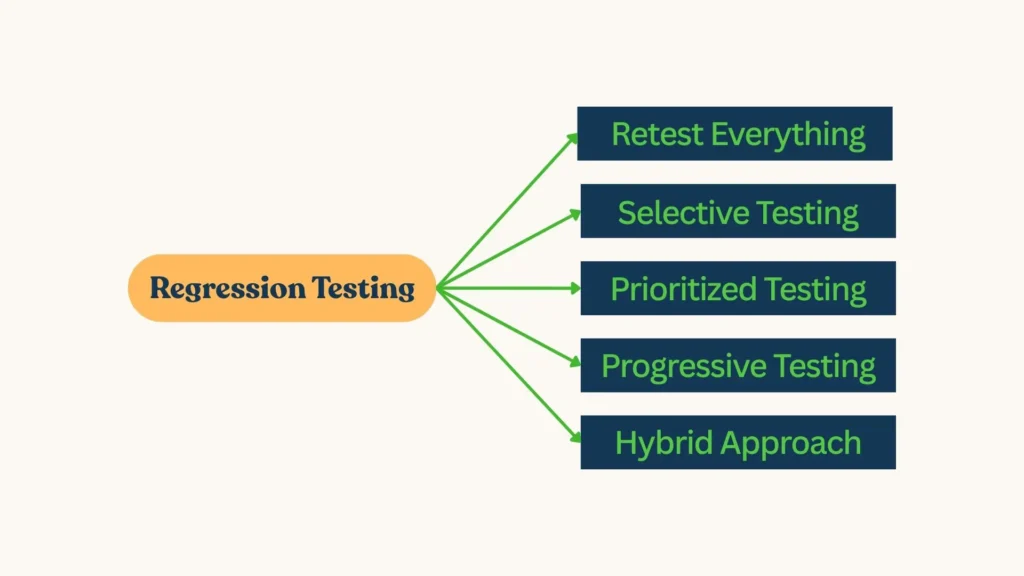
Retest Everything (The Full Sweep)
This is the brute-force method: run every single test case you’ve got, from top to bottom. It’s like taking your car to the shop and telling them to check every bolt, tire, and spark plug.
- When to Use: Small projects with a manageable test suite, or after a massive overhaul where anything could’ve gone sideways.
- Pros: You’re guaranteed to catch anything that broke—total peace of mind.
- Cons: It’s slow as molasses on big apps. Imagine testing a 10,000-line banking system from scratch every time—it’s overkill for minor updates.
Selective Testing (The Targeted Strike)
Here, you’re more like a sniper than a carpet bomber. You pick a subset of tests that are most likely affected by the recent changes. If you updated the payment gateway, you’d focus on payment-related tests, not the user profile page.
- When to Use: When you know your app’s architecture well and can map changes to specific areas.
- Pros: Faster and leaner—saves you from testing irrelevant stuff.
- Cons: You need to really understand dependencies, or you might miss a ripple effect.
For example, tweaking a database query? Test the data retrieval and display logic, not the UI animations.
Prioritized Testing (The Smart Sort)
This is where you put on your strategist hat. You rank your tests based on importance—like criticality, usage frequency, or failure history—and run the top ones first.
- When to Use: Tight deadlines or limited resources (pretty much every sprint, right?).
- Pros: Hits the high-risk spots early, maximizing bang for your buck.
- Cons: Takes some upfront effort to figure out what’s “important.”
Progressive Testing (The Agile Buddy)
Perfect for evolving apps, this approach focuses on testing new features alongside a smaller set of regression tests for older stuff. It’s like checking the new wing of a building while spot-checking the foundation.
- When to Use: Continuous development cycles where new code is added often.
- Pros: Keeps up with rapid changes without overwhelming you.
- Cons: Less thorough for legacy code unless paired with other methods.
Hybrid Approach (The Mix-and-Match)
Most teams don’t stick to one method—they blend them. Maybe you retest everything for a major release, but use selective testing for a quick hotfix. It’s like having a Swiss Army knife—you use the tool that fits the job.
Automation Tips: Making Regression Testing a Breeze
Running regression tests manually every time is like hand-washing a pile of dishes when you’ve got a dishwasher. Automation is the way to go—it’s faster, repeatable, and lets you focus on the fun stuff (like finding new bugs). Here’s how to nail it:
Pick the Right Tools
You’ll need a solid automation framework. Some favorites:
- Selenium: Great for web apps—controls browsers like Chrome and Firefox.
- JUnit or TestNG: Perfect for Java-based unit and regression tests.
- Playwright: A modern pick for cross-browser testing, super fast and reliable.
- Appium: For mobile apps—Android and iOS covered.
Choose based on your app type (web, mobile, desktop) and team skills.
Start with the Basics
Don’t boil the ocean—automate your stable, repetitive tests first. Things like login flows, data validation, or core workflows are prime candidates. Once you’ve got those humming, branch out to trickier stuff.
Make Tests Modular
Write small, reusable test scripts that can be mixed and matched. For example, a “login” module can be used in tons of tests—don’t rewrite it every time. It’s like building with LEGO bricks—snap them together as needed.
Handle Data Like a Pro
Use data-driven testing to run the same test with different inputs. Instead of hardcoding “user123” and “pass123,” pull from a file or database with multiple username-password combos. Less code, more coverage—win!
Keep an Eye on Maintenance
Automated tests aren’t set-it-and-forget-it. As your app evolves—say, a button’s ID changes—your scripts need updates too. Schedule regular check-ins to keep them fresh, or they’ll start failing for no apparent reason.
Plug into CI/CD
If your team uses continuous integration (like Jenkins or GitHub Actions), hook your regression tests into it. Every code commit triggers the suite, catching issues before they sneak into the main branch. It’s like an early warning system for bugs.
Don’t Skip the Logs
Add good logging to your scripts—timestamps, pass/fail statuses, error messages. When something breaks, you’ll know exactly where to look instead of playing “guess the failure.”
Prioritizing Test Cases: Where to Focus Your Energy
With a big app, you might have hundreds (or thousands!) of test cases. Running them all every time isn’t realistic—so how do you choose? Prioritization is your secret sauce. Here’s how to do it right:
Risk-Based Prioritization
Focus on the highest-risk areas—parts of the app that:
- Handle critical functions (e.g., payments, user data).
- Have a history of breaking.
- Could cause major damage if they fail (think legal or financial fallout).
If your e-commerce app’s checkout breaks, that’s a bigger deal than a typo in the footer.
Impact of Changes
Look at what’s changed recently and prioritize tests tied to those areas. A new API endpoint? Test the data flow. UI redesign? Check the layouts. Use your version control logs (like Git) to see what’s been touched.
Usage Frequency
Prioritize tests for features users hit all the time. If 80% of your users log in daily, those tests trump a rarely-used admin panel.
Failure History
Some parts of your app are like that one flaky light switch—they keep breaking. Check your bug tracker (Jira, Bugzilla) for patterns and bump those tests up the list.
Business Value
Talk to your product folks—what features drive revenue or keep customers happy? Prioritize tests that protect those golden geese.
Pro Tip: Use a simple scoring system (1-5) for risk, impact, and usage, then sort your tests by total score. It’s nerdy but effective.
Manual vs. Automated: Finding the Balance
Automation’s awesome, but don’t ditch manual testing entirely. Some things—like how a UI feels or edge cases you haven’t scripted yet—need a human touch. My rule of thumb:
- Automate: Repetitive, stable, high-volume tests (e.g., login, CRUD operations).
- Manual: Exploratory testing, usability checks, or one-off scenarios.
It’s like cooking—use a mixer for the dough, but knead the tricky bits by hand.
→ Related content: Automated Testing vs. Manual Testing
Setting Up a Solid Test Environment
Your tests are only as good as the sandbox they run in. A shaky test environment is like testing a boat in a kiddie pool—it won’t tell you much. Here’s what to aim for:
- Mirror Production: Same OS, database, network setup, and data (sanitized, of course).
- Stable and Isolated: No random updates or shared resources messing with results.
- Quick to Reset: Use containers (like Docker) to spin up fresh setups fast.
A good environment means your “it works here” actually means something.
Tackling Common Regression Testing Challenges
Even with the best plans, stuff goes wrong. Here’s how to handle the usual suspects:
- Test Suite Bloat: Too many tests slow you down. Regularly prune outdated or duplicate ones—like spring cleaning for code.
- Flaky Tests: Random fails drive you nuts. Check for timing issues (add waits), unstable environments, or test dependencies—fix the root cause.
- Time Crunch: Deadlines loom. Prioritize and automate to squeeze more into less time.
- Missed Bugs: Sometimes you test the wrong thing. Pair with devs to double-check what needs coverage.
Best Practices to Level Up Your Regression Game
Let’s wrap up with some engineer-approved best practices:
- Keep It Lean: Trim your test suite to essentials—quality over quantity.
- Document Clearly: Comment your scripts and log your runs so anyone can pick up where you left off.
- Collaborate: Chat with devs—they know what’s fragile or new. Two heads beat one!
- Monitor Results: Use dashboards (like in Jenkins) to spot trends—don’t just run and forget.
- Stay Sharp: Learn new tools and tricks—testing evolves as fast as coding.
→ Try out AgileTest – Best Test Management Tool for Jira
Wrapping It Up: Regression Testing Is Your Safety Net
There you go—your engineer’s guide to mastering regression testing! It’s not just about running tests; it’s about keeping your app rock-solid through every change. Whether you’re retesting everything, picking your shots, or automating like a boss, regression testing ensures your hard work doesn’t unravel.
So next time you push a change, lean on these strategies—prioritize smart, automate where it counts, and keep that quality high. Your users will love you for it, and you’ll sleep better knowing the app’s got no surprises hiding. Happy testing, my friend!