

Learn to write effective defect reports that accelerate fixes and improve quality. This guide breaks down the essential components, from title to root cause analysis, for any project context.
Why a Good Defect Report is Your Project’s Superpower
Consider a common scenario: a defect report lands in a developer’s queue with the title “Bug” and the description, “It’s broken.” This report, lacking any useful detail, goes nowhere fast, creating a frustrating cycle of questions, delays, and wasted effort.
Now, contrast that with a report that arrives with a crystal-clear title, precise steps to reproduce the issue, logs attached, and a clear explanation of the user impact. That report isn’t a problem; it’s a solution waiting to happen.
This highlights why a good defect report is a project’s secret superpower. It’s far more than just a formal complaint about something that’s broken; it’s one of the most critical communication artifacts in the entire software development lifecycle (SDLC). When crafted with care, it serves four vital purposes:
- Guides the Defect’s Journey: A good report contains all the information needed to manage the issue from its initial discovery (“New”) all the way through analysis, fixing, re-testing, and finally (“Closed”). It’s the defect’s passport as it travels through the workflow.
- Takes the Project’s Temperature: When the data from all defect reports is aggregated, it creates a powerful dashboard showing the overall health of the project. A spike in critical defects near a release date is a key indicator of product quality and test progress.
- Grades the Latest Release: By analyzing the defects found in a specific product increment or sprint, a team can assess its quality with objective data. This helps in deciding if a build is stable enough for a wider release.
- Helps the Team Build Better Next Time: A great defect report contains clues that help assess process capability. By tracking where and why defects are introduced, teams can identify weaknesses in the development process and work to prevent entire classes of bugs from ever happening again.
A well-written defect report is the foundation for all these powerful activities. It’s not about bureaucracy; it’s about clarity, collaboration, and continuous improvement.
Striking the Right Balance: Just Enough Information
Before diving into the details, it’s important to address a common trap: information overload. When setting up a defect tracking system, it’s tempting to create dozens of custom fields to capture every conceivable piece of data. The best practice is to avoid this.
Every additional field made mandatory increases the time it takes to report a defect. It adds cognitive load and can create confusion for the person logging the issue. When the process becomes a chore, people start taking shortcuts, filling fields with junk data, or worse, not reporting issues at all.
The test manager or QA lead is typically responsible for working with the team to decide which information is truly necessary for a specific project context. The goal is to adhere to the “less is more” philosophy: only collect data that will actually be used for defect management or process improvement.
That said, consistency is king. While specifics might be tailored for a given project (e.g., a performance issue needs details about load conditions that a UI bug won’t), the core information gathered should be consistent. This consistency across the project—and ideally, across all projects in an organization—is what allows for meaningful comparison of data and trend-spotting over time.
Read our guide about Test report here: Test Report: Your Guide to Mastering Test Reporting.
The Core Components: What Every Defect Report MUST Have
No matter the project, every effective defect report is built on a foundation of mandatory information. These are the non-negotiable elements that give the report its basic structure and purpose. Most modern defect management tools will create some of these automatically, but it’s crucial to understand what they are and why they matter.
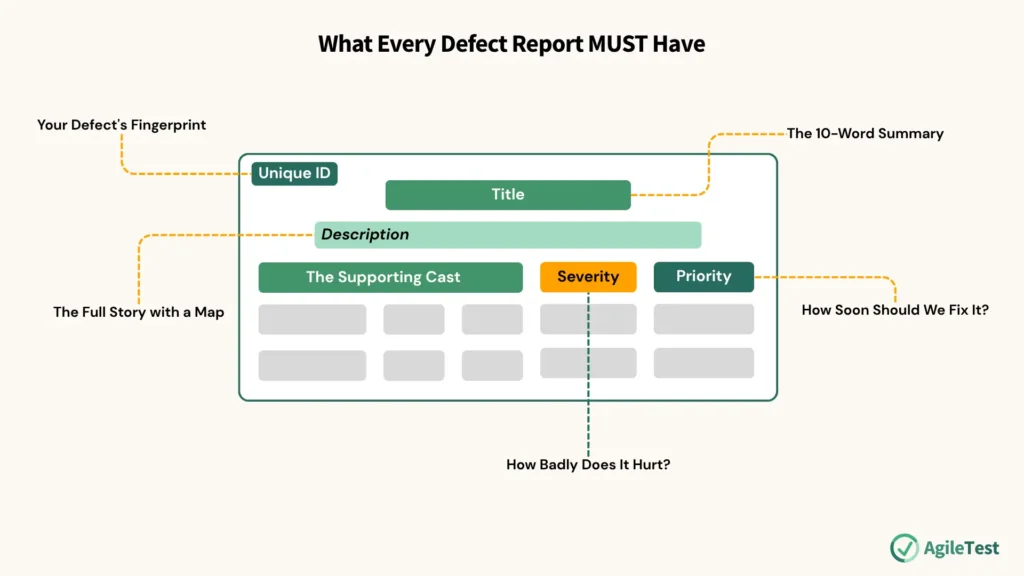
The Unique ID: Your Defect’s Fingerprint
Every defect needs a unique identifier (e.g., PROJ-1234). This is usually assigned automatically by the tracking tool (like Jira or Azure DevOps) the moment the report is created. This ID is the single source of truth for that issue, allowing everyone to reference the exact same defect in conversations, code commits, and test cases.
The Title: The 10-Word Summary
If a developer only reads one part of a report, it will be the title. It needs to be a short, specific, and descriptive summary of the problem.
- Bad Title: “Login Bug”
- Good Title: “User Login Fails with ‘Invalid Credentials’ Error on Chrome when Using Special Characters in Password”
A good title immediately tells the reader the feature, the problem, and key context. This helps tremendously when scanning a list of defects to understand the current state of the project.
The Description: The Full Story with a Map
This is the heart of the report. It should provide a detailed description of the anomaly and, most importantly, must include clear, numbered steps to reproduce the failure. This creates a map for the developer to follow so they can arrive at the exact same problem. This section should also include:
- Expected Result: What was supposed to happen?
- Actual Result: What actually happened?
This simple “Expected vs. Actual” format removes ambiguity and clearly defines the problem.
Severity: How Badly Does It Hurt?
Severity describes the technical impact of the defect on the system. It’s an objective measure of how badly the bug is breaking things. While the scale can be customized, it typically looks something like this:
- Critical: Causes a system crash, data loss, or a complete blockage of a core business function with no workaround. (e.g., The “Checkout” button doesn’t work for anyone).
- Major: A major piece of functionality is broken, or a core feature is not working as expected, but there might be a workaround. (e.g., The credit card payment option fails, but users can still use PayPal).
- Minor: An issue that affects a non-critical part of the application or a cosmetic issue that impacts the user experience but doesn’t break functionality. (e.g., A logo is misaligned on a specific page).
- Trivial: A very small issue, like a typo in an error message or on a rarely visited page.
Priority: How Soon Should We Fix It?
Priority describes the business urgency of fixing the defect. This is a subjective measure that is often decided by the Product Owner or a Defect Management Committee. Unlike severity, priority is about scheduling.
Severity and priority are related, but not the same, which is a crucial distinction. For example:
- A critical severity bug (like a server crash on an internal admin page) might be a low priority to fix if it only affects one internal user.
- A trivial severity bug (like a typo of the company name on the homepage) might be a high priority to fix because it’s embarrassing and impacts brand perception.
Refer to our guide about cross-functional defects management: It’s Not Just a Bug, It’s a Conversation: Why Quality is a Team Sport
The Supporting Cast (Generated by the Tool)
Defect management tools automatically capture other essential data points that provide a full audit trail:
- Reporter: The name of the person who found the issue.
- Date/Time of Creation: A timestamp of when it was reported.
- Current State: The defect’s stage in the workflow (e.g., New, In Progress, Ready for Test).
- Current Owner: The person currently assigned to work on the defect.
- Change History: A log of every action taken on the ticket, creating full traceability.
- References: Links to related items, like the test case that found it or other connected defects.
Install AgileTest to manage and keep track of your testing activities now.
Level Up Your Reports: Context is Everything
Once the mandatory core components are in place, adding contextual information can elevate a report from good to great. This extra data transforms a simple bug ticket into a powerful tool for analysis and improvement. This information can be grouped by its intended purpose to maximize clarity.
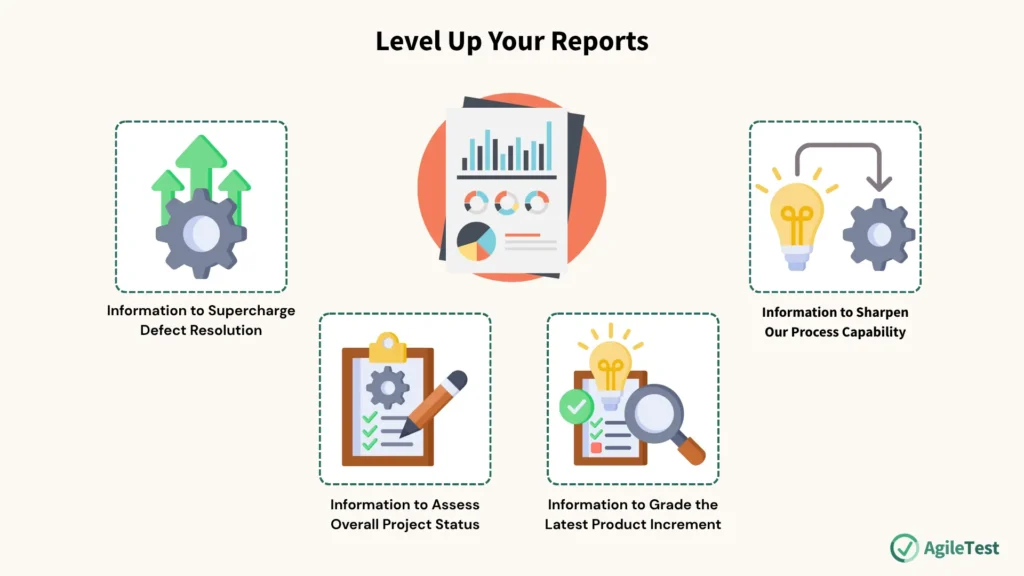
Information to Supercharge Defect Resolution
This information helps the developer find and fix the bug faster.
- Environment Details: This is huge. Was the defect found on Windows 11 with Chrome, or on an iPhone 14 with Safari? Include the OS, browser version, device type, screen resolution, etc.
- Test Item/Release Number: Which specific version or build of the software was being tested? Code changes constantly, and knowing the exact version is vital.
- Component or Subsystem: If there’s an indication of which part of the application the defect is in (e.g., “Authentication Service,” “Reporting Module”), including it can help route the ticket to the right developer or team instantly.
Information to Assess Overall Project Status
This data helps project and product managers understand the bigger picture and make strategic decisions.
- Risks, Costs, and Benefits: What is the business risk of not fixing this defect? Will the company lose customers or violate an SLA? What is the benefit of fixing it?
- Available Workarounds: This is gold for customer support teams. If there’s a way for users to accomplish their goal despite the bug, documenting it can save a lot of frustration.
- Affected Requirements: Linking the defect back to the specific user story or requirement it violates is incredibly powerful. It directly connects the bug to business value.
Explore how to manage defects with QA’s guide for the Agile approach: Beyond the Bug Hunt: A QA Manager’s Guide to Agile Defect Management
Information to Grade the Latest Product Increment
This data helps analyze trends and understand the nature of the quality issues being faced.
- Defect Type (Taxonomy): Classifying defects into categories is essential for trend analysis. Is it a Functional bug, a UI/UX issue, a Performance problem, or a Security vulnerability? A spike in security defects, for example, indicates a need to focus on security training and reviews.
- Work Product Where It Was Introduced: Did this bug originate in the requirements, the architectural design, or the code itself? Knowing this helps pinpoint weaknesses in the early stages of the SDLC.
Information to Sharpen Our Process Capability
This is the most strategic data that can be collected, as it provides the fuel for genuine process improvement.
- Root Cause Analysis (RCA): The ultimate “why.” Why did this bug happen? Was it a simple typo, a misunderstood requirement, or a flawed third-party library? Performing RCA helps move from fixing symptoms to curing the disease.
- Phase of Introduction vs. Detection: This is a key metric. Was a requirement bug introduced in the design phase but not detected until system testing, weeks or months later? The bigger the gap between introduction and detection, the more expensive the defect is to fix. A large gap is a clear signal of the need to improve early-stage review processes (a practice known as “shifting left”).
Putting It All Together: A Template for a World-Class Defect Report
Here is a simple template that incorporates these best practices. It can be adapted for any team’s specific needs and toolset.
ID: [Auto-Generated by Tool]
Title: [Clear, concise summary of the issue]
Status: New | Reporter: [Your Name] | Date/Time: [Auto-Generated]
Project: [Project Name] | Release/Build Version: [e.g., v2.5.1-beta]
Environment:
- OS: e.g., Windows 11 / macOS Sonoma
- Browser: e.g., Chrome v125 / Firefox v126
- Device: e.g., Laptop / iPhone 15 Pro
Severity: Critical | Major | Minor | Trivial
Priority: High | Medium | Low
Description:
[Provide a brief overview of the feature and the problem.]
Steps to Reproduce:
- [First clear, simple step]
- [Second clear, simple step]
- [And so on…]
Expected Result:
[Describe what should have happened after the final step.]
Actual Result:
[Describe what actually happened. Include error messages verbatim if possible.]
Attachments:
- [Screenshot highlighting the issue]
- [Video recording of the steps]
- [Relevant log file (e.g., console.log, server.log)]
Workaround (if any):
[Describe any steps a user can take to avoid this issue.]
Notes/Context:
[Any other relevant information, like links to related requirements or thoughts on the root cause.]
Make use of the AgileTest report features to manage your defects efficiently.
Final Thoughts: A Tool for Collaboration, Not Accusation
It’s crucial to remember one final point: a great defect report is an act of professional empathy. It’s not a tool for pointing fingers or “catching” developers making mistakes. Instead, it’s a collaborative document designed to help a talented colleague understand a problem so they can apply their skills to fix it.
Taking the time to write a clear, concise, and complete report saves team members time and frustration. It accelerates the path to a solution and contributes to a culture of collaboration and shared ownership of quality.
Teams should work together to discuss and refine their defect reporting process using these principles. Better reporting doesn’t just create better software; it creates happier, more effective, and more successful teams.