
That feeling of relief when the last line of code is merged, the final test goes green, and the feature is “done”—it’s one of the best parts of our job. But in the rush to move on to the next exciting challenge, we often forget a crucial final act: test completion.
Test completion isn’t just about stopping. It’s a set of professional activities that formally closes the loop on a testing cycle. Think of it as the “cool-down” after an intense workout. It ensures that we finish strong, preserve valuable knowledge, and pave the way for future success. Whether it’s the end of a two-week sprint, the launch of a major release, or the conclusion of a specific test level (like performance testing), taking the time to wrap things up properly is what separates good teams from great ones.
This guide will walk you through the five essential test completion activities: creating the final report, archiving your work, handing off key information, cleaning up your workspace, and, most importantly, learning from your experience. Let’s explore how to master this final act and turn it into a powerful tool for your team.
The Final Verdict: The Test Completion Report 📜
Before you can officially say “we’re done,” you need to summarize the journey. The test completion report is the official document that does just that. Don’t think of this as tedious paperwork; instead, think of it as the highlight reel or the executive summary of your entire testing effort. It answers the one question every stakeholder has: “Did we succeed, and are we ready to ship?”
Creating this report ensures that all planned testing has been accomplished and that you have a clear picture of whether your test objectives have been met. This task involves pulling together information from all your hard work—from the initial test plans to the final test results and defect reports.
What Goes into the Report?
A good test completion report is concise yet comprehensive. It synthesizes data into a clear story about the product’s quality. Key elements include:
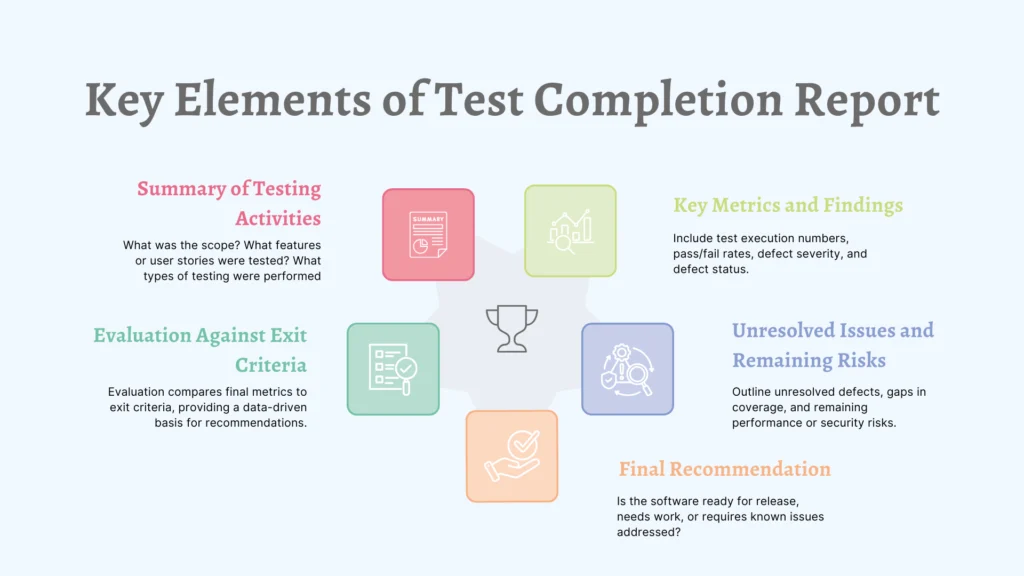
- A Summary of Testing Activities: What was the scope? What features or user stories were tested? What types of testing were performed (e.g., functional, regression, performance)?
- Evaluation Against Exit Criteria: This is the heart of the report. Your test plan defined exit criteria (e.g., “95% of test cases passed,” “zero open critical defects”). The report directly compares your final metrics against these criteria. This provides a clear, data-driven basis for your final recommendation.
- Key Metrics and Findings: Present the final numbers that tell the story. This includes metrics like:
- Total number of tests executed.
- Final pass/fail/blocked percentages.
- Total number of defects found, broken down by severity.
- The status of all defects (e.g., how many are fixed, how many are still open).
- Unresolved Issues and Remaining Risks: No product is perfect. Therefore, be transparent about any known issues. For any unresolved defects, you’ll create change requests or product backlog items to ensure they aren’t forgotten. Also, highlight any areas that received less test coverage than desired or any residual performance or security risks.
- The Final Recommendation: Based on all the above, what’s the verdict? Is the software ready for release? Should it be released with a list of known issues? Or does it need more work?
Once drafted, the report is approved and communicated to relevant stakeholders—like the Product Owner, Project Manager, and development leads. This approval is the formal sign-off. It signifies that everyone is aligned on the state of the product’s quality and accepts the outcome of the testing effort.
Preserving the Gold: Archiving Your Testware 🗄️
Imagine a master chef creating a brilliant new dish and then throwing the recipe away. Unthinkable, right? The test cases, automation scripts, and test data you created are your team’s “recipes” for quality. To archive testware is to recognize it as a valuable asset and preserve it for the future.
This task is about more than just saving files; it’s about curating your work so it can be easily found, understood, and reused.
What to Archive and Why
You’ll archive two main categories of testware:
- Assets for Future Reuse (The Recipes): The source text notes that these are typically test cases. This includes manual test scripts, automated UI or API tests, performance test scripts, and reusable test data sets. When you archive these, your goal is to make them accessible and easy to understand. This means using clear naming conventions, adding descriptive comments to your scripts, and storing them in a logical folder structure. A well-archived regression suite can save your team hundreds of hours on future releases.
- Assets for the Historical Record (The Lab Notes): This category includes test results, detailed test logs, test reports from various stages, and other related work products. Why keep these?
- Auditing and Compliance: In many industries, you’re required to prove that you performed due diligence in your testing.
- Trend Analysis: By looking at defect reports and test results over several releases, you can identify trends. Is quality improving or declining? Are certain parts of the application consistently buggy?
- Forensic Analysis: If a critical bug appears in production months later, having the detailed test logs from that release can be invaluable for debugging.
All of these assets should be stored in a configuration management system like Git or a dedicated test management platform like TestRail or AgileTest. This ensures they are version-controlled, backed up, and centrally located for the whole team.
The Handoff: Sharing Valuable Work Products 🤝
Knowledge is only powerful when it’s shared. The handover testware task is about ensuring that the critical information and work products you’ve generated get to the people who need them most. It’s a proactive communication step that bridges the gap between different teams and different phases of the product lifecycle.
Who Needs to Know What?
- To the Support and Operations Teams: The source highlights a crucial handover: communicating known defects that are deferred or have been accepted. When the support team gets a call from a customer on launch day, they shouldn’t be surprised. Providing them with a list of known issues, their symptoms, and any available workarounds empowers them to provide excellent customer service and reduces escalations.
- To the Product and Development Teams: Your list of unresolved defects is a direct input for future work. During the handover, these items are formally converted into change requests or product backlog items. This ensures that technical debt and lower-priority feature gaps are properly captured, prioritized, and scheduled in future sprints, rather than being lost in an old spreadsheet.
- To Future You and Your Teammates: The reusable testware you just archived? The handover includes making sure the rest of the team knows it exists and how to use it. This is especially important for onboarding new team members or for when another team needs to run regression tests on your component.
Tidying Up: Cleaning the Test Environment 🧼
You wouldn’t start preparing a gourmet meal in a kitchen covered in the mess from your last one. Similarly, you shouldn’t start a new testing cycle in a dirty test environment. The goal of this task is to clean the test environment and restore it to a pre-defined state, ensuring it’s ready for the next project or iteration.
A clean environment is a reliable environment. It prevents “phantom” bugs caused by leftover data or configurations from previous test runs, saving you hours of frustrating debugging.
Your Cleanup Checklist
The cleanup process typically involves:
- Removing Test Data: Delete test accounts, clear database tables, and remove any files or artifacts generated during testing.
- Uninstalling Test Tools: Remove any temporary test drivers, test stubs, or other specialized testing tools that were installed.
- Resetting Configurations: Restore configuration files, network settings, and application states to their original, baseline condition.
The ultimate goal is to restore the environment to its “golden state”—a known, clean, and documented starting point. In modern DevOps, this process is often automated using Infrastructure as Code (IaC) tools and scripts, allowing you to tear down and rebuild a pristine environment with a single command.
Learning and Improving: The Retrospective 🧠
Of all the completion activities, this is arguably the most valuable. This is where you pause, reflect, and figure out how to get better. The task to perform, collect, and document lessons learned is typically done in a retrospective meeting. It’s a blame-free, open forum for the entire team—developers, testers, and product owners—to discuss the entire software development lifecycle (SDLC), not just the testing.
Fueling Continuous Improvement
The retrospective is where you turn your recent experience into actionable wisdom. The discussion should revolve around a few simple but powerful questions:
- What went well in this cycle that we should continue doing?
- What didn’t go so well or caused problems?
- What will we do differently in the next cycle?
From a testing perspective, you might discuss:
- Were our test estimates accurate? If not, why?
- Did our test strategy catch the most important bugs? Were there any surprising “escapes” into production?
- Were there bottlenecks in our process? (e.g., waiting for builds, unstable environments, slow bug-fix turnaround).
- How can we improve collaboration between developers and testers?
The key is to end the meeting with a small number of concrete, actionable improvement items. A “lesson learned” is useless if it’s just a note on a wiki page. An actionable item like, “We will automate the creation of test users to speed up test setup,” can have a real impact on the next sprint.
Conclusion: Finishing Strong
Test completion is not an administrative afterthought; it’s a discipline that marks the difference between a team that simply gets work done and one that builds a foundation for long-term success.
By diligently performing these five activities—Reporting your results, Archiving your assets, Handing off knowledge, Cleaning your workspace, and Learning from your experience—you create a powerful feedback loop. You provide clear closure for stakeholders, you build a library of reusable assets that accelerates future work, you empower your support and operations colleagues, and you embed a culture of continuous improvement at the heart of your team. It’s the professional way to cross the finish line, ensuring that every project you complete makes the next one even better.