

Manage sprint test progress sounds simple until you actually try to understand where your sprint stands. With modern tools, the team can generate test reports in minutes.
However, turning those reports into a clear understanding of overall sprint progress is a completely different challenge. During daily standups, team members can report on their tasks, yet lack a clear view of the overall progress.
In this article, let’s explore common challenges teams may face and see how AgileTest Summary & Analyzer helps teams overcome them.

1. Generating Test Reports Is Easy, But Managing Testing Progress Is Not
Most teams today have no problem generating test reports. With tools in Jira, it’s easy to track execution results, test case status, and defects. However, they may encounter some issues when checking the sprint test progress.
There are two main reasons behind this challenge:
Fragmented Testing Data Across Multiple Reports
One of the biggest issues is scattered information. Many tools offer a variety of test report templates that help teams quickly gather data for specific purposes. For example, Test Execution Report, Requirement Coverage, Defect Summary, etc.
While these reports are useful individually, each is designed to provide a detailed view of a specific testing part. As a result, teams often have to switch between multiple reports and Jira issues. They need to manually piece together insights to form a complete view of their testing progress.
Limited Insight for Effective Decision-Making
Even when the data is available, it often lacks meaningful insights. Reports typically show numbers, but they don’t explain what those numbers imply.
Consequently, teams are left wondering:
- Which areas are truly at risk?
- What should we focus on next?
- …
As a result, teams spend more time on figuring progress than actually acting to improve and move the sprint forward.
2. How Teams Can Better Manage Sprint Test Progress?
Instead of spending time piecing together data, what if teams could instantly understand their sprint progress with a single question?
To achieve this, teams need more than just reports. They need a better approach to connect all testing data into a single context and transform it into actionable insights.
The new approach should centralize all sprint testing data and continuously update it based on ongoing testing activities. It should also be interactive, allowing you to ask questions, explore deeper through follow-ups, and receive meaningful, context-aware insights.
This is where AgileTest Summary & Analyzer can help. The agent can analyze your test data across test executions, sessions, and runs within the sprint. From this input, the agent can answer you not only what has happened, but also what it means and what to do next.
Let’s see how teams can use AgileTest Summary & Analyzer to track and manage sprint test progress more effectively.
3. Manage Sprint Test Progress with AgileTest Summary & Analyzer
Step 1: Create Your Jira Sprint
First, you need to create your Jira Sprint. Your Jira Sprint acts as the foundation for tracking test progress, where all work items and activities are organized. You should make sure to include:
- A defined sprint goal
- All relevant work items needed for the sprint, such as requirements, bugs, and related tasks
- Team members with the appropriate access and responsibilities to carry out the work
A well-structured sprint ensures that all testing activities are aligned, helps you track progress, and generates meaningful insights later on.
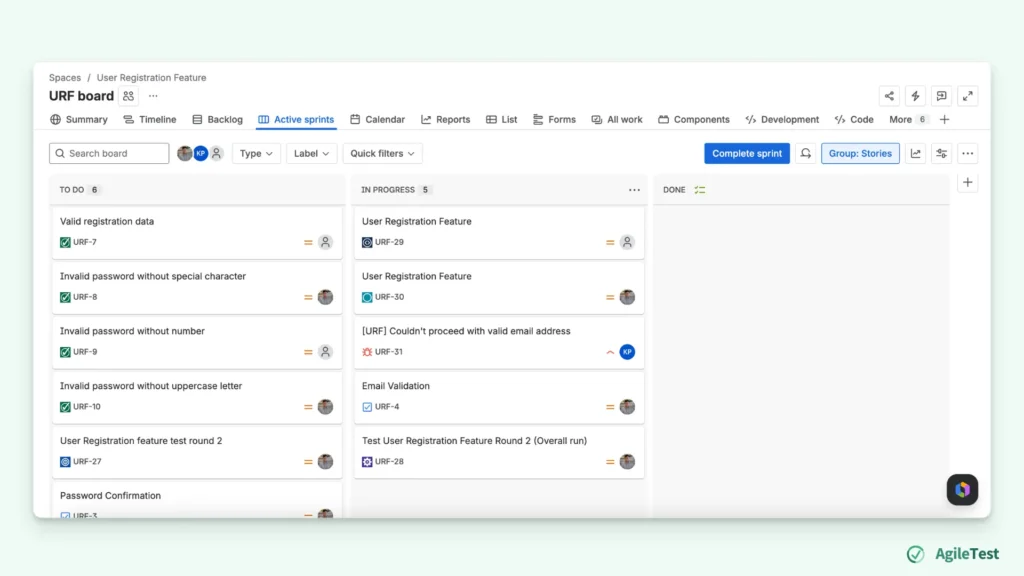
Step 2: Link AgileTest Milestone To Your Jira Sprint
AgileTest does not use a native “Sprint” concept. Instead, it uses Milestones to represent testing progress. To align your testing activities with the sprint, you need to create milestones and link them to your Jira Sprints.
Once linked, all testing activities within that milestone are grouped under the same sprint context. This allows AgileTest to accurately analyze progress and provide meaningful, sprint-level insights.
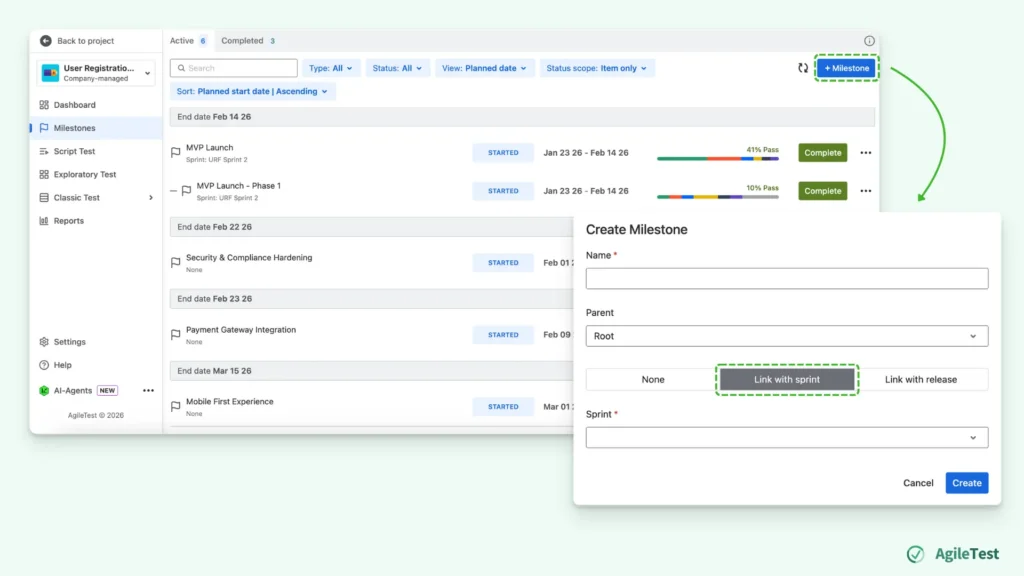
Step 3: Add Milestone Detail To Your Test Items
After linking your milestone to the Jira Sprint, the next step is to assign that milestone to your testing items.
In AgileTest, you can link your milestones with Test Executions, Test Sessions, Test Runs, or other testing activities. For each of them, make sure to select the correct milestone so that results are aligned with the sprint context.
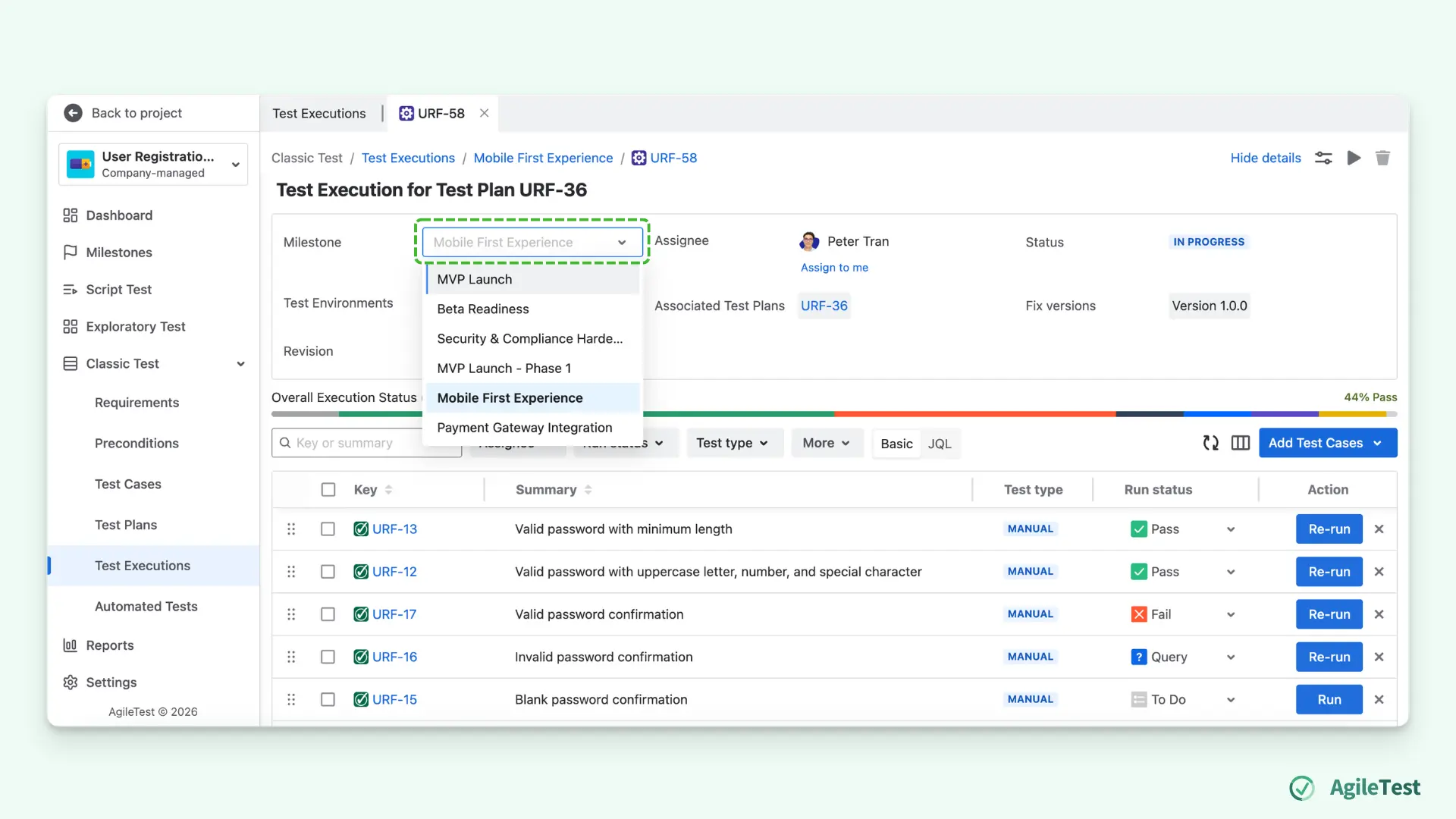
Step 4: Ask AgileTest Summary & Analyzer To Track Details
After finishing all your testing activities, you can ask the AgileTest Summary & Analyzer to summarize the sprint test progress.
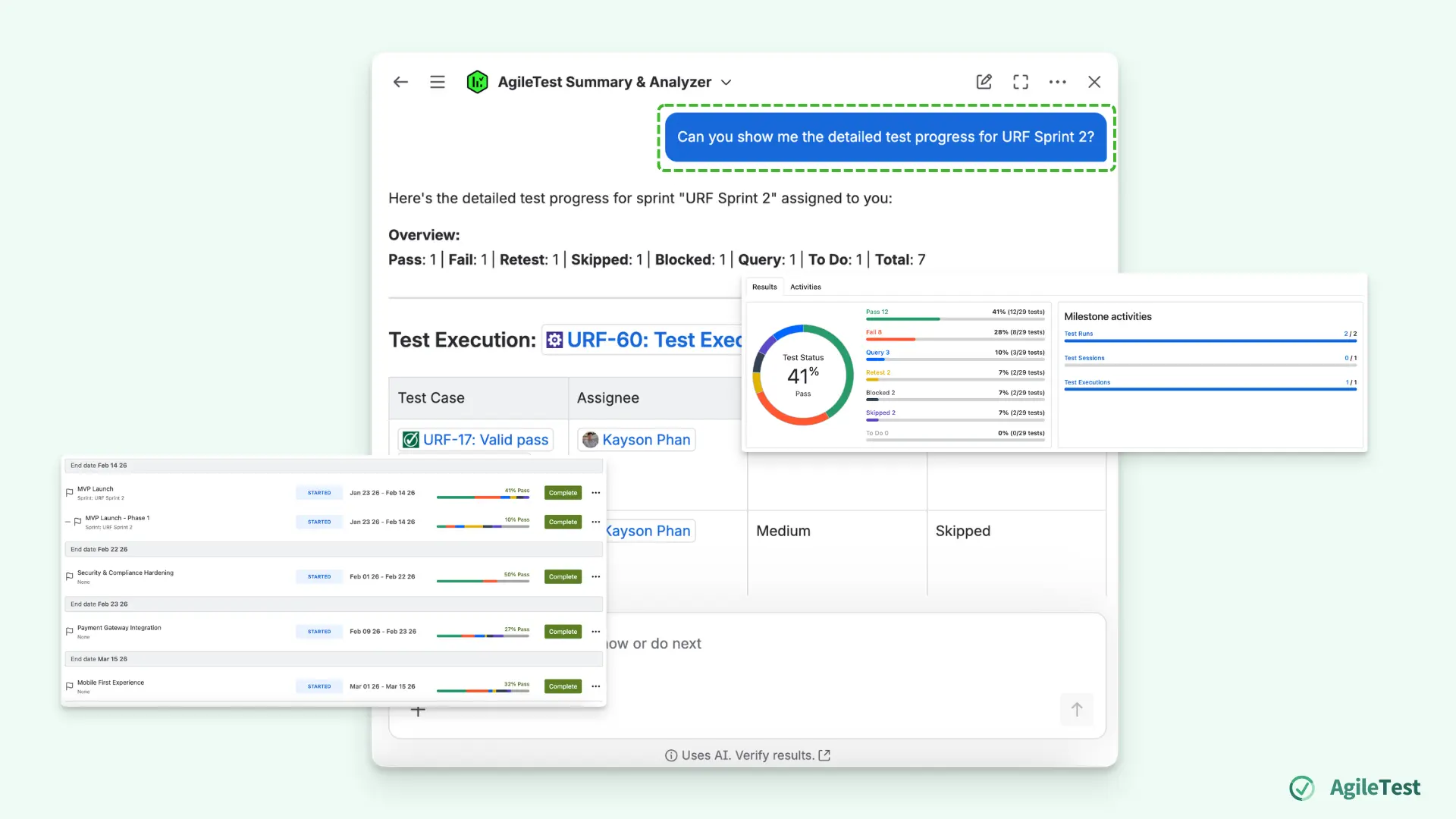
You can input the prompt to the agent like this: “Show me my + [Your Jira Sprint Name] + sprint test progress”.
You will immediately see your overall progress, including how many tests have passed, failed, or are still in progress. The AI Summary & Analyzer agent will show you all the data linked to your sprint. Based on your test results, it provides a comprehensive overview of your testing status.
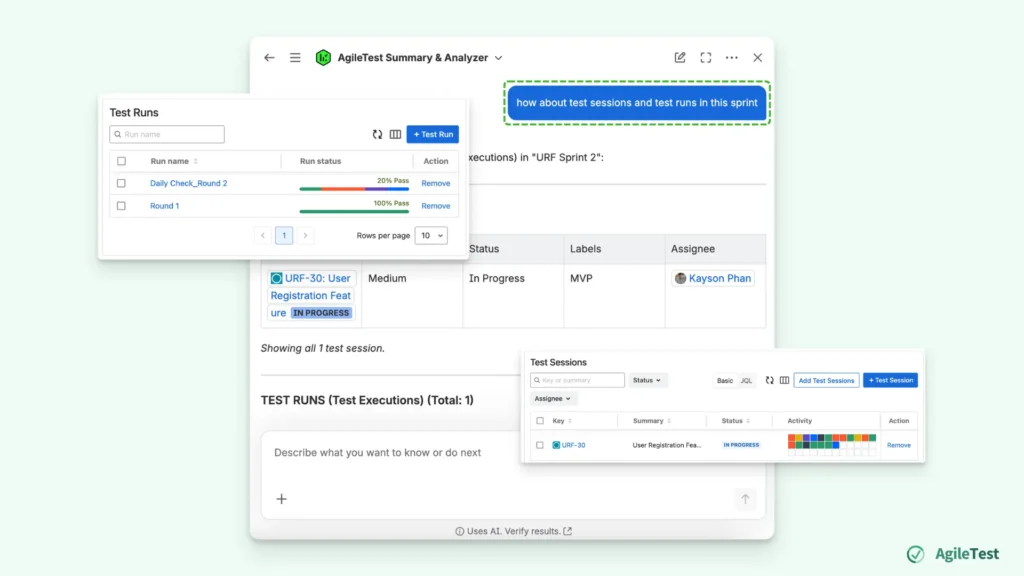
You can also ask some follow-up questions to further explore and clarify your sprint testing context. For example, after getting an overview of the test execution, you might ask more specific questions like “How about test sessions and test runs in this sprint?” to view details of particular testing activities.
Step 5: Refine And Review The Answer
Once you receive the initial summary, you can continue refining your queries to gain deeper and more relevant insights. Instead of stopping at a general overview, ask more contextual questions, such as:
- “Are we on track to meet our sprint goals?”
- “What should we focus on next?”
The AgileTest Summary & Analyzer will not only provide updated answers but also deliver contextual analysis, including progress evaluation, remaining workload, and potential risks. This helps you move beyond simply understanding the current status to actually making informed decisions.
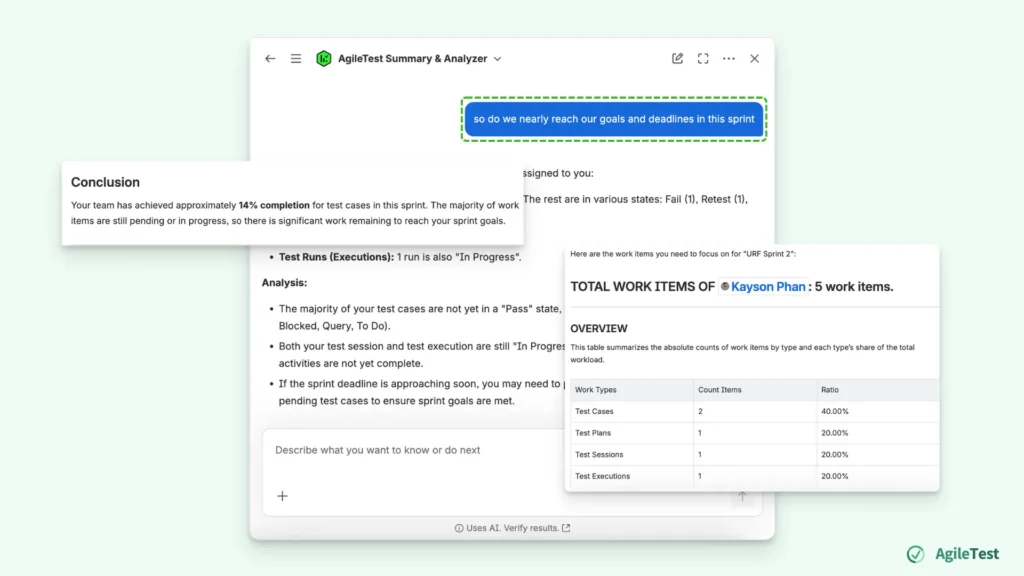
The agent highlights your current progress with percentages and suggests what you should focus on next to complete your sprint. You can instantly understand not only your progress but also where the risks are and what actions to take next. For example, the AI can highlight repeated test case failures so you can know which items need attention.
You’re now ready to manage and optimize your sprint test progress with AgileTest Summary & Analyzer. Start using AgileTest today and transform the way you track and manage your sprint testing progress.
Final thoughts
Managing sprint test progress doesn’t have to be a manual and time-consuming process. As shown throughout this guide, by structuring your sprint properly and leveraging AgileTest Summary & Analyzer, you can turn fragmented testing data into clear, actionable insights.
With a more insight-driven approach, you can ensure better alignment across your team, reduce uncertainty, and ultimately deliver higher quality software on time.
Install AgileTest and try out AgileTest Generator now.