
Testing an AI product is a different problem than testing a login form. Ask an AI video generator to render the same prompt twice. You can get two different results, and both may be arguably valid. There’s no single “correct” output to assert against. That’s exactly why so many QA teams struggle to answer a simple question: how do you know you’ve tested enough?
This article walks through how to answer that question for an AI video generation tool. It uses invideo AI as the real-world example and AgileTest to structure, execute, and prove the coverage. The underlying workflow follows four steps: benchmark first, then turn the benchmark into requirements. Next, generate and execute test cases against those requirements, then report on coverage.
This approach works for any product where “quality” is more subjective than pass/fail. AI video generation just happens to be one of the harder versions of that problem. That makes it a good stress test for the method itself.
Start With an AI Video Generation Benchmark, Not a Guess
Before writing a single test case, you need a definition of “good” that isn’t a gut feeling.
Choosing Test Subject
For this walkthrough, the product under test is invideo Agent, an AI video generation platform. We chose it specifically because it publishes its own benchmarking approach, giving us a real, documented starting point instead of a hypothetical one.
How invideo’s Agentic AI Video Process Changes the Benchmark
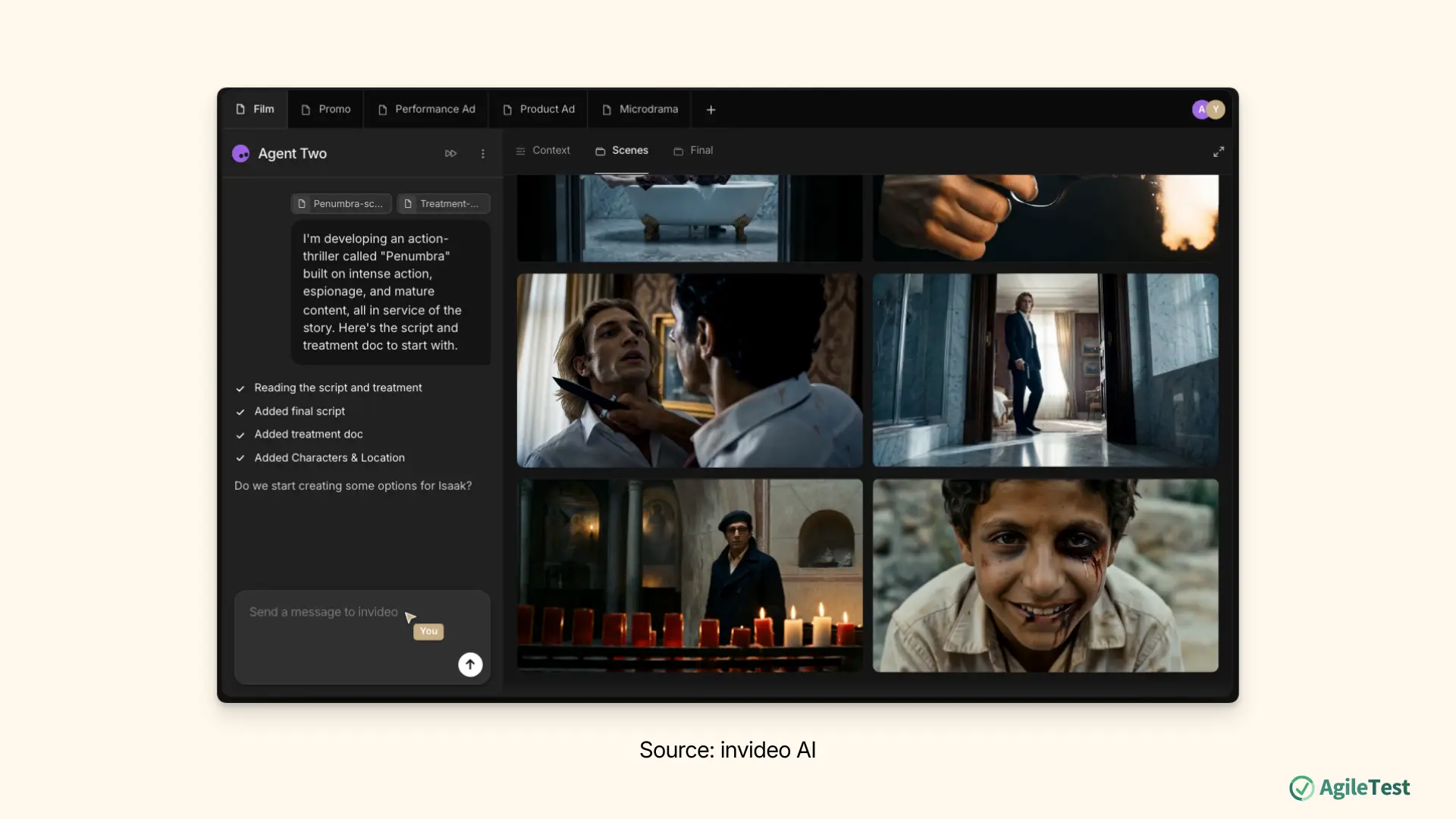
invideo has also moved past single-shot generation (type one prompt, get one clip) into what it calls an agentic video production process: an AI production team working under human direction, rather than a single generator.
A persistent project Context stores what needs to stay the same throughout a project, like a character’s look or a brand’s colors. Briefs define each individual piece of work built from that Context, such as one ad or one scene. Specialized expert agents (script, storyboard, cinematography, editing, and so on) each handle a different part of the work and pass information to one another, and a finishing stage pulls the approved material into a final timeline. The human stays in charge of the creative decisions; the agents execute them.
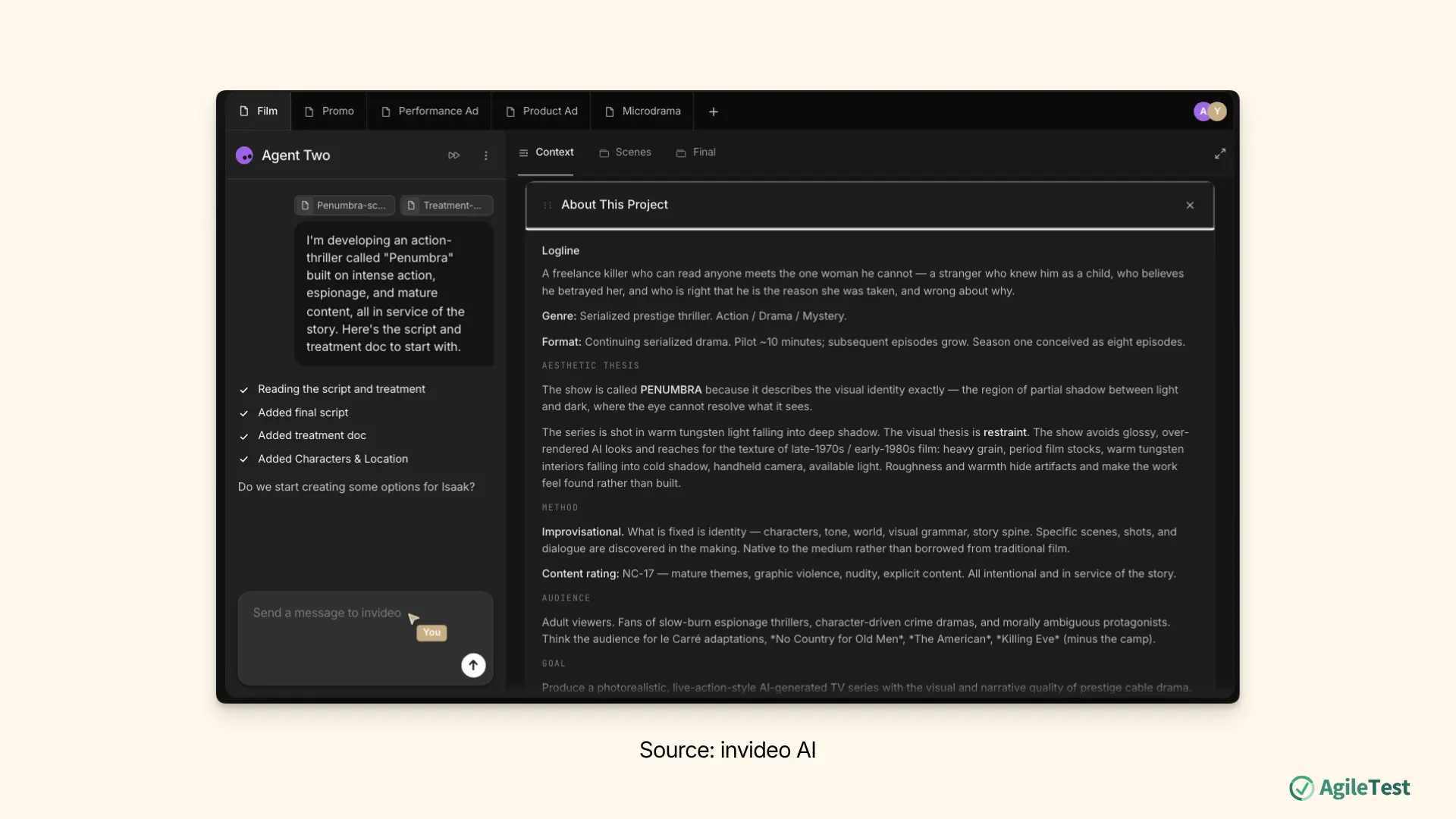
For example, a marketing team could lock a product’s look and brand colors once in a Context, then generate ten ad variations as separate Briefs without re-explaining the brand each time.
That project-level structure changes what the benchmark needs to check: a single good-looking clip isn’t proof the system works, because the process behind it has to hold up across the whole project.
- Does a locked character or product’s look actually stay consistent across shots, Briefs, and sessions, or drift after a few generations?
- Does a new expert agent joining mid-project correctly pick up existing Context, or does the team have to re-explain everything?
- Does the agent keep enforcing a standing rule, like an approval step or brand restriction, automatically, rather than someone having to repeat it every time?
Each becomes its own checkpoint for the benchmark below, not just the final clip.
Generation Model Benchmarking Protocol
Invideo’s own approach to benchmarking AI video generation models is a useful reference point precisely because it isn’t a research metric. It’s built to answer “can this model actually do the work,” not to produce an Elo score or an FVD number. The protocol breaks into a few repeatable moves that translate directly into a QA test plan:
- Use a large, standardized sample. Generate 30+ outputs across a fixed set of prompts before drawing any conclusion, so results are comparable instead of anecdotal.
- Document the hard specs. Resolution tiers, clip-length limits, and cost, so feature claims can be checked against reality later.
- Stress-test across prompt categories. Simple physics, complex physics, timecode instructions, and camera-angle changes, and record the failure mode, not just the failure rate. Does the model distort scene geography, or just miss the instruction?
- Push duration and consistency to their ceiling. Lip-sync or frame consistency often holds up fine for a few seconds and breaks down well before a minute. Test to the breaking point, not just the happy path.
- Verify feature claims directly. Avatar accuracy (face versus voice), in-frame text tracking, factual grounding, and subject rotation and background replacement are the kinds of claims worth checking directly. Test the claim, not the spec sheet.
- Score against a named baseline, and apply a production-readiness bar: a model can meet its spec sheet and still not be deliverable-quality.
That gives testers a concrete, checkable definition of quality instead of “the video should look good.” It also maps directly onto categories a test plan can be organized around.
Apply a Quality Evaluation Framework for AI-Generated Video
A benchmark tells you what to compare across models. A quality-evaluation framework tells you what to actually look at inside a single output. A recent survey on evaluating AI-generated video quality splits assessment into general dimensions that apply to any generated video, plus special dimensions for content involving people or animals:
General dimensions (apply to every output):
- Overall quality: Is the output coherent, clear, and free of perceptual distortion?
- Spatial quality: Do objects and scenes stay consistent and correctly positioned across frames?
- Temporal quality: Is motion smooth and continuous over time, without unnatural jumps or flicker?
- Text-video alignment: Does the video faithfully reflect the details described in the prompt?
Special dimensions (for content with people or animals):
- Action plausibility: Is the movement physically realistic?
- Human artifacts: Are anatomy, body movement, and gesture natural, not warped or uncanny?
For a QA team, these translate directly into test categories: functional/overall accuracy, spatial and temporal consistency, and prompt fidelity. Wherever content includes people, add a dedicated pass for physical plausibility and human-artifact defects. That’s the difference between “we tried a few prompts and it looked fine” and an actual, defensible test plan.
Turn the Benchmark Into Test Requirements and Acceptance Criteria
With the benchmark and evaluation categories defined, apply standard QA practice. Write a requirement and acceptance criteria for each dimension in AgileTest. That way, every test case generated later has something concrete to trace back to.
The table below shows one representative example per Coverage Focus type (Functional, Negative & Edge, Performance, Security, and Accessibility). This makes the range visible before the next section puts them to work.
| Requirement | Acceptance Criteria (illustrative) | Coverage Focus |
|---|---|---|
| Text-video prompt alignment: Video must reflect every explicit detail in the prompt. | At least 90% of a 30-prompt sample shows full alignment with every explicit prompt detail; log partial matches along with the specific detail missed. | Functional |
| Lip-sync duration ceiling: Single-speaker lip-sync must stay accurate up to the documented duration limit. | Lip-sync drift stays within tolerance for clips up to the documented ceiling; log any drift beyond that point along with the exact second it begins. | Performance |
| Feature availability boundaries: Model-restricted features must fail gracefully outside their supported scope. | Requesting a boundary-restricted feature outside its supported scope returns an explicit error in 100% of attempts; it never produces a silent wrong output. | Negative & Edge |
| Content moderation / prompt safety: Disallowed prompts must be declined or filtered, not generated. | The system declines or filters 100% of a defined disallowed-prompt test set and produces no disallowed content. | Security |
| Caption/subtitle accuracy: Auto-generated captions must match spoken dialogue and stay synced. | Captions stay within the defined word-error-rate threshold and remain synced within ±0.3 seconds of audio, across a 10-clip sample. | Accessibility |
| Context persistence across Briefs: A locked character, product, or brand element must stay consistent across every Brief generated within the same project. | AI Generations correctly reflect a locked Context element in at least 95% of cases across a 10-Brief sample; log any deviation against the specific Brief and element that broke. | Functional / Negative & Edge |
| Cross-agent handoff fidelity: A new expert agent joining a project must correctly receive and apply prior Context and decisions without the team re-briefing it. | In a defined handoff test, the newly added agent’s output correctly reflects at least 90% of the relevant prior Context; log any missed detail as a handoff defect. | Functional / Negative & Edge |
This description field isn’t just documentation. It’s the direct input for the next step, so the more specific the acceptance criteria, the better the generated test cases will be.
Generate Full Test Coverage With AgileTest’s AI Generator
Writing exhaustive test cases by hand for every benchmark category is exactly the kind of coverage gap that creeps in under deadline pressure. This is where AgileTest’s AI Generator earns its place in the workflow.
Try AgileTest for Jira free here: Atlassian Marketplace.
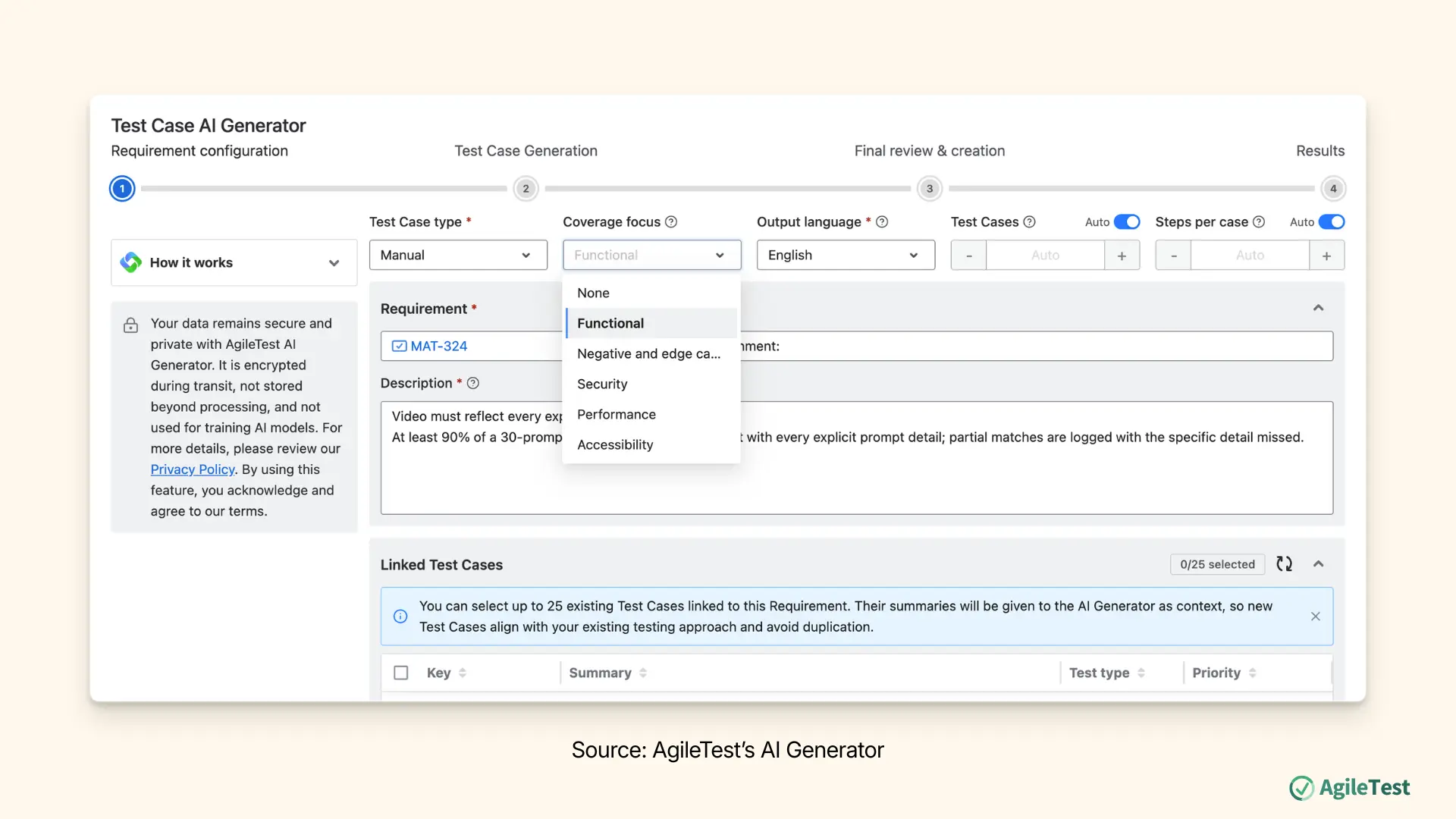
From a requirement’s detail screen, clicking AI Generator opens the Requirement Configuration screen, where the requirement’s summary and description (including the acceptance criteria just written) become the context the AI draws from. You can also add up to 25 existing linked test cases as reference, so the generator doesn’t duplicate coverage that already exists.
Output Preferences control the shape of what gets generated:
- Test Case Type: Manual, Cucumber, or Generic.
- Coverage Focus: Functional, Negative and edge cases, Security, Performance, or Accessibility.
- Test Case Number and Steps Per Case: Set manually (1–20 each) or left on Auto.
The Coverage Focus setting is the part that matters most for full coverage. Run the generator once per focus against the same requirement. That means a functional pass, then an edge-case pass, then a performance pass, and so on. This is how you deliberately cover categories that a single balanced batch would gloss over. It’s the same “test to the breaking point” philosophy invideo uses in its own benchmarking. Now AgileTest captures it as reusable, traceable test cases instead of a one-off exercise.
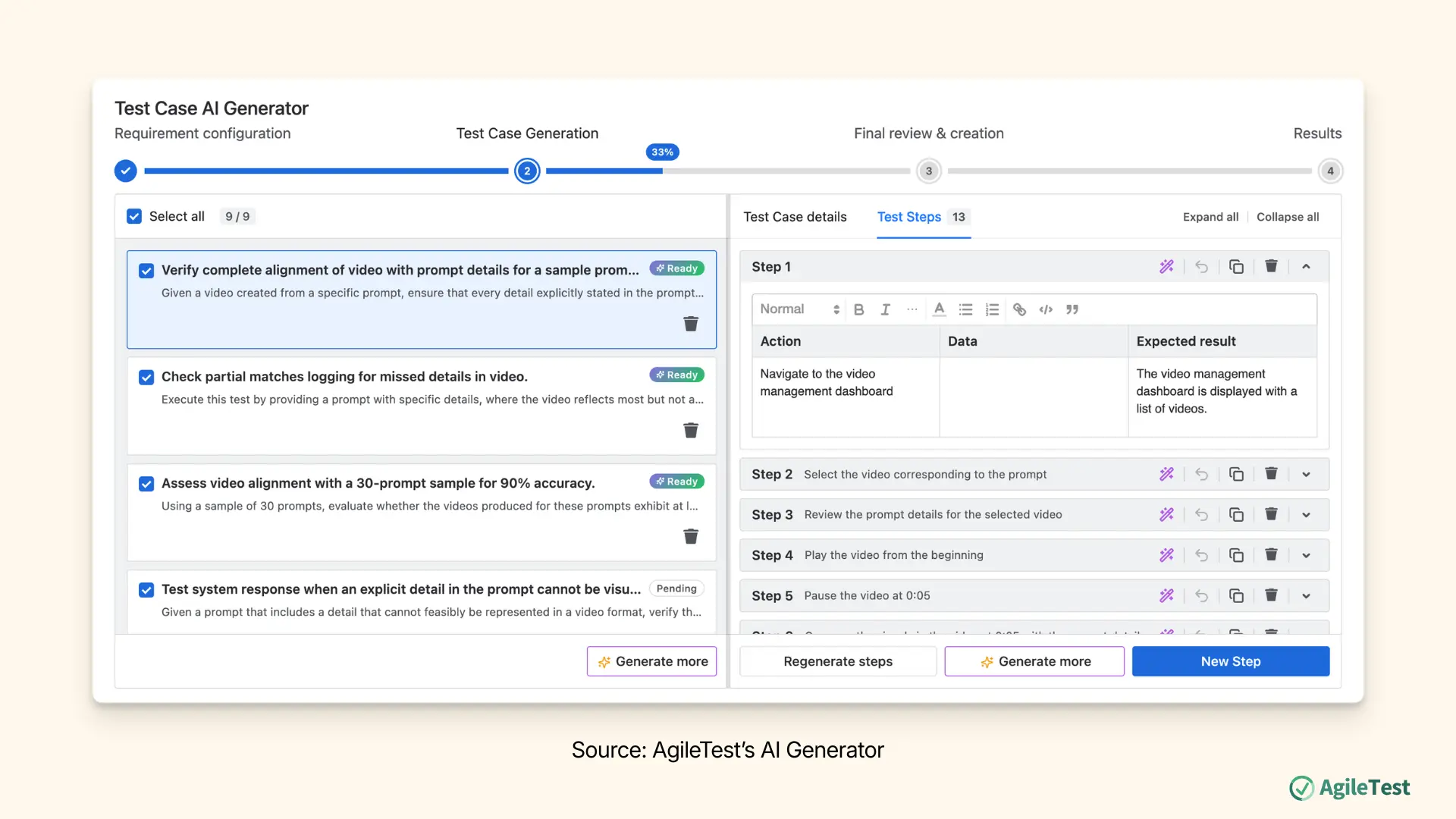
The AI proposes test cases in a left-hand panel with steps shown alongside. You can edit each step’s Action, Data, and Expected Result directly or regenerate them with feedback. You can also duplicate or delete steps before anything is committed. Clicking Generate creates the reviewed cases and links them to the requirement. Each one also carries a “Source” marker showing it was AI-generated. That marker is useful during later audit or review.
Execute Test Cases and Log Defects Without Leaving the Workflow
With test cases generated and organized, execution happens in AgileTest’s Test Execution space. Before running a case, the Test Coverages tab confirms which requirement it’s linked to, and the Preconditions tab confirms any setup needed. This is useful for recording exactly which model, prompt set, or app version is under test.
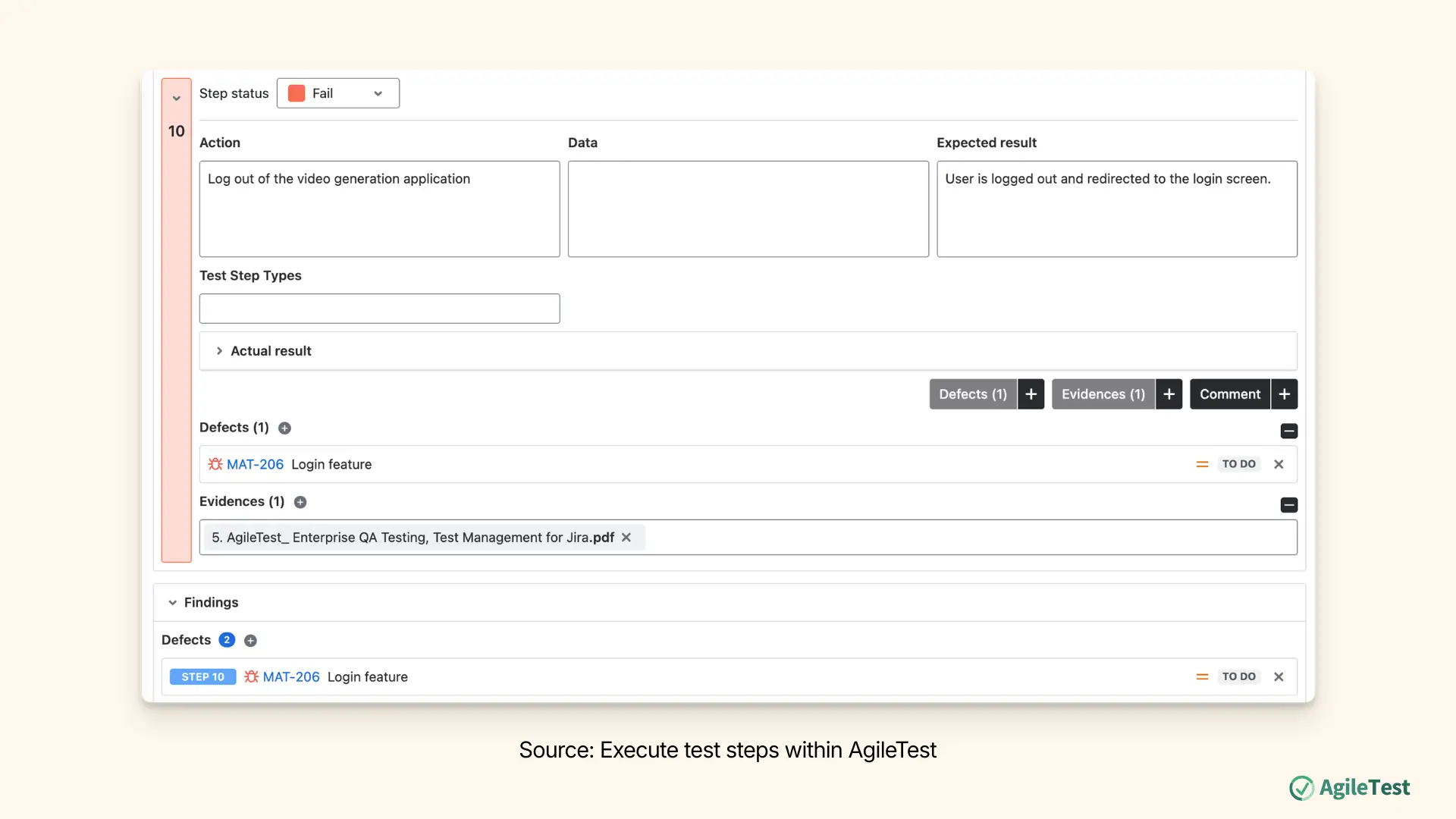
During execution, three actions happen per step, none mandatory on their own:
- Enter the Actual Result: What the generated video actually did.
- Set the Step Status from a color-coded dropdown (pass, fail, blocked, and so on).
- Attach a Finding: Evidence (the output clip or a screen recording of the defect, up to 25MB), a Comment, or a Defect.
For a defect specifically, the tester either links an existing Jira bug or creates a new one directly from that step. For AI-output testing, that inline linking matters more than usual: it ties the bug to the exact prompt, model, and clip that produced it. That’s exactly the context a developer needs to reproduce a failure that might not repeat the same way twice.
Prove Test Coverage With Traceability and Metrics Reports
The step that actually answers “did we test enough” is reporting.
Test Traceability ties each requirement to its linked test cases, test plans, test runs, and defects in one view. An App Status column flags coverage directly. It includes an explicit Uncovered status for any benchmark requirement that never got a test case attached, alongside per-case statuses like Pass, Fail, Blocked, or Retest. Scope and filters (by test environment, version, test plan, or a custom JQL query) make it easy to isolate just the performance pass, or just what’s uncovered for a specific model version, instead of scanning everything at once.
Project Metrics rolls the run up further: a Project Overview of aggregate counts, an Activity Overview trended over a selectable time window, Top Contributors, and Top Test Cases, ranked by execution frequency and linked defect count, which surfaces exactly which video-quality checks are turning up problems most often.
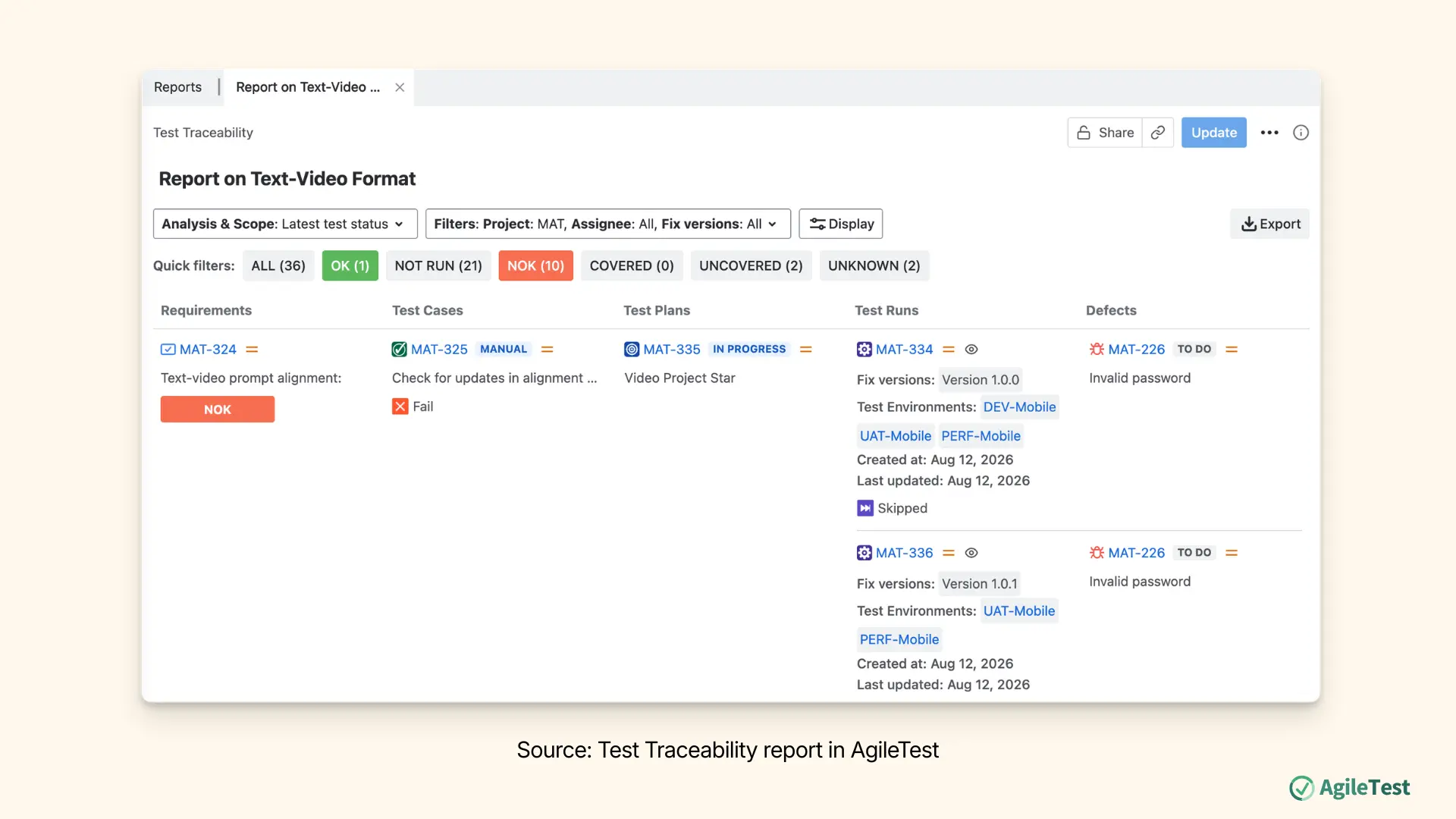
You can switch both reports from Private to Public accessibility, producing a link you can send straight to stakeholders with Jira access, such as a product manager deciding whether a model update is ready to ship, or a team evaluating a vendor tool. For stakeholders who don’t have Jira access, export the report as PDF or Excel and send it directly instead, so they can see whether testing is done and what it found either way.
Related article: How to measure your test progress.
FAQ: Testing AI Video Generation Tools
1) What makes testing an AI video generator harder than testing typical software?
Outputs are non-deterministic: the same prompt can produce different results on different runs, so there’s no single expected output to assert against. Testing has to rely on benchmark criteria and quality dimensions instead of exact-match checks.
2) What’s the difference between a benchmark and a quality-evaluation framework?
A benchmark compares models or versions against each other on defined criteria. A quality-evaluation framework defines what to look for inside a single output: spatial consistency, temporal smoothness, prompt alignment, and so on. Used together, they turn “does this look right” into testable, repeatable criteria.
3) Can AgileTest generate edge case and performance test cases automatically?
Yes. The AI Generator’s Coverage Focus setting includes Functional, Negative and edge cases, Security, Performance, and Accessibility. Running it once per focus against the same requirement is the most reliable way to get a full spread of coverage rather than one generic batch.
4) How do you prove test coverage to stakeholders who don’t use Jira?
All of AgileTest reports can both be switched to Public accessibility, which generates a shareable link, giving stakeholders with Jira access a read-only view of coverage and results. For stakeholders without Jira access, export the report as PDF or Excel and send it to them directly instead.
Final Thoughts: A Repeatable Framework for Test Coverage
None of this workflow is specific to video generation. Benchmark first, then translate the benchmark into requirements. Generate and execute test cases against those requirements with a deliberate coverage focus. Then report on traceability rather than gut feel. That’s a repeatable pattern for testing anything where quality is more nuanced than pass/fail.
AI video generation is just a particularly good test case for the test case. That’s because it’s one of the hardest things to define “correct” for. Consider a test workflow that can produce provable, traceable coverage for something as fuzzy as “does this video look right.” If it can do that, it’ll hold up for whatever your team is actually shipping.