
Test traceability report is often the first thing QA teams look for when release time approaches, and the same question comes up again: Is this requirement fully tested?
In Jira-based projects, testing work does happen: test cases are created, tests are executed, and defects are fixed. Yet many teams still struggle to answer that question with confidence. Coverage is often inferred from Jira statuses, memory, or manual checks, rather than clearly demonstrated with data.
This article identifies why that gap exists, how teams typically try to manage it, and why test traceability is essential for turning assumptions into reliable insight. It also shows how a test traceability report helps QA teams clearly understand coverage, risk, and readiness in real projects.
1. What QA Teams Experience Day-to-Day in Jira
In most projects, QA teams don’t struggle because they don’t know what to test; they struggle because they don’t clearly know whether they have tested enough.
Requirements usually live as Jira issues. User stories, tasks, or bugs are organized in the backlog and sprint board. Test cases might be stored in shared documents or even spread across multiple Jira projects. Test executions happen during the sprint, testers mark tests as passed or failed, and defects are logged when something breaks.
In this setup, testers do create items and execute the tests, but the connections are weak or invisible. Teams know testing was done. Teams remember running test cases. Also, teams recall fixing several bugs. But teams may be reluctant to answer whether they have:
- Checked each requirement in Jira
- Verified whether test cases exist for it
- Confirmed that those tests were actually executed
- Made sure the latest results are considered
In many teams, there’s no centralized view where this information comes together. As a result, test coverage is often assumed rather than visible. A requirement might appear “Done” because the Jira status is closed, even though its defects have not yet been resolved. Over time, this creates a dangerous gap between what teams believe is tested and what is actually tested.
2. How Teams Try to Cope With the Visibility Gap
To deal with this gap, many Jira teams choose to use Excel or Google Sheets as a workaround. Before a release, QA teams go through Jira issues one by one, checking whether test cases have been executed. These spreadsheets quickly become critical, but also fragile. They need constant updates, since when a requirement changes or a test is re-executed, the information can become outdated.
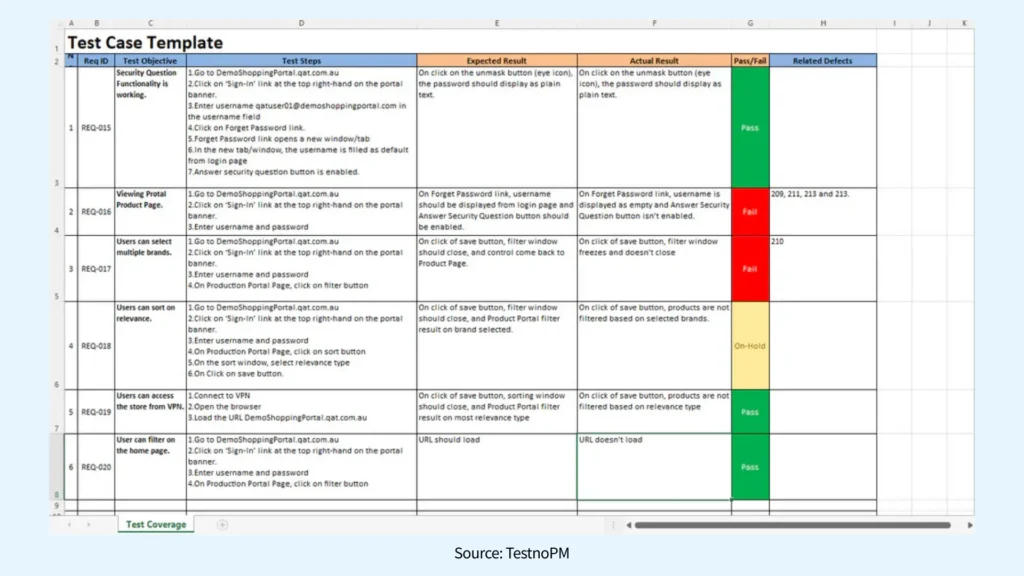
Unfortunately, as test projects grow, the accuracy of this approach declines. QA teams end up spending hours maintaining spreadsheets instead of focusing on testing itself. As release pressure increases, updates are often rushed or skipped altogether, increasing the risk of human error. A single missed update can make an untested or failing requirement appear fully covered.
At its core, this challenge exists because Jira tracks issues well, but not testing relationships.
3. Why Test Traceability Matters in Real Projects
After dealing with manual spreadsheets and last-minute audits, many QA teams eventually reach the same realization: the problem isn’t testing effort, it’s visibility. Without a clear way to connect requirements, tests, and results, teams are forced to rely on assumptions rather than evidence.
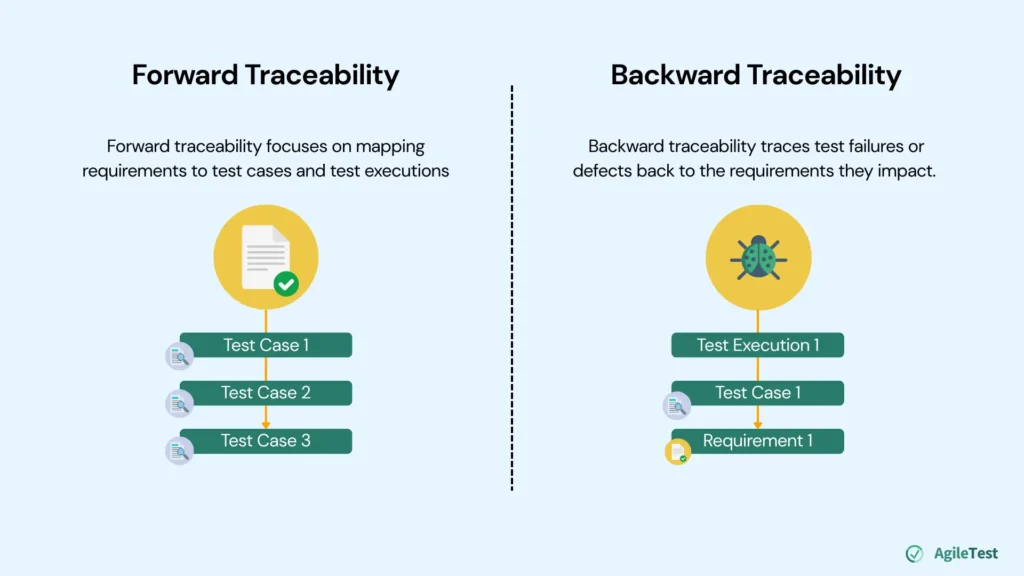
Test traceability matters because it turns testing from a collection of activities into reliable, actionable data. Instead of assuming coverage, teams can clearly see how requirements, tests, executions, and defects relate to one another. It usually works in two directions.
Forward Traceability
Forward traceability focuses on mapping requirements to test cases and test executions. It answers questions QA teams are asked every release cycle:
- Do all requirements link with at least one test case?
- Have those test cases actually been executed?
- …
Instead of guessing what was tested, teams can prove it by tracing each requirement through the testing process. Research conducted by Angelina and Juan indicated that projects with strong forward traceability can reduce up to 30% of missed features before releases.
Backward Traceability
Backward traceability works in the opposite direction. It traces test failures or defects back to the requirements they impact. This helps teams answer a different but equally important set of questions:
- Which requirements are affected by this defect?
- Is this functionality still safe to release?
- …
Backward traceability helps teams avoid scope creep and ensures that tests and fixes truly correspond to what the product was intended to do. A study by Hongyan also confirmed that backward traceability can reduce recall costs by up to 25%.
Learn more with our Guide to Test Traceability here.
4. How Can AgileTest Help You Track Your Testing Traceability
After understanding why forward and backward traceability matter, the next challenge is making them work in real projects. This is where AgileTest helps QA teams turn traceability from a concept into a practical, day-to-day capability.
The AgileTest Traceability report provides a centralized view of test traceability. QA teams no longer need to manually collect data from multiple places or rely on memory and assumptions. Instead, they can clearly see which requirements have in-progress defects or what the status of test cases linked with this requirement is.
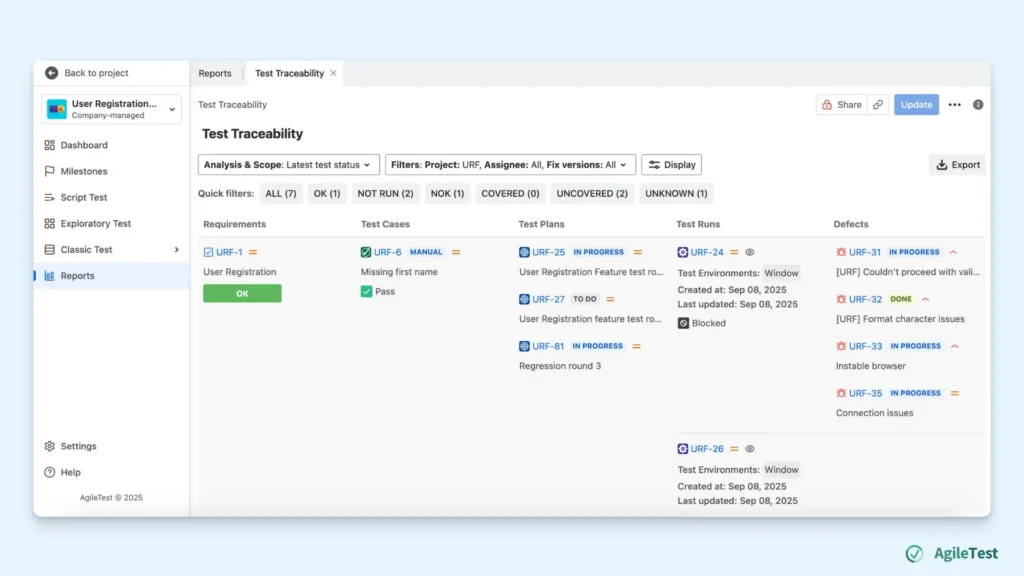
Let’s explore how to configure this report:
Step 1: Link requirements with corresponding test items
Initially, you need to link your Jira requirements with the relevant test cases in AgileTest. This connection forms the foundation of traceability and ensures each requirement can be validated via at least one test case.
To minimize manual linking later, it’s recommended to associate test cases with their corresponding requirements during the creation stage. Doing this early helps maintain consistent traceability and reduces extra effort when generating reports near release time.
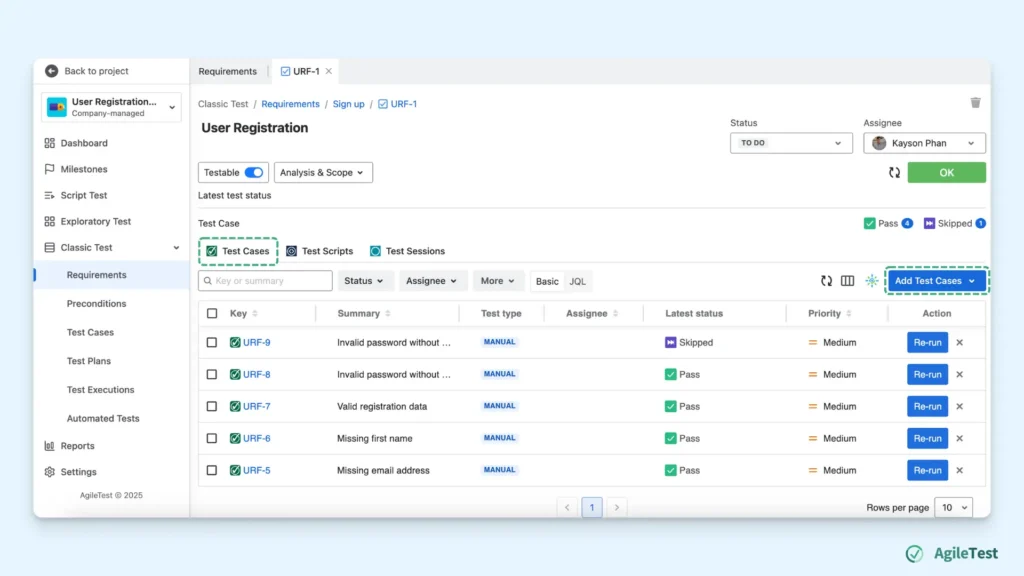
Step 2: Generate Test Traceability Report
After executing all your test cases, you can go to the Report section to generate Test Traceability report. To do this, navigate to the AgileTest Reports section and select the Test Traceability Report type. The report automatically gathers data from linked requirements, test cases, plans, executions, and defects.
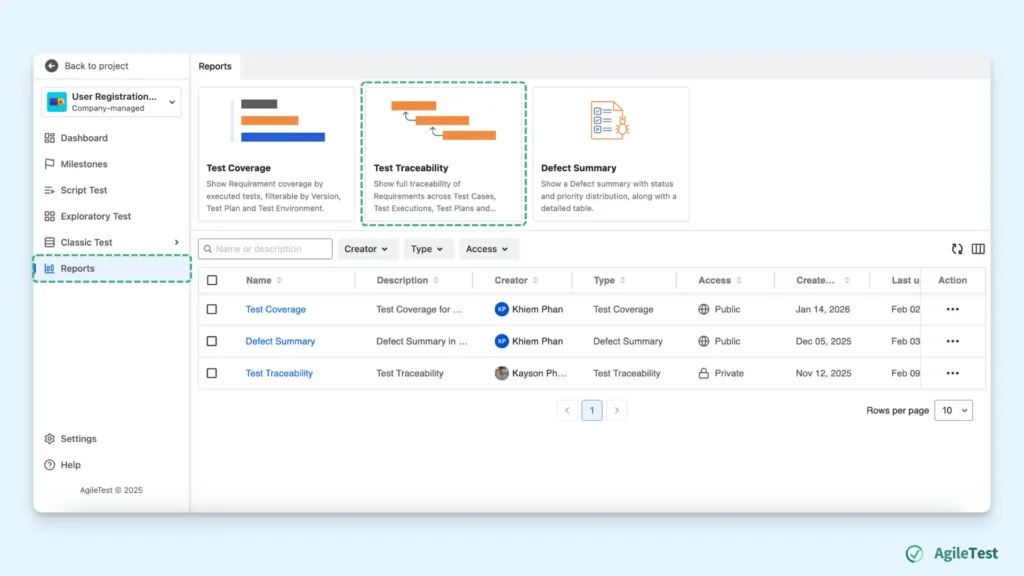
Step 3: Apply Filters to Display Specific Requirements
Then, you can use filters such as project, assignee, version, etc., to focus on the requirements you want to review. The report will display only the requirements that match the selected filters. This is ideal for QA teams to review requirements for a specific project, owner, or release.
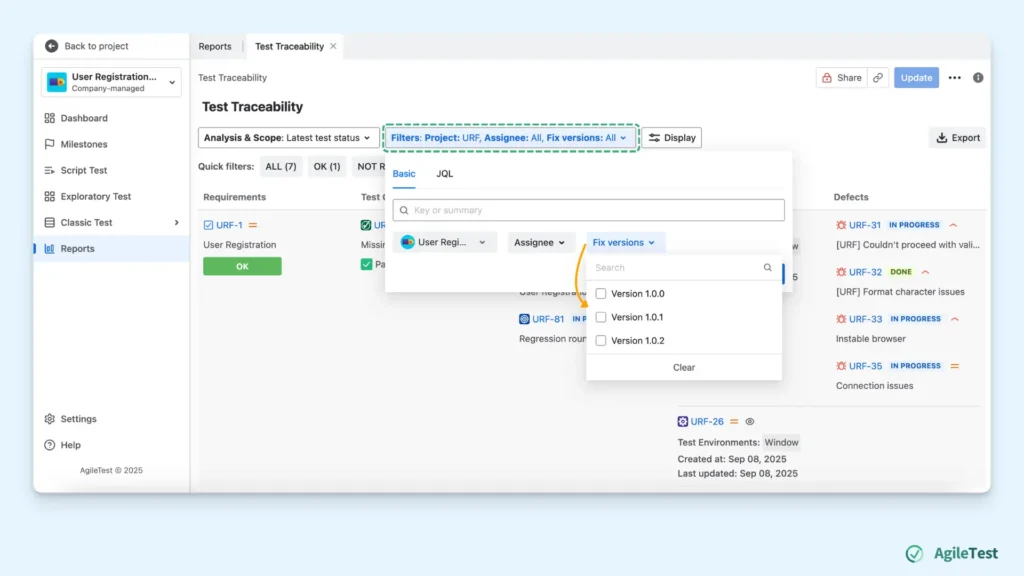
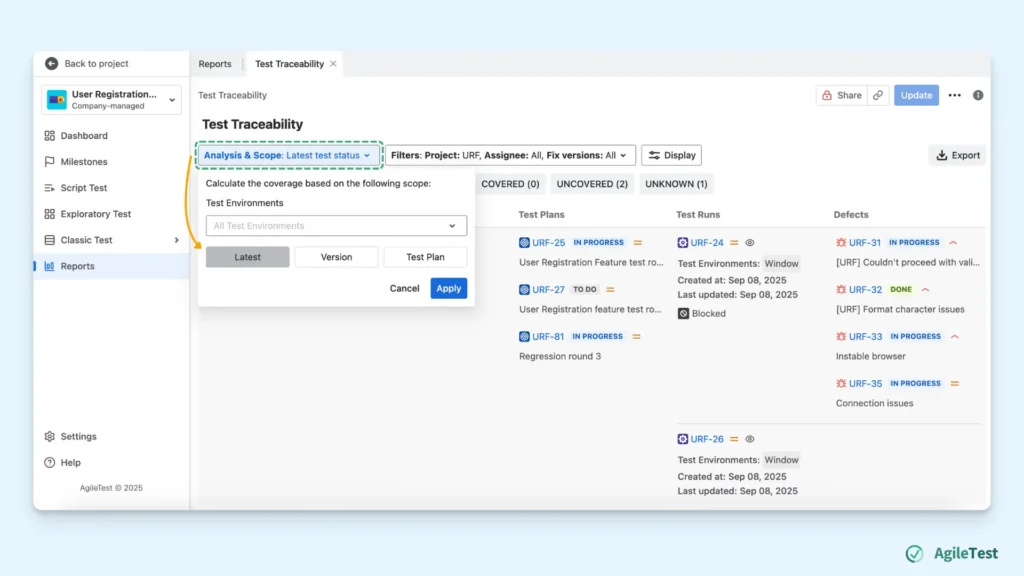
Step 4: Adjust the Calculation Scope
In the final step, you will define how the requirement status is calculated by configuring the Analysis and Scope settings. This allows you to control which test executions are included and how their results determine the overall requirement status.
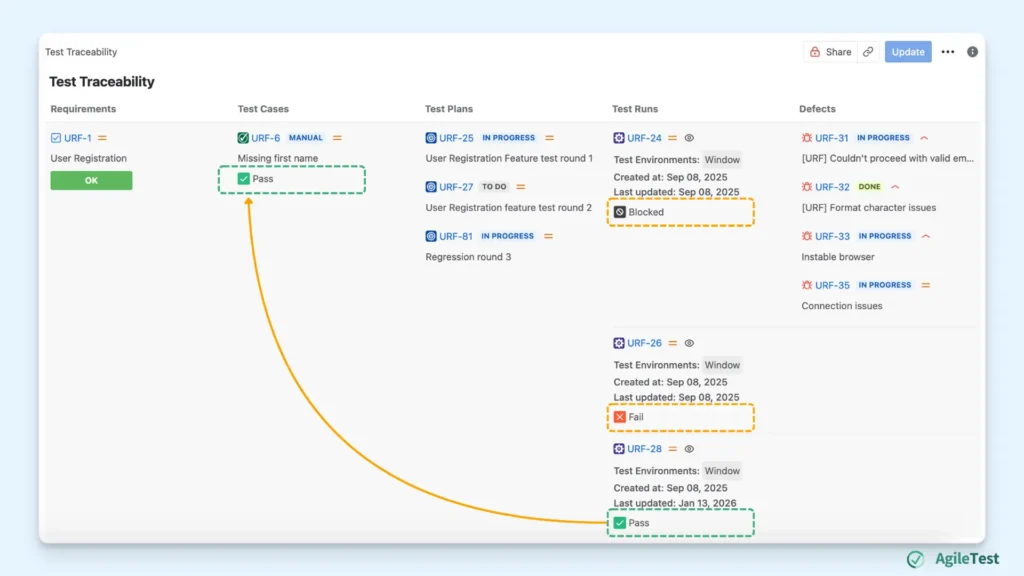
For example, the requirement URF-1 (User Registration) is linked to the test case URF-6. Three test executions have been created: URF-24, URF-26, and URF-28 to execute the same test case URF-6. Each of these executions represents a different run of the same test case:
- URF-24: Blocked
- URF-26: Fail
- URF-28: Pass
Because the calculation scope is configured to use the latest execution result, AgileTest determines the status of the test case based on the most recent test run. In this example, URF-28 is the latest execution, and its result is Pass.
How Test Traceability Report Helps Your QA Teams?
Once the Test Traceability Report is configured, QA teams can clearly understand the current state of testing and release readiness.
From a forward traceability perspective, AgileTest shows how each requirement is linked to test cases and their latest execution status. This allows teams to identify requirements that are not fully covered, early in the sprint, rather than during last-minute checks.
From a backward traceability perspective, AgileTest connects test failures and defects back to the requirements they impact. When a defect is logged, teams can understand which requirements are affected and assess the risk to the release. This helps teams prioritize fixes and avoid releasing functionality that hasn’t been fully validated.
Final thoughts
Knowing which requirements are actually tested should not rely on assumptions or last-minute checks. A clear test traceability report gives QA teams a centralized view of coverage, risk, and readiness, helping them make confident release decisions. By embedding traceability into everyday Jira workflows, teams can move from manual verification to reliable, data-driven insight.
AgileTest is a Jira Test Management tool that utilizes AI to help you generate test cases effectively. Try it now