
Atlassian test case management often starts with spreadsheets. They’re simple, familiar, and easy to set up. But as products grow and testing becomes more complex, spreadsheets quickly become difficult to manage. As a result, many teams then move to Jira to centralize their work and improve visibility across testing items. Jira helps teams collaborate better, but it isn’t designed to handle all testing workflows in depth.
In this article, we’ll look at the common challenges of managing test cases with spreadsheets, and how Jira can help. After reviewing some Jira’s limitations, we will explore how AgileTest complements Jira for more effective test case management.
1. Goodbye Spreadsheets: Why You Need a More Efficient Tool?
Limited Scalability:
At first, managing test cases in a spreadsheet seems simple. You start with just a few columns (test case name, description, status, etc) and everything fits neatly in place. But as your testing grows, this simple system becomes a burden. What once was manageable with a glance turns into a time-consuming activity.
Finding specific tests, checking their status, or tracking their progress takes more and more time as your list grows. While filters and tags can help, they aren’t always fast or flexible enough when you have hundreds of test cases. Without a better system, it can feel like you’re endlessly scrolling through data, with important details hidden among the clutter.
Lack of Real-time Visibility:
Spreadsheets can’t provide a clear, real-time view of testing progress. When the same test cases are reused across different test cycles or executions, teams are forced to go back and forth between tabs to track and update each test case’s status. This creates redundancy and increases the chances of missing or outdated information.
While pivot tables can count how many executed or passed test cases, you can’t capture the whole testing progress. Spreadsheets make it difficult to track the overall status of testing. For example, a process with 90% passed test cases in a pivot table could still have critical bugs unnoticed. These issues might go unnoticed, leading to missed blockers or delays that affect the quality of the product. Therefore, spreadsheets can track test case quantity, but they don’t provide the quality insights needed to fully understand testing progress.
Manual Effort & No Testing-Specific AI:
In spreadsheets, test case management remains a manual process, from creating test cases to updating their statuses. For example, you need to manually update the test’s status, results, and dependencies when it is reused across different cycles. If new features are added, teams have to adjust every instance to update affected test cases. This repetitive effort consumes significant time and resources, leaving less room for more strategic testing activities.
2. Welcome to Jira: Centralizing Test Case Management
With the limitations of spreadsheets becoming clear, teams are turning to more efficient tools to manage their test cases. Many teams are turning to tools like Jira to better manage their test cases as an Atlassian Test Case Management approach.
Centralized Platform:
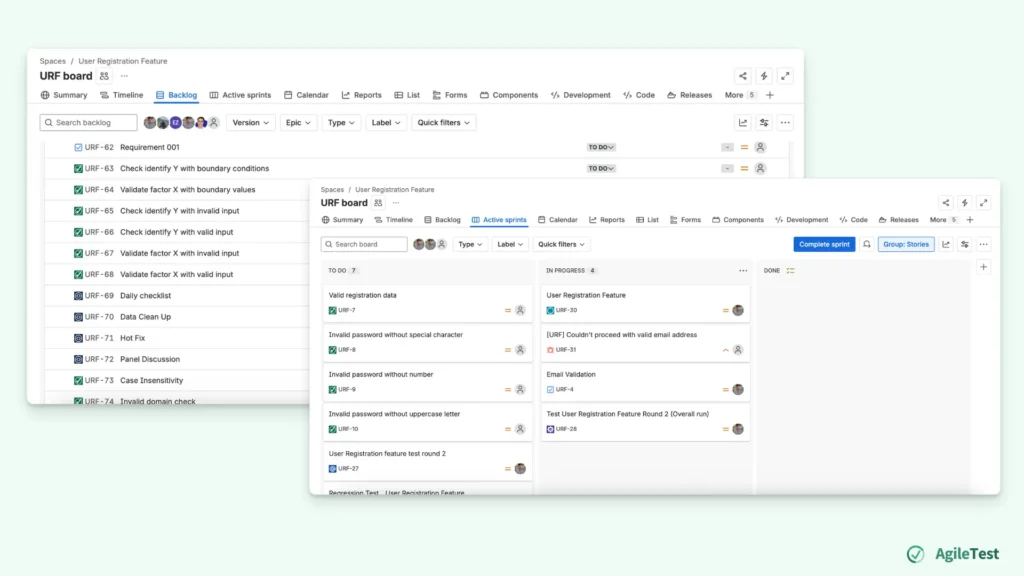
Jira brings all your test cases, requirements, and defects into one board, helping teams stay organized and aligned. Each work item can be linked to others, allowing you to easily track if a test case fails due to a specific requirement or defect. Once a work item is updated with a status, it automatically reflects in other linked work items. This ensures that the status of related test cases, defects, and requirements is all synchronized in real time. Teams can be relieved from manually updating statuses across multiple sheets or tabs.
Collaboration and Planning:
Development teams already use Jira for planning, management, and tracking. So, adding test case management to the same platform fits naturally into their workflow. This eliminates silos between development and testing, making collaboration easier.
Every work item on the board reflects its Jira status, so everyone can quickly see if it’s in progress, to-do, or completed. This provides clear visibility into who is responsible for each task and highlights where attention is needed. Instead of sheets of test cases, teams can now track how many items are left to resolve before deadlines.
3. Jira Limitations For A Comprehensive Test Case Management
There are still areas where Jira struggles to fully meet the complex needs of test management, especially in large projects. Let’s explore some limitations of Jira and how they may impact your testing process.
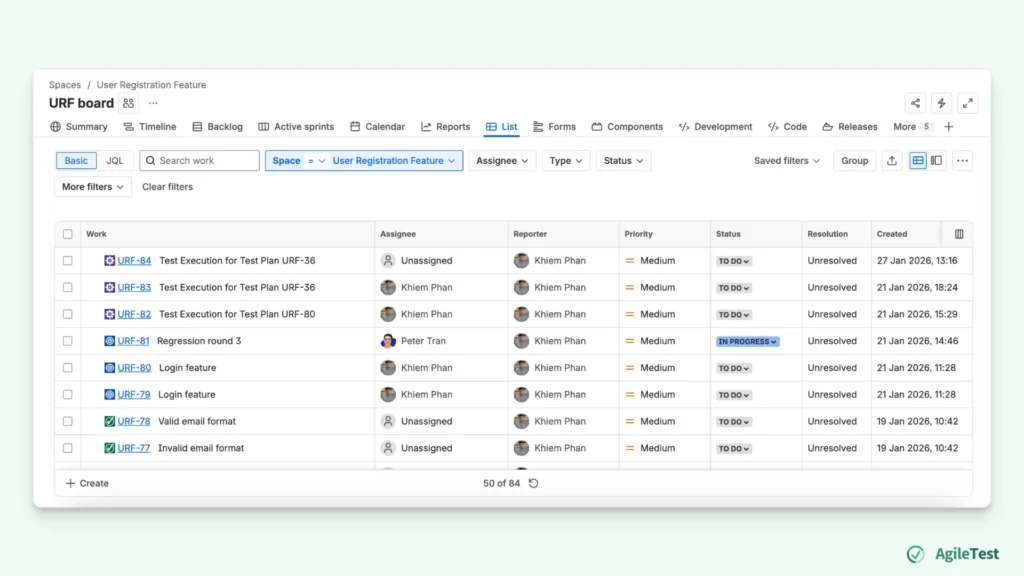
Cluttered Board with Multiple Work Item Types
Jira does bring all testing items together on a single board, making it easy for teams to track progress. However, as the size of the project increases, having all work item types displayed together can be an issue. With too many work items on the same board, teams may get confused about the testing process.
Lack of Specialized AI Tools For Testing
While Jira offers some AI-driven features like automation rules and recommendations, it lacks specialized AI tools for writing test cases or analyzing test results. These AI capabilities are not tailored to the complexities of test case creation, execution, or result analysis. As a result, teams to rely on manual effort to fill in these gaps.
4. Hello AgileTest: The Perfect Complement to Jira
It’s clear that Jira is an excellent project management tool, but not built to handle testing workflows in depth. In the next section, we’ll look at how AgileTest complements Jira limitations in the testing process.
Organize Test Cases
AgileTest introduces test folder and test plan features, giving teams a clear way to organize and track testing work.
With AgileTest, test cases are no longer just another issue type on a crowded board. Teams can organize test cases into test folders, grouping them by feature, module, release, or any preferred categories. This hierarchical organization makes it easy to navigate and locate test cases quickly, even thousands of test cases.
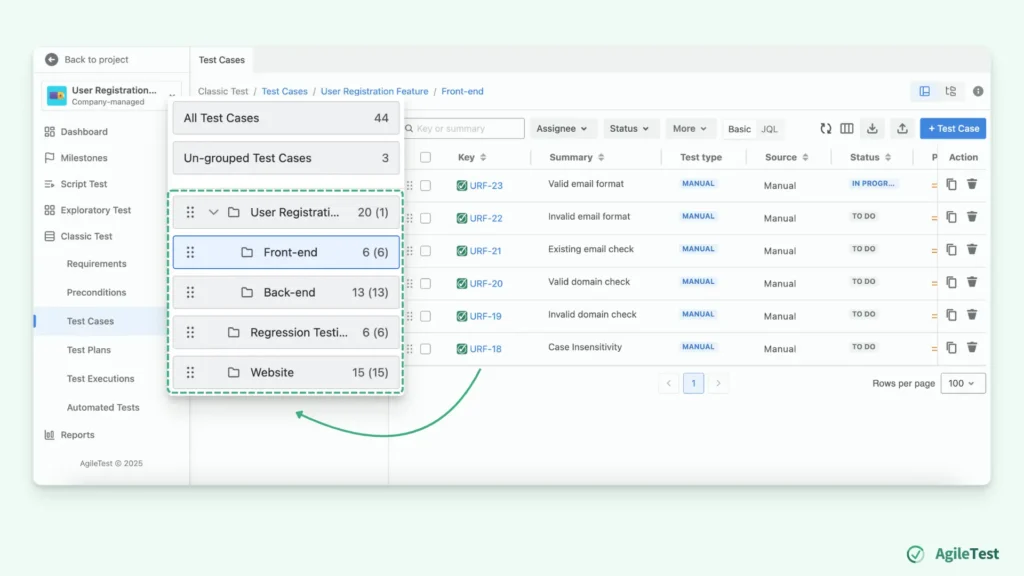
Discover how to avoid disorganized test case structure with AgileTest.
In addition, test plans give teams a clear way to track testing at the project or release level. Teams no longer have to look through individual test cases scattered across Jira. Instead, they can easily see which test cases belong to each test execution, how many have already been executed, and what still needs to be completed. Each test execution has its own execution status, so teams can run the same test cases across different executions. This makes it easy to track progress for each run independently. You can see how many tests have been executed, what’s still pending, and where issues occur. This creates a focused, testing-centric view of progress that complements Jira’s project tracking, without adding extra clutter or confusion.
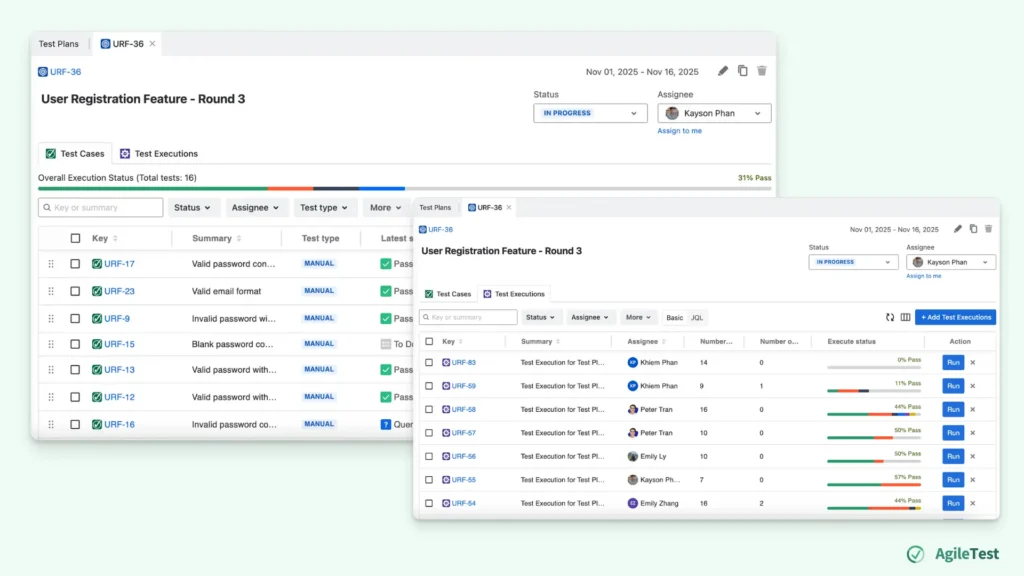
Learn more about how to create an effective Test Plan now
AI Agents
Beside organization, AgileTest helps teams reduce the manual effort involved in test case management through AI Agents designed for testing. Writing and maintaining test cases is often repetitive and time-consuming, especially when requirements change or new features are added. AgileTest’s AI Agents assist by generating test cases based on requirements or existing work items, helping teams get started faster and maintain consistency across tests.
AI Agents can fetch information from your test data, allowing teams to ask questions about their testing process. Instead of manually checking multiple tickets or test cases, teams can quickly understand things through conversations with AI. By turning testing data into easy-to-access insights, teams stay aligned with the work tracked in Jira while reducing the time spent searching for information.
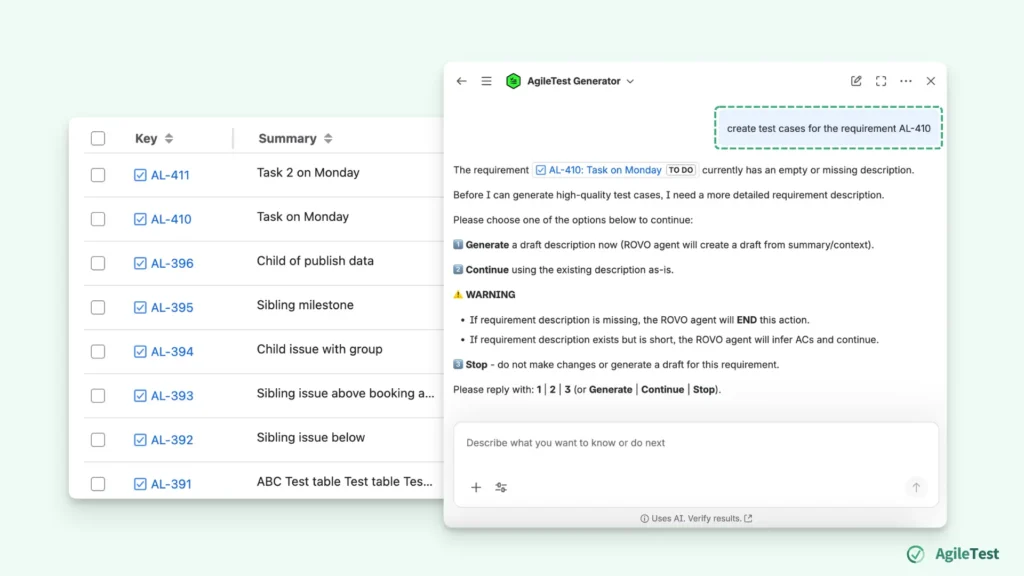
AgileTest is a Jira Test Management tool that utilizes AI to help you generate test cases effectively. Try it now
Final thoughts
Switching from spreadsheets to Jira is a big improvement for Atlassian test case management. Jira brings structure, visibility, and better collaboration into the testing process. However, as projects grow and testing needs become more complex, Jira alone may not be enough.
With testing-focused features and AI support, AgileTest helps teams organize test cases, track executions, and reduce manual effort. If your team is moving beyond spreadsheets and finding Jira helpful but limiting for testing, combining Jira with a testing-focused tool to scale up without losing clarity and enhance your Atlassian Test Case Management.