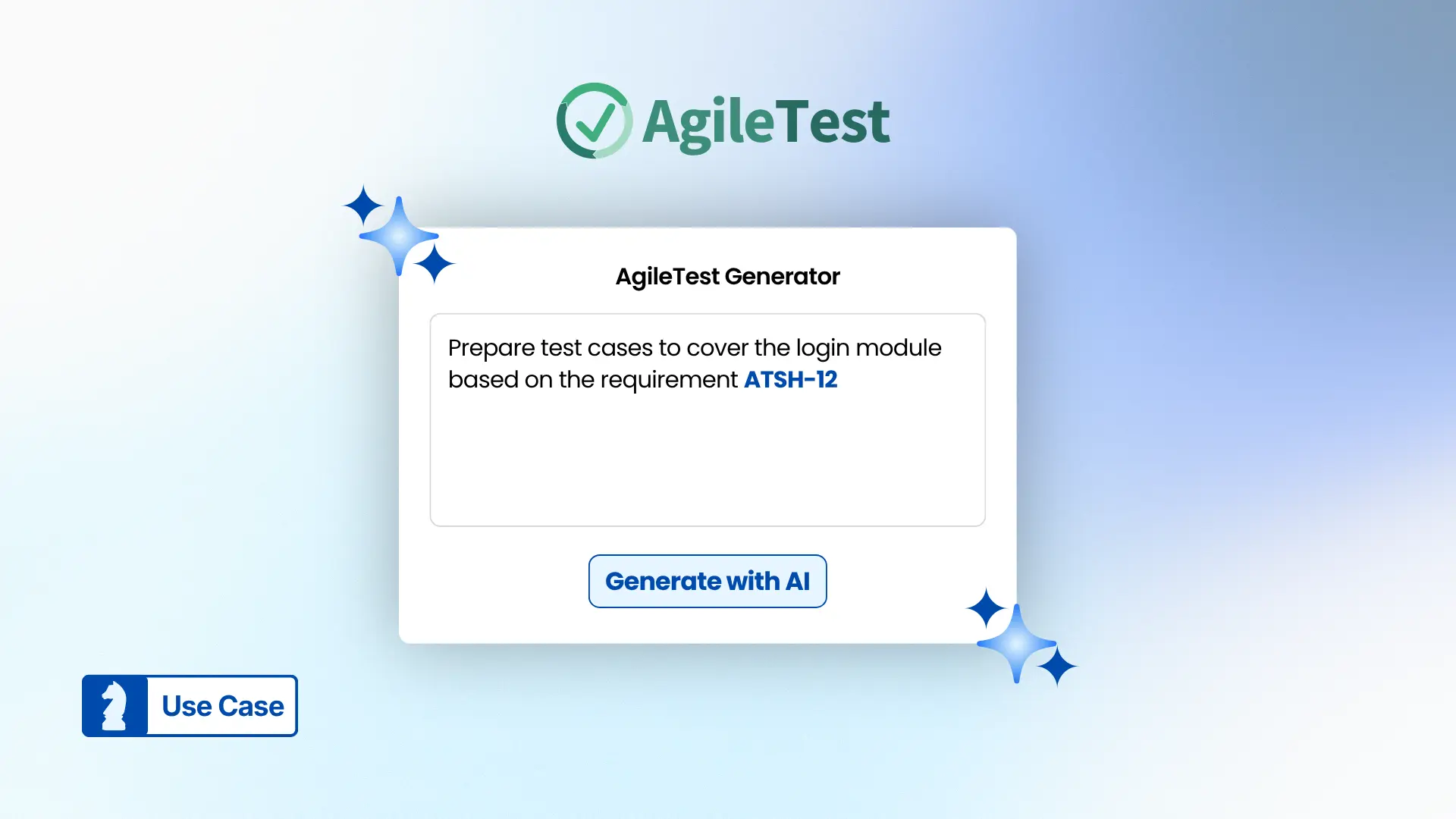

Create test cases with AgileTest Generator can help address this challenge. While many testing tools can automate test case generation, they often depend on well-prepared requirement descriptions.
This article explores the limitations of current AI tools for test case generation and demonstrates how teams can use AgileTest Generator to refine requirements and generate structured test cases.
1. Test Case Generation Is Becoming Automated
For many QA teams, creating test cases used to be a completely manual process. Testers had to read through requirements, analyze the feature behavior, brainstorm scenarios, and then document test cases step by step. While this approach works, it can be time-consuming and repetitive, especially when teams are working with large projects.
Today, the landscape is changing. Many testing tools now offer AI-powered or in-app test case generation to help speed up the test design process. By analyzing requirement descriptions or user stories, these tools can automatically suggest relevant test scenarios, test steps, and expected results.
However, while test case generation is becoming increasingly automated, the process is not always as efficient as it seems. In many cases, teams still need to invest significant manual effort before the generation step can even begin.
2. Preparing The Input For Test Generation
Breaking Down the Test Case Generation Process
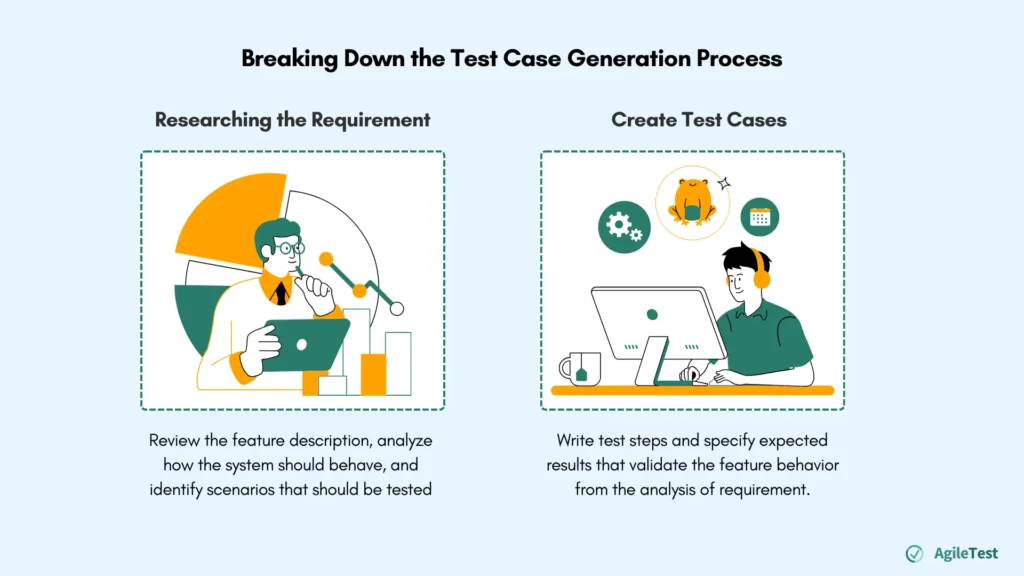
When looking closely at how test cases are typically created, the process can generally be divided into two main stages.
The first stage involves researching and understanding the requirement. Testers need to review the feature description, analyze how the system should behave, and identify scenarios that should be tested. This may involve examining flows, business rules, edge cases, etc that explain how the feature is expected to work.
The second stage focuses on transforming that understanding into structured test cases. Once the context is clear, testers can begin writing test steps and specifying expected results that validate the feature behavior.
Read more: How to Perform Effective Test Analysis: From Requirements to Test Conditions
Input Quality Determines the Output
While many tools can now generate test cases automatically, they still rely heavily on the quality of the input provided. In most cases, these features generate test cases from your descriptions, along with additional notes to help understand the functionality. Some tools may require detailed information, such as:
- Clear requirement descriptions
- Acceptance criteria
- Sample and/or expected data
- User flows or system behaviors
- ….
The more structured and detailed the input is, the better the generated test cases will be. Without sufficient context, the results may be too generic, miss important scenarios, or require significant editing afterward.
Today, many AI-powered tools can generate structured test cases once sufficient context is provided. However, the earlier stage of understanding and preparing the requirements still largely relies on manual effort.
What If This Generation Flow Can Be Better?
Although modern testing tools can automate parts of the test case generation process, the overall workflow often remains partially manual.
So the question becomes:
- Can teams reduce the time spent preparing the requirement context before generating test cases?
- Can testers collaborate with an AI assistant to improve the requirement context before generating test cases?
- Is there a way to refine requirements and generate test cases in a more interactive and efficient workflow?
This raises an opportunity to rethink how requirements are prepared and refined before generating test cases. Instead of manually restructuring requirements first, what if testers could refine the requirements and generate test cases within the same interactive workflow?
3. Using AgileTest Generator to Create Test Cases
Below is a simple flow showing how teams can use AgileTest Generator to generate test cases more effectively.
Step 1: Create a Jira Requirement
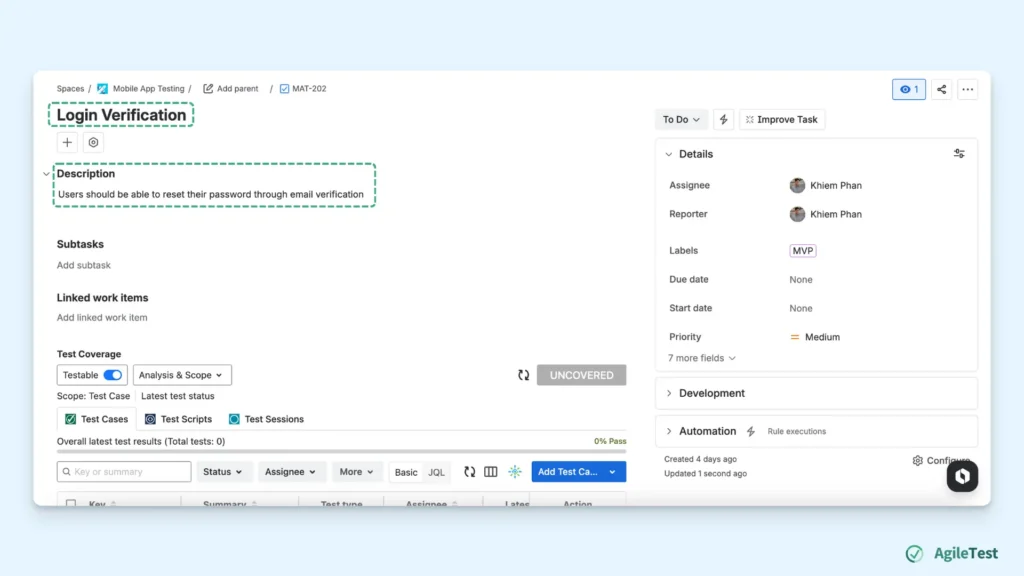
The process begins by creating a requirement in Jira, such as a Story, Task, or Feature request.
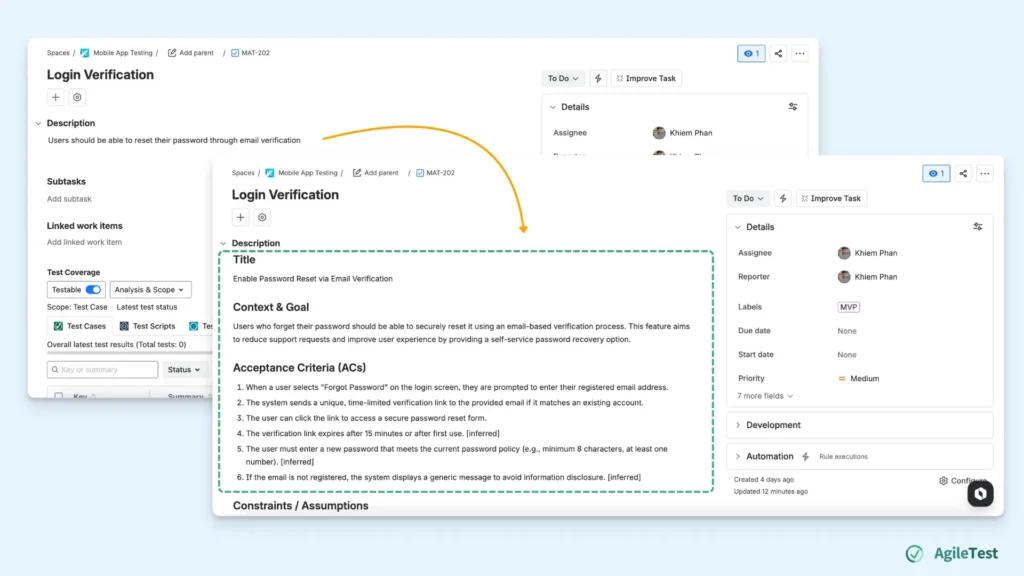
At this stage, the requirement does not need to be perfectly structured. You will just need a requirement name and its short description of the feature as a starting point. For example, a requirement might initially describe a feature such as: “Users should be able to reset their password through email verification”.
Once the requirement is created, it becomes the primary context for AgileTest Generator to analyze and generate relevant test cases.
Step 2: Refine the Requirement
Next, you can use AgileTest Generator to improve and clarify the requirement description. You can interact with the agent using natural language, just as you would describe the requirement to a teammate.
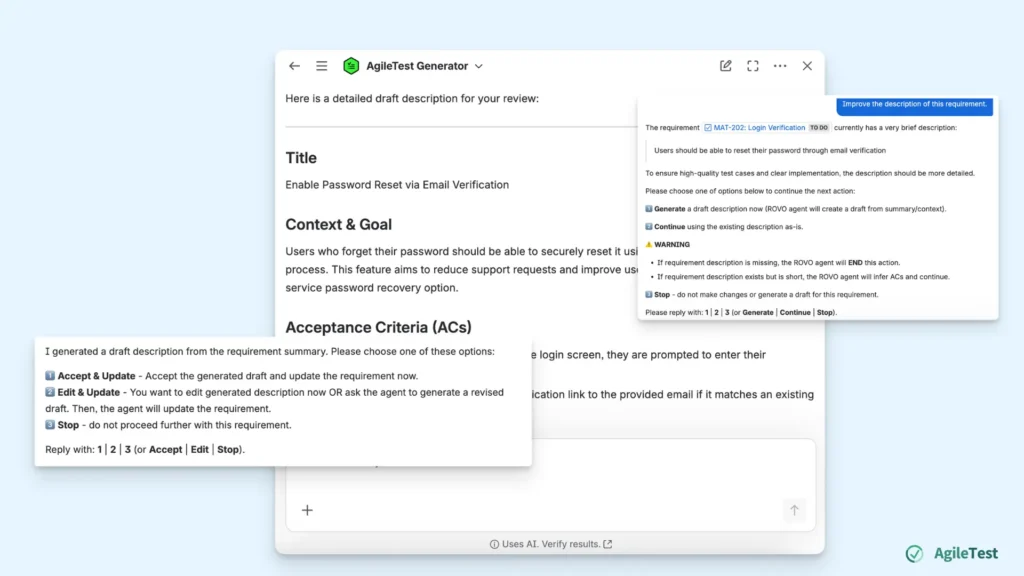
You can ask the agent to improve the requirement by sending a command such as “Improve the requirement for the requirement + [Requirement ID]”.
Based on the existing summary or context, AgileTest Generator can propose a more detailed draft of the requirement. The generated draft organizes the information into structured sections such as a Title, Context & Goal, Acceptance Criteria, Constraints / Assumptions, and Typical Flows.
For example, a simple requirement like “Users should be able to reset their password through email verification” can be expanded into a clearer and more structured description after refinement:
Title
Enable Password Reset via Email VerificationContext & Goal
Users who forget their password should be able to securely reset it using an email-based verification process. This feature aims to reduce support requests and improve user experience by providing a self-service password recovery option.Acceptance Criteria (ACs)
- When a user selects “Forgot Password” on the login screen, they are prompted to enter their registered email address.
- The system sends a unique, time-limited verification link to the provided email if it matches an existing account.
- The user can click the link to access a secure password reset form.
- The verification link expires after 15 minutes or after first use. [inferred]
- The user must enter a new password that meets the current password policy (e.g., minimum 8 characters, at least one number). [inferred]
- If the email is not registered, the system displays a generic message to avoid information disclosure. [inferred]
Constraints / Assumptions
Email delivery may be delayed due to external mail server issues.
The reset link must be single-use and expire after 15 minutes.
Password policy is enforced during reset.Typical flows / Examples
Happy path:
User clicks “Forgot Password” → enters registered email → receives email → clicks link → sets new password → can log in with new password.Negative:
User enters unregistered email → system displays generic message (“If your email is registered, you will receive a reset link.”).Boundary:
User tries to use an expired or already-used link → system displays “Link expired or already used” message.Notes for testers
Use test accounts with valid and invalid emails.
Verify email content and link expiration.
At this stage, teams can review the generated draft and choose how to proceed. Teams can also continue interacting with the agent to refine the description or clarify missing details before finalizing the requirement.
Step 3: Ask AgileTest Generator to Suggest Test Cases
Once the description has been refined, you can ask AgileTest Generator to generate test cases based on the updated requirement.
At this stage, simply request the agent to create test cases for the requirement. Before generating the test cases, AgileTest Generator will ask you to choose the type of test case you want to create. After selecting the test type, you can also specify how many test cases you want the generator to create. This agent can suggest up to 15 test cases per request.
You can command the agent to create test cases for this updated requirement with the request: “Create + [Number of test cases] + [Manual/Generic/Cucumber] test cases for this requirement.”
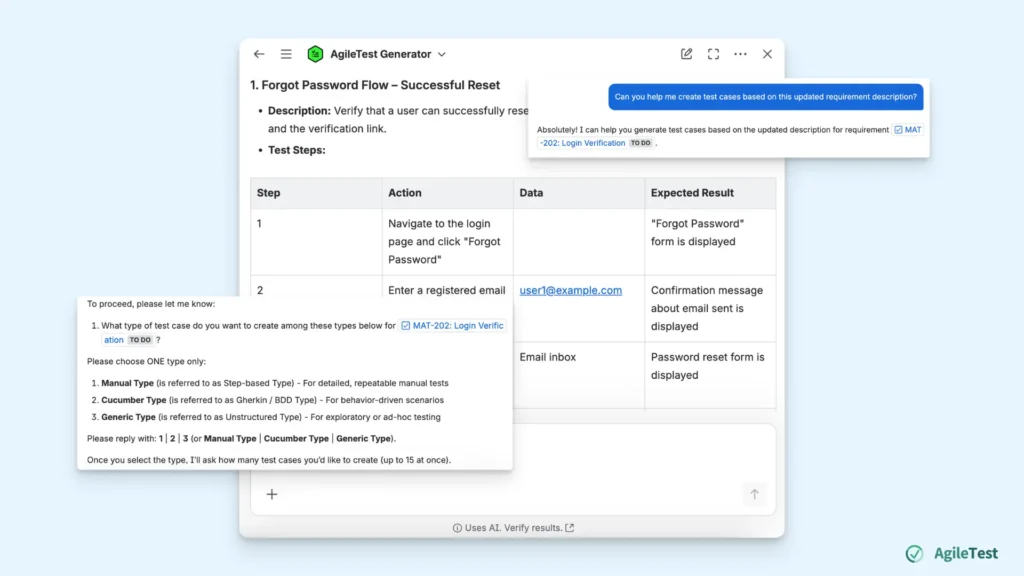
Once the configuration is confirmed, AgileTest Generator analyzes the refined requirement and generates a set of suggested test cases. Each test case includes a short summary, followed by detailed test steps that outline the actions testers need to perform. The generated steps may also include sample data, along with the expected results illustrating how each step should behave.
If the suggested test cases do not meet your expectations, you can continue interacting with the agent to refine them. For example, you may ask the agent to generate additional test cases, focus on edge cases, or negative flows. This interactive process allows teams to gradually improve the generated test cases before selecting the ones they want to keep.
Step 4: Review and Add the Generated Test Cases
After AgileTest Generator produces the suggested test cases, the next step is to review and refine them. Teams can request the agent to edit the test steps, adjust expected results, or add additional scenarios to improve coverage.
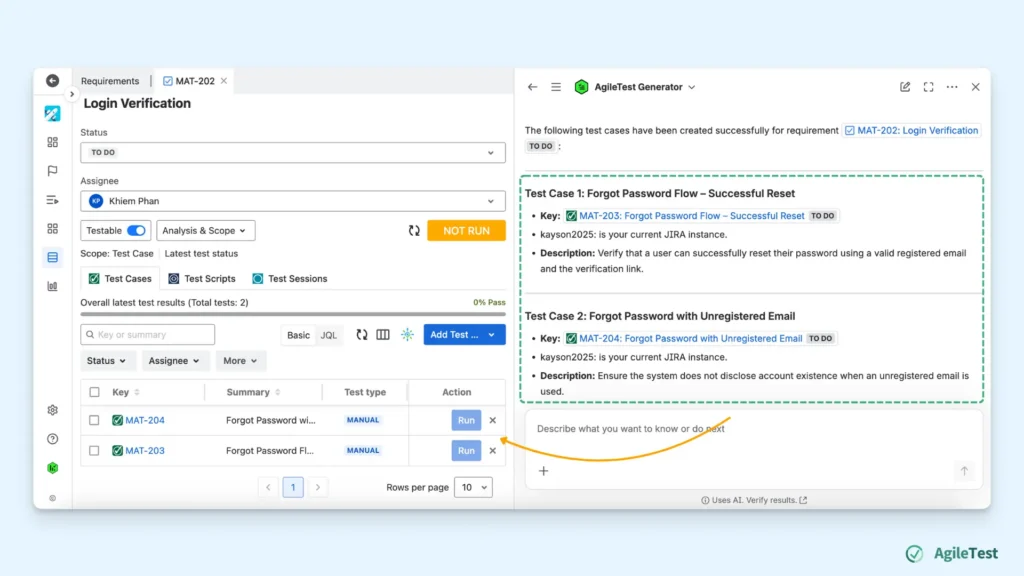
After making the necessary adjustments, you can select which test cases should be created and added to the requirement.
Your request to add test cases to the requirement can be: “Add the + [Order number of the suggested test cases] + test cases to this requirement”.
Once confirmed, the selected test cases will be generated and linked directly to the requirement in AgileTest.
Final thoughts
While many AI-powered tools can help generate test cases, much of the effort still happens earlier in the process when teams need to research features and refine requirement descriptions.
Create Test Cases with AgileTest Generator helps improve this workflow by allowing teams to improve the requirement context and generate structured test cases within the same interaction. Instead of manually restructuring requirements before generation, testers can refine the description and produce test scenarios more efficiently.
With this approach, teams can create test cases faster while maintaining clear traceability between requirements and testing activities.
Install AgileTest and try out AgileTest Generator now.