Jira test plan management is something many QA teams try to handle within Jira’s existing features. Since the platform was originally designed for issue and project tracking, teams use some alternative approaches.
This article explores the most common workflows teams use to manage test plans in Jira, the gaps they encounter during execution, and how Jira-native tools like AgileTest help fill in those missing pieces.
1. How Testers Currently Use Jira for Test Plan Management
For many QA teams, Jira is already the central hub where development tasks, bugs, and releases are tracked. Naturally, testers try to fit their test planning activities into Jira as well. However, because Jira doesn’t offer native test planning features, teams often rely on workarounds to organize and monitor their testing efforts.
Planning Work Items on the Timeline or Calendar
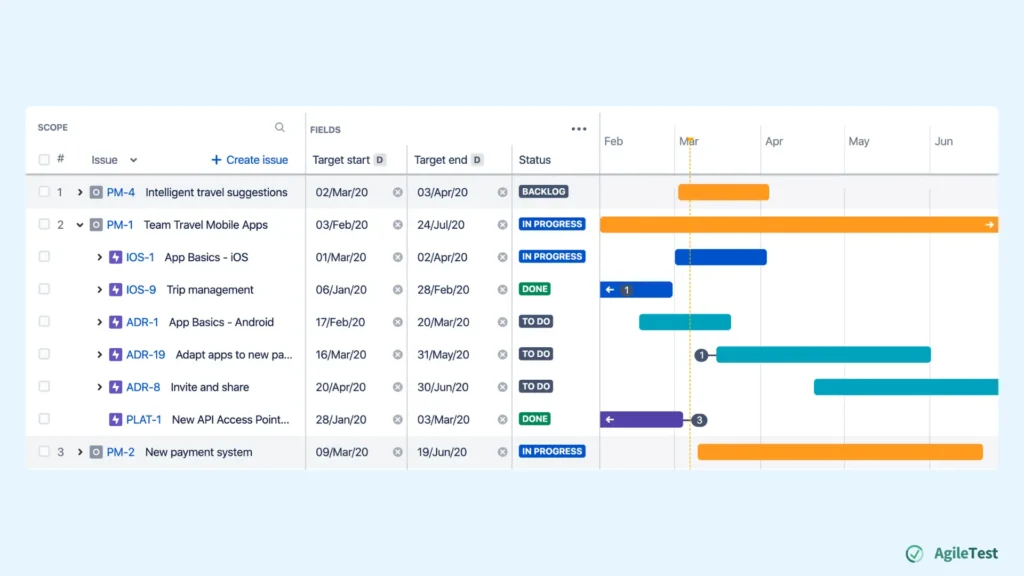
Jira Timeline
Teams can create Epics or Issues on the Jira Timeline in a specific timeline. Then they can add the start date, end date, task dependencies, and estimated duration. When viewed together on the timeline, this collection of work items becomes their ‘test plan’ for the release. For example, QA teams use it to visualize when smoke testing should start, when regression should finish, and so on.
It helps them see when certain phases begin, how long each activity should take, and how to distribute resources into the project’s release timeline. Testers use this as a reference point to organize their workload and coordinate with development and product teams.
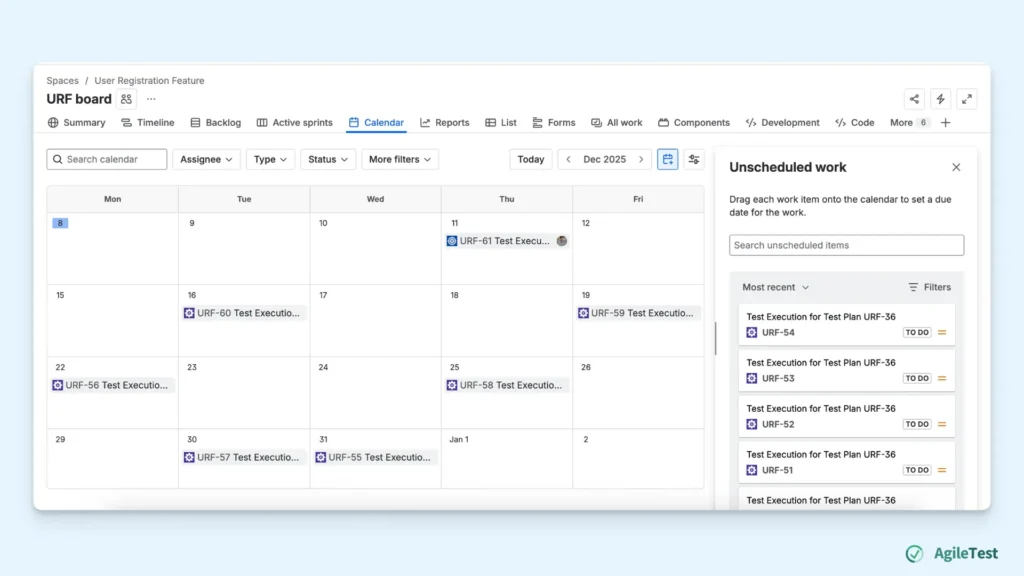
Jira Calendar
Some teams use the Jira Calendar view as a simple way to visualize their test plan. They create events or date-based issues that represent key testing activities. These items are placed on specific calendar dates so QA teams can see exactly when each testing activity is scheduled.
Over time, the calendar fills up with all the important testing milestones for a release cycle. When viewed together, these date-based entries act as a simple test plan, giving the team a day-by-day overview of what’s happening, who is responsible, and when certain testing periods are expected to begin or end. Teams refer to the calendar regularly to coordinate workloads and ensure the schedule stays aligned with the project timeline.
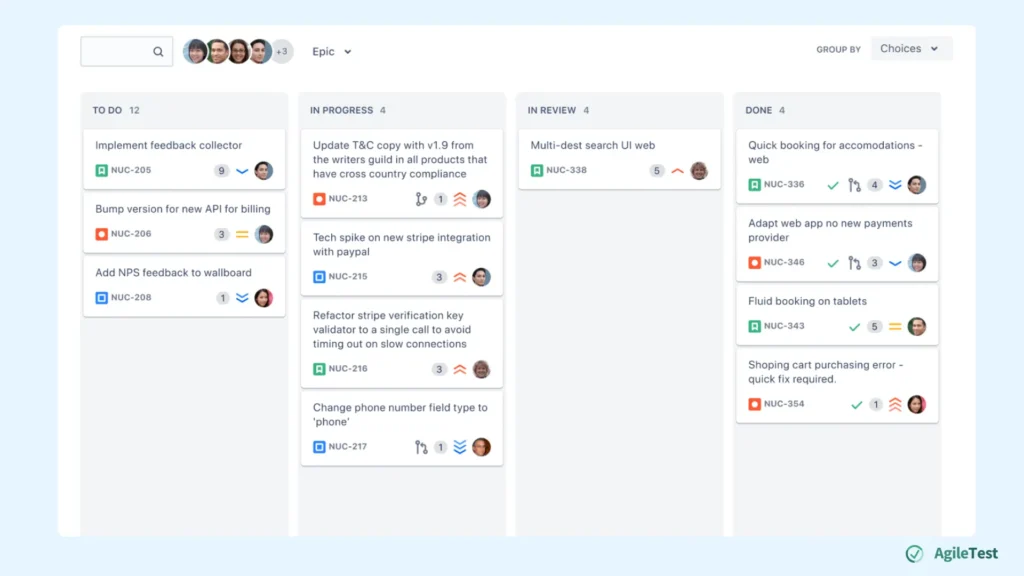
Tracking Progress with Jira Board
To keep track of testing progress within a plan, many teams rely on Jira Boards. They create tickets representing all the testing work items and place them on the board. As testing begins, team members update these tickets with findings, comments, or attachments. By dragging each ticket through the workflow columns, everyone can see the current status at a glance.
The board also provides a quick snapshot of outstanding work. For example, items remaining in the ‘To Do’ will alert teams to distribute workload and adjust priorities as needed.
2. Problems With This Traditional Jira-Based Test Plan Approach
So, what could be the problems when using Jira to plan and keep track of testing projects? In fact, Jira does a great job helping teams outline key activities in a test plan. Its Timeline, Calendar, and Board views give QA teams a structured testing flow from start to finish.
However, once teams move beyond high-level planning and into the actual execution of testing, Jira’s limitations start to show. Testers need more than just dates and workflow columns; they need a way to track real test progress and manage re-testing.
Tracking Issues
When testing starts, QA leads need to know what has been tested, what passed, what failed, and what requires attention. But in Jira, work items moving from “In Progress” to “Done” doesn’t tell them anything about the actual testing outcome. Testers try to fill the gaps by leaving comments, attaching screenshots, or updating fields manually. This creates scattered information that is hard to follow.
In real life, this means test leads spend a lot of time chasing updates: pinging testers for status, checking individual issues one by one, or piecing together the story from comments. They want a clear, centralized view of test progress, but Jira only shows task status, not test results. This makes it difficult for teams to understand where the plan truly stands or whether they are ready to close.
Rerunning Test Cases
Re-testing is one of the most time-consuming parts of QA, especially when bugs start coming in. Testers need a simple way to identify which scenarios failed and run them again as a separate cycle. But Jira doesn’t differentiate between an initial test run and a re-run. Once an issue is marked “Done,” the testing history disappears into comments or status changes.
To compensate, teams often reopen issues or create new tasks just to represent re-testing. This leads to confusion: testers lose track of which are validating, teams can’t see whether fixes were actually verified, etc. Instead of focusing on validating fixes, testers waste valuable time trying to manage the workflow itself.
3. AgileTest Test Plan Features
These challenges simply mean Jira wasn’t built with dedicated test plan execution in mind. As teams grow, QA teams often look for solutions that can extend Jira with the missing execution and tracking capabilities. This is where tools like AgileTest, a Jira plugin, come in. This add-on has the test plan–specific features that help teams manage progress and handle re-testing activities inside Jira.
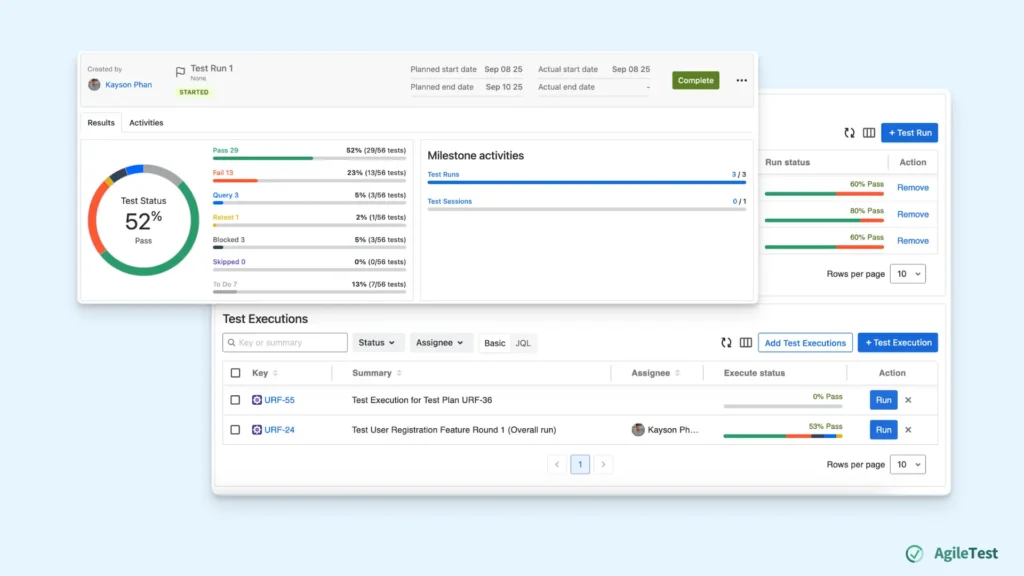
Tracking Test Progress with Milestones
In AgileTest, Milestones provide a structured way to track progress throughout a test plan. Instead of relying on scattered updates or manually checking, teams can look at the key results on the Milestone screen.
Each milestone reflects real execution data from test runs within the plan. QA teams can see which test executions have been conducted and the overall progress in percentage, and visualized charts. This gives all team members a clear view of progress without needing to chase status updates.
Milestones help bring clarity and structure to testing activities. They show where the team is in the plan, what has been achieved so far, and what still needs attention. Thus, teams can stay aligned throughout the entire testing cycle.
Re-executing Failed Test Cases
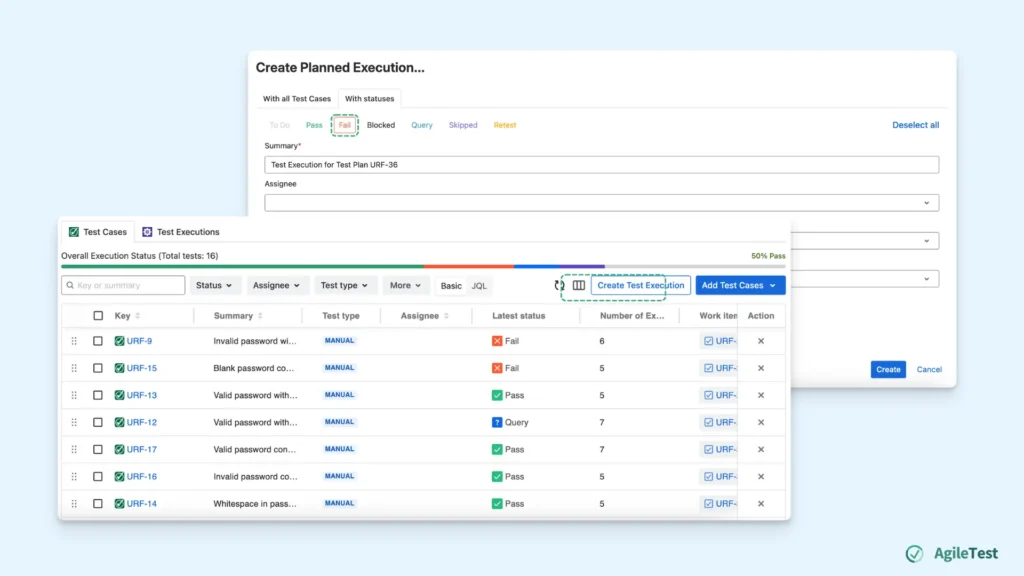
Re-testing is a natural part of every test cycle, and AgileTest includes built-in support for creating new execution rounds directly within the test plan. If certain test cases fail in an initial run, teams can quickly generate a new test execution that contains only those failed items.
This helps testers focus on exactly what needs to be re-validated without recreating tasks or losing the context of previous attempts. Each new execution run is tracked separately, allowing teams to see the history of how issues progressed over multiple test cycles.
Final thoughts
Jira Test Plan Management makes it easy for teams to outline testing schedules, but it doesn’t provide the structure needed to track execution or manage re-testing. By pairing Jira with a dedicated test planning solution like AgileTest, teams can keep working in Jira while gaining clearer visibility into progress, cycles, and test outcomes. This helps testing activities stay organized and aligned throughout the release process.
AgileTest is a Jira Test Management tool that utilizes AI to help you generate test cases effectively. Try it now
Q1: Can Jira be used for test plan management?
Yes, many QA teams use Jira to manage parts of their test plan by relying on features like Timelines, Calendars, and Boards. However, Jira does not offer native test planning capabilities, so teams usually need workarounds to organize and track testing activities.
Q2: How do teams typically plan their testing activities in Jira?
Teams often map out their testing phases on the Jira Timeline or Calendar by creating issues with start/end dates and dependencies. Others use Jira Boards to track testing tasks as they move through workflow columns such as “To Do,” “In Progress,” and “Done.”
Q3: What challenges do teams face when using Jira for test plan execution?
Jira does not support test execution tracking. Teams cannot easily see which tests passed or failed, monitor real-time progress, or manage re-testing. Important details often end up scattered across comments and attachments, making it hard to understand the true status of the test plan.
Q4: Why is re-testing difficult to manage in Jira?
Jira doesn’t differentiate between initial test runs and re-runs. When issues are marked “Done,” testing details are lost in comments. Teams often reopen issues or create new ones to represent re-testing, leading to duplicated tasks and unclear execution history.
Q5: How does AgileTest improve test plan management inside Jira?
AgileTest adds structured test plan features to Jira, including Milestones for tracking execution progress and built-in support for re-running failed test cases. This helps teams see real progress, understand testing stages, and manage re-testing without leaving Jira.