
If your team uses Jira for managing software projects, you’ve probably faced challenges keeping test cases organized. Maybe test cases get scattered around, duplicated, or lost.
Perhaps tracking progress feels messy, or linking tests back to requirements and bugs feels like a puzzle without the pieces. You’re not alone—many QA teams struggle to keep Jira organized for testing.
The good news is, there’s an easier way: AgileTest. This dedicated Jira app optimizes test case management, simplifying everything from creating test cases in Jira to tracking results, and saving you from unnecessary headaches.
Why Test Case Management in Jira Needs Optimization
Many teams use Jira effectively for tasks and projects but find it cumbersome for managing tests. Common issues include:
- Without proper organization, test cases become scattered across multiple Jira issues and projects. This causes duplicated efforts, lost test cases, and wasted time searching for the correct test.
- Without clear tools and processes, it’s challenging to quickly see what has been tested, what’s still pending, and the overall testing progress. This lack of clarity can delay projects and complicate test reports.
- It’s difficult to clearly link requirements, test cases, and defects. Poor traceability makes it hard to quickly identify impacts of changes and troubleshoot issues.
- Manual, exploratory, and automated testing each have distinct requirements. Managing them simultaneously without an effective system can become confusing and inefficient.
Poor test management in Jira can quickly lead to inefficiency, confusion, and frustration, slowing down your team’s productivity.
Meet AgileTest
AgileTest transforms Jira into a powerful, streamlined test management tool designed to eliminate these frustrations.
What Is AgileTest & What Does It Bring to the Table?
AgileTest is a Jira add-on built to handle all your testing needs without forcing you out of your familiar project board. It keeps your test plans, executions, and results neatly organized right alongside your development work.
With a few clicks, AgileTest can draft initial test cases in Jira using AI, based on the requirements you’ve already written. That means less manual setup and more focus on quality.
You can run manual or exploratory tests directly in Jira. Each test step can be marked off immediately, and any issues you find pop up as linked defects.
Automated test results flow back into AgileTest from your CI/CD pipeline. This way, you get real-time updates on all your test runs in one place.
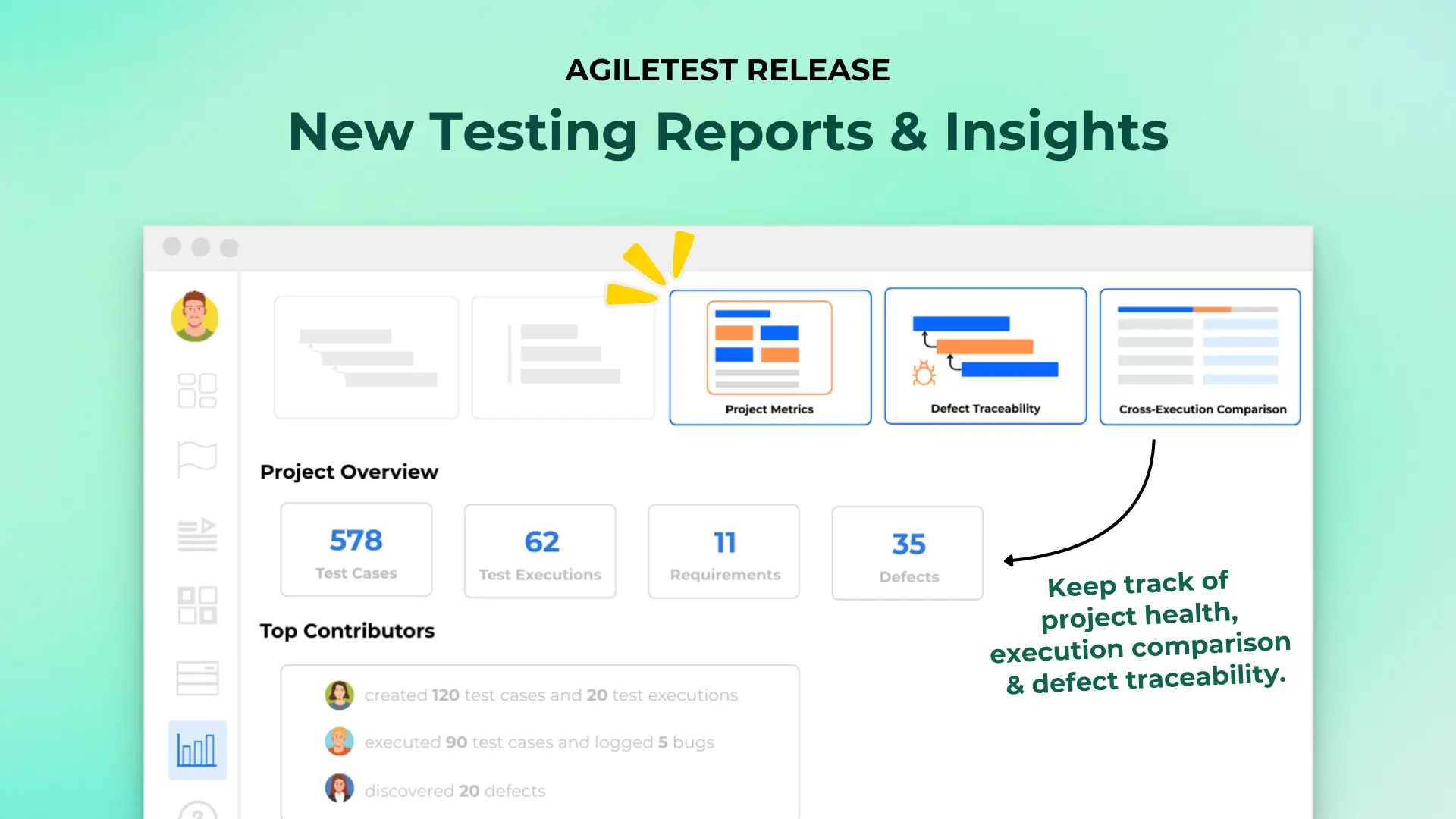
Dashboards provide instant visibility. Coverage metrics, pass/fail rates, and trend charts help you spot gaps and keep your team aligned.
All of these features live inside Jira—no extra tools, no context switching, just a smoother testing workflow.
Think of AgileTest as your Jira software assistant, organizing your testing inventory so clearly that anyone can quickly understand the status and progress without needing lengthy explanations or manual digging.
Step-by-Step: Optimizing Test Case Management with AgileTest
Let’s look at the simple steps to set up and optimize AgileTest within Jira:
1. Install and Configure
Begin by finding AgileTest in the Atlassian Marketplace and adding it to your Jira instance.
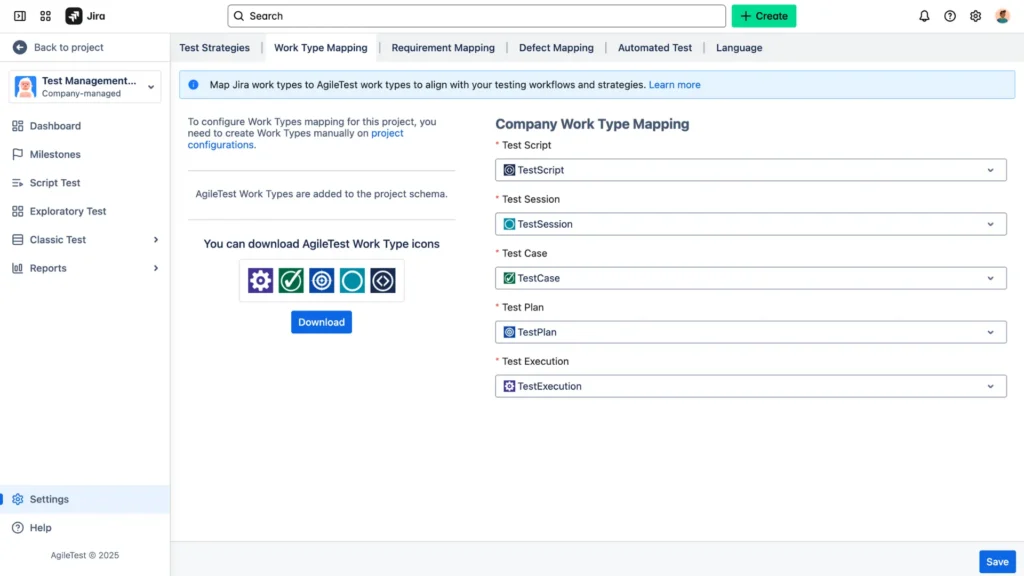
Once installed, head to your project settings to enable AgileTest’s custom issue types – TestScript, Test Session, TestCase, TestExecution, and TestPlan. This makes all testing features available where you work.
2. Define Requirements
Write clear, concise requirements in Jira using stories or tasks.
These should describe what needs to be tested, with acceptance criteria that all members and AgileTest can read.
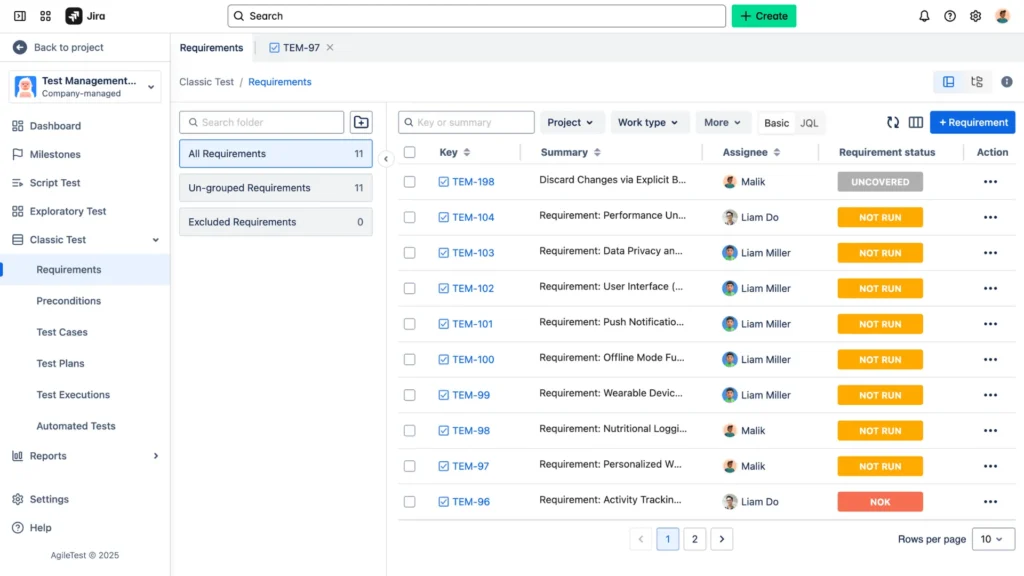
Well-defined requirements allow AgileTest’s AI to suggest relevant test steps, so take a moment to outline expected behavior and edge cases.
3. Build and Organize Tests
With requirements in place, use AgileTest’s AI-powered assistant to draft test cases automatically.
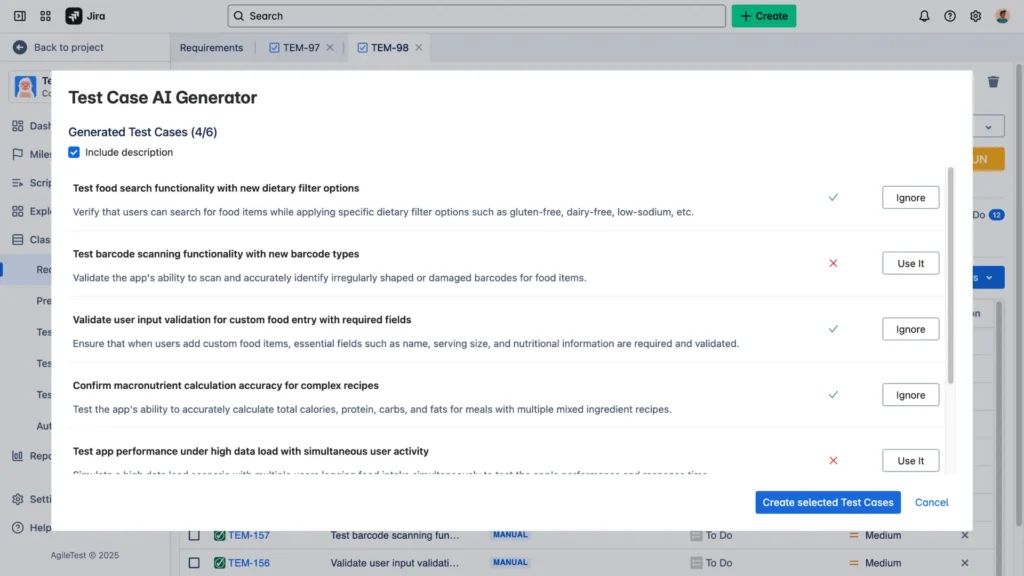
Review and refine each suggestion—add or remove steps to match your context.
Then, group your tests by logical categories (for example, by feature area, sprint goal, or release milestone) so the entire team can find and update them easily.
4. Plan and Assign
In planning mode, link your test cases to the sprint or release they belong to as a TestPlan.
Assign each test case in test plans to a team member based on expertise and availability.
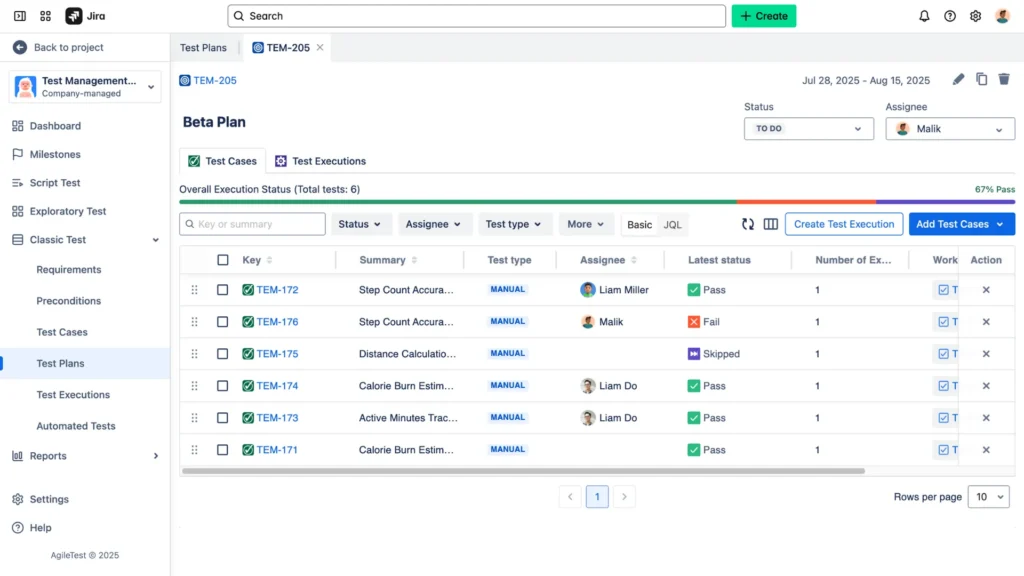
This clarity ensures that everyone knows exactly which tests they own and when they need to execute them.
5. Execute and Track
Run tests directly in Jira under the Test Execution issue type.
For manual tests, tick off each step as it completes and record any defects on the spot.
For automated tests, integrate your CI/CD pipeline so results flow back into the Test Run records automatically.
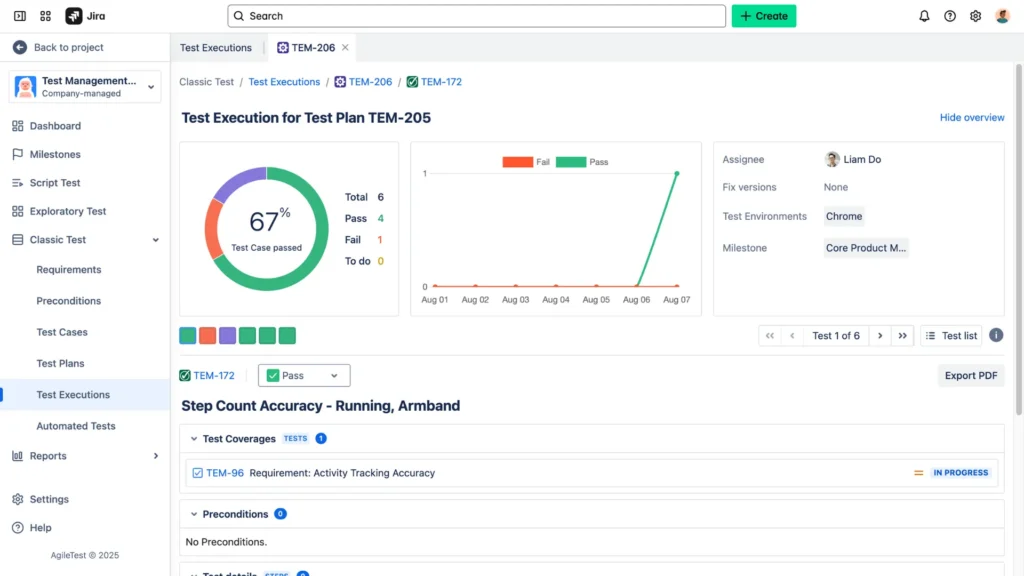
Real-time status indicators show pass, fail, or blocked without leaving your dashboard.
6. Review and Improve
After test executions (test runs) finish, open AgileTest’s dashboards and reports to assess coverage and results.
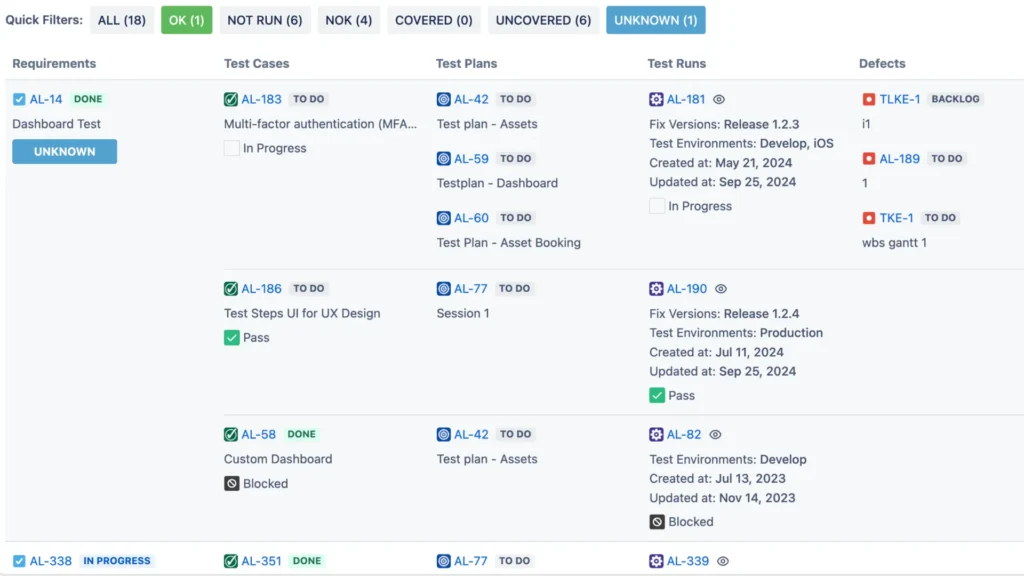
Look for patterns—repeated failures or untested areas—and update your test cases in Jira or requirements accordingly. Regular reviews keep your test suite lean, accurate, and aligned with evolving project needs.
→ Read AgileTest documentation for more details
Following these steps transforms Jira into a cohesive test-management hub. You’ll spend less time wrestling with tools and more time ensuring quality in every release.
Best Practices to Maximize AgileTest’s Value
Here are five practical recommendations to get the most from AgileTest:
- Keep all test cases in one central repository so your team always knows where to find and update them.
- Take advantage of AI-generated test outlines to save time, but always check each suggestion against your specific requirements.
- Feed automated test results from your CI/CD pipelines directly into AgileTest to maintain up-to-date test runs without manual effort.
- Regularly review the dashboards to catch slowing progress or recurring failures early, and adjust your test suite accordingly.
- Set a routine to audit your workflows, issue types, and naming conventions so your testing environment stays clear and clutter-free.
Just like regularly tidying up a physical workspace boosts productivity, these best practices keep your test environment organized and efficient.
Conclusion
Optimizing test case management in Jira doesn’t need to be complicated. AgileTest simplifies the entire process, bringing clarity, efficiency, and confidence to your software testing activities.
By following straightforward steps and best practices, you can dramatically improve your team’s productivity and testing quality—making your job easier and your outcomes more reliable.