
One finding from IBM indicates that bugs caught in production cost 30 times more to fix than those found during the development phase. Recently, 9 top UK banks encountered a system outage due to a disruption caused by a change in systems and internal software malfunctions (The Guardian, 2025). This emphasizes the need for Regression Testing, which is a technique that re-runs previously executed tests to ensure that existing, working functionality still performs as expected after recent changes have been applied.
This article will give you the contextual background to emphasize the need for Regression Testing, then define exactly what Regression Testing is and how you can apply AgileTest to conduct Regression Testing effectively for your projects.
1. Sources of Threats from Fast Testing without Thorough Checks
In today’s Agile world, organizations are racing to constantly deliver value in short cycles, a practice driven by fast-paced methods like Agile and DevOps. Yet, these approaches help the team receive feedback and learn faster; they also create problems with quality when thorough testing activities are not taking place.
These problems are far more than just annoying bugs; they’re a financial issue. Poorly built software is now estimated to cost the U.S. economy alone trillions of dollars every year (CISQ, 2022). Those expenditures are for expensive security breaches, fixing errors discovered too late, which are more costly than catching them early.
Why New Updates Should Always Be Tested
The core insight is: speed should never compromise quality. Every new update or release provides an opportunity for improvement, but also requires careful validation. By conducting regular testing throughout the entire development cycle, teams gain the crucial ability to catch issues immediately. This early detection allows for quick, low-cost adjustments, ensuring that every update reliably moves the product forward without impacting the overall quality.
Why Even Working Features Can Become a Risk?
The issue isn’t just with newly developed features or recent fixes; existing, perfectly functional features can also become a major risk. While these features may be working today, they could break other parts of the system due to unseen dependencies or side effects.
Teams might have the “feature complacency” stereotype, which assumes that because a feature worked yesterday, it will continue to work today. Every time a development team adds a new feature or fixes a bug, there is a risk of unintentionally “breaking” something that already worked perfectly. These hidden risks are often uncovered only when issues become critical, leading to expensive troubleshooting and longer release cycles.
To make sure that new updates are regularly tested and will not impose any threats to the current working system, Regression Testing has been applied. But what exactly is Regression Testing?
2. Regression Testing
What is Regression Testing?
Regression testing is a type of software testing that makes sure recent changes (like bug fixes or new features) haven’t broken any of the system’s existing, previously working functions. Its main goal is to confirm that the software still performs exactly as expected after any modification.
You should use regression testing in three main stages. Before a new update, regression testing is applied to confirm that the new codes still work well before deployment. After changes take place, no matter big or small, regression testing is also applied to verify if any functions have been in conflict due to the changes. Periodically, such as once per sprint, regression testing is also conducted to ensure that the system still performs well.
The three main approaches
There are three main approaches to conducting Regression Testing.
The Retest All approach involves running every single previously executed test case, ensuring maximum coverage. You should use this method mainly when the system has major changes or when the updates affect core, high-risk components.
Conversely, Selective Testing means running only a minimal subset of tests that cover the specific areas logically affected by the recent code modifications. This highly efficient method is ideal for fast-paced environments or when applying a small hotfix where quick feedback is essential.
Finally, Hybrid Testing combines the strengths of the others: teams automate and frequently run a high-priority test core (Selective), while periodically conducting a full suite execution (Retest All). This practical strategy is best for seeking a stable balance between rapid execution speed and comprehensive stability checks across multiple releases.
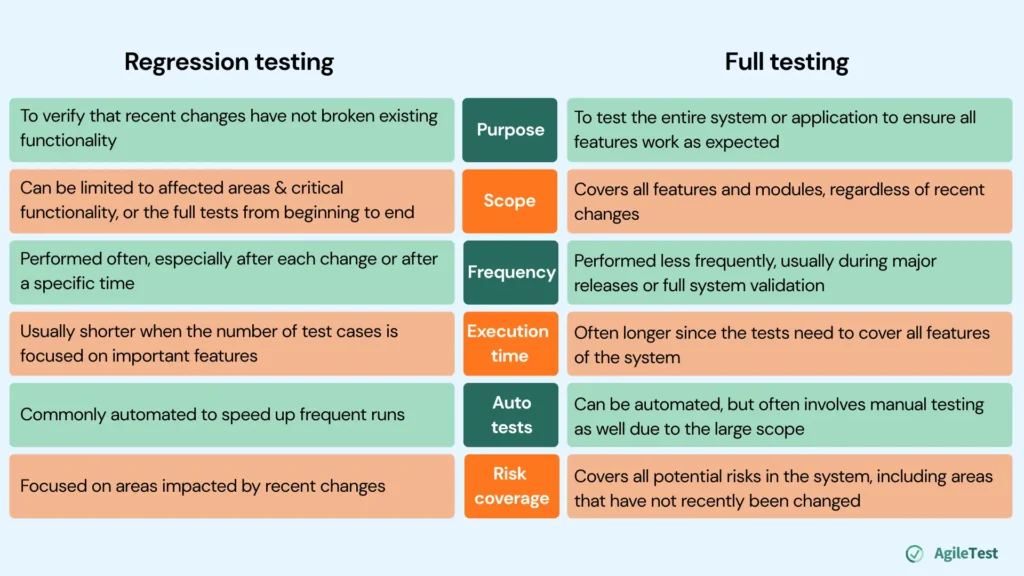
Differences between Regression testing and Full testing
In some cases, the Regression Testing can make it easily confusing with Full Testing. This table will point out the key differences between these two testing types.
3. How can AgileTest help you conduct Regression Testing more effectively?
AgileTest is a testing management platform designed to help teams plan, execute, and track testing activities effectively. Two of the core features include Script Test and Test Case Management, which enable users to quickly create and organize test scripts, manage checklists, and maintain full visibility of testing progress across projects. You can conduct Regression Testing on AgileTest with either one of these two features, or even both of them.
Using the Test Case Management feature for Regression Testing
This feature is most effective when you prioritize reusability. From the start, you’ll need to set up everything, from writing detailed test cases with specific steps to creating a tracking plan and defining the execution process. In return, this setup allows you to store your testing data efficiently, making it easy to reuse not just for regression testing, but for other types of testing throughout your workflow.
Manual Regression Testing
Step 1: Identify test cases for Regression Testing
To begin with, you need to generate a list of test cases. These test cases should come from your requirements or objectives that you want to verify after each test run. For example, if you want to check the login features daily, some test cases can be “Verify login portal via Email, Google, etc, works.”
With AgileTest, you could either import your existing test cases or automatically create new test cases based on requirements, saving you more time for the initial setup.
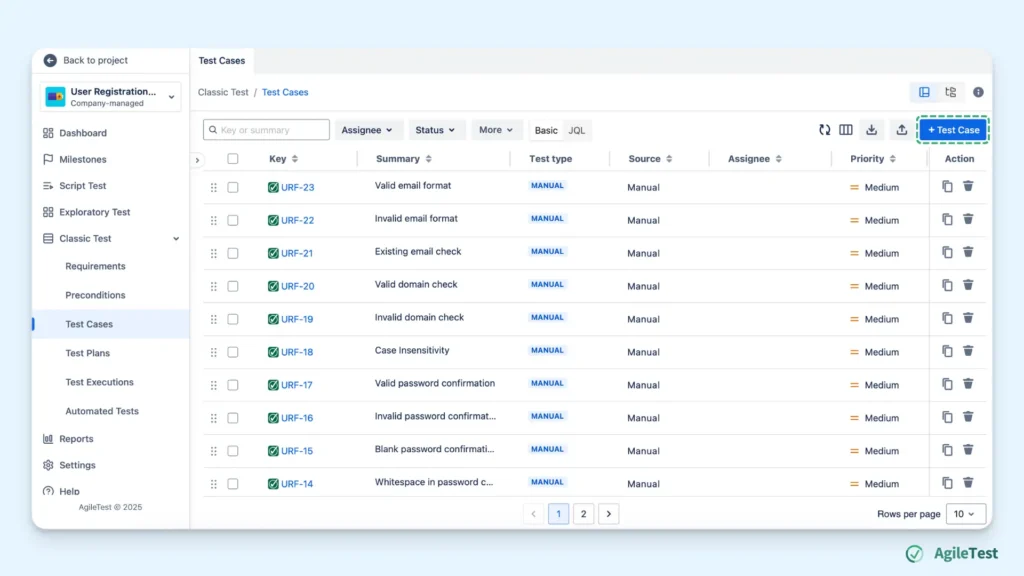
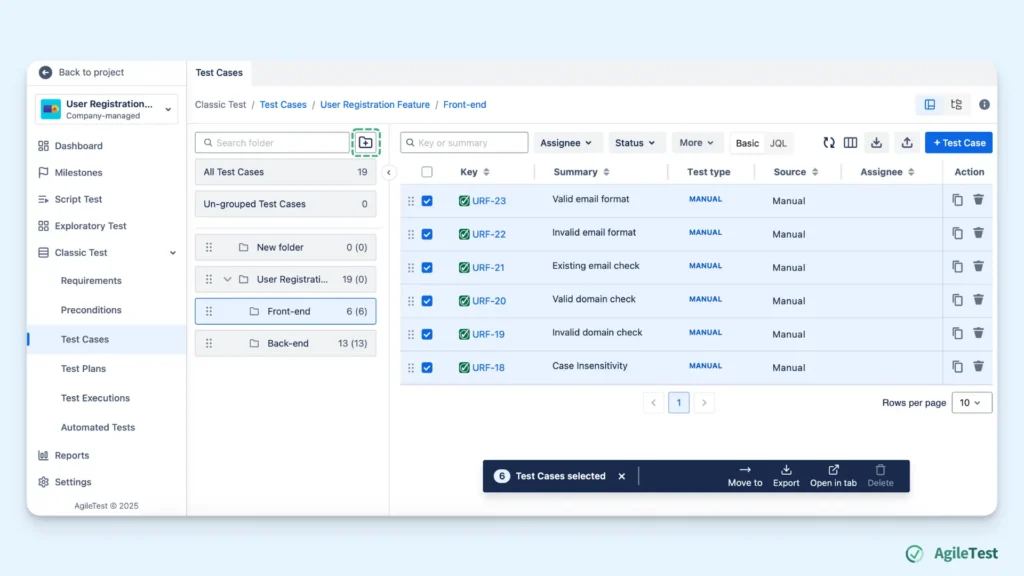
It is recommended to keep track and manage your test cases within folders. After having a list of test cases, you can create a folder to group them in. This will help you better manage and locate them in the later steps and avoid missing any test cases that need to be run.
For instance, when you set up regression testing for different aspects of one feature, you can put the prepared test cases into each folder, such as Front-End, Back-End, security, etc
Step 2: Create a Test Plan
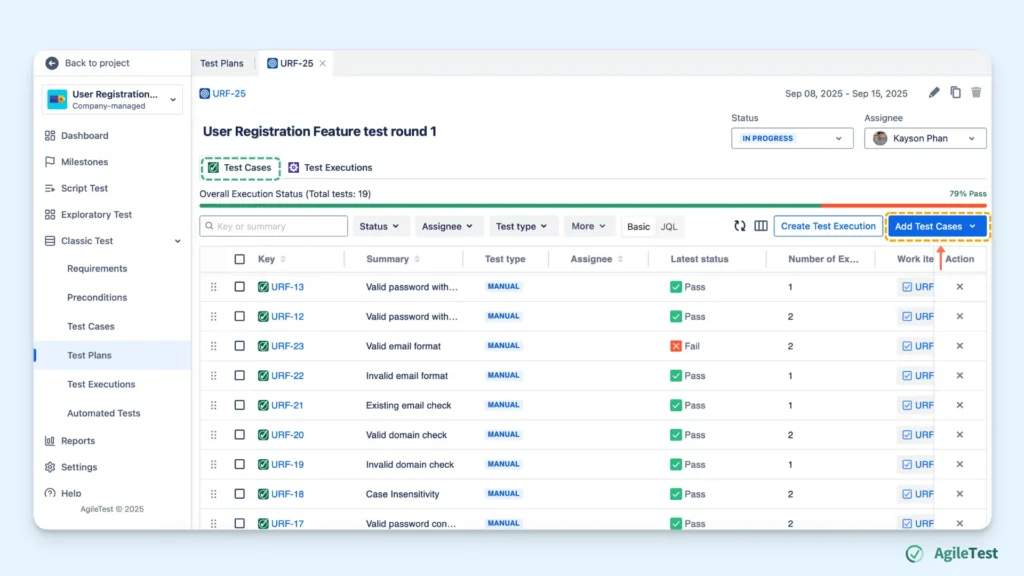
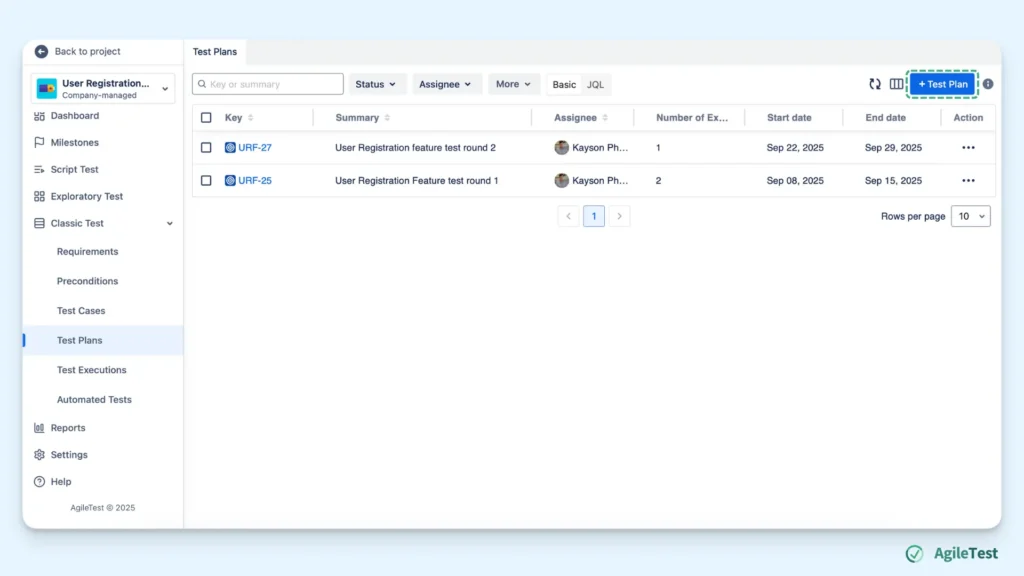
Creating a test plan is the best way to strategize and manage your test cases for regression testing. A Test Plan is a strategy with a defined timeline (starting date and end date), with Test Execution to run all your test cases. Without a plan, you can easily fall behind on your test project and lose track of which test cases to execute, which increases the risk of missing important checks.
With AgileTest Test plan, alongside the purpose of setting a timeline to follow, you can add existing test cases from folders & sub-folders and manage their testing orders for each run.
Step 3: Set up Test Execution
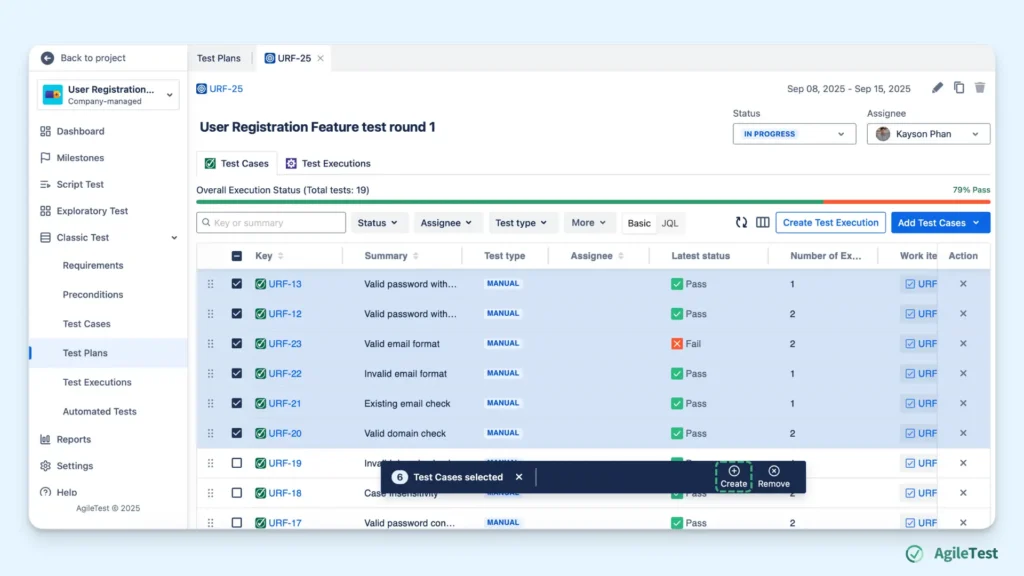
When you already have a plan with a defined timeline to follow, the next step is to prepare for Test Execution sessions, the main testing action that helps you reach your goal. You can create a Test Execution in the Test Execution section or inside a Test plan.
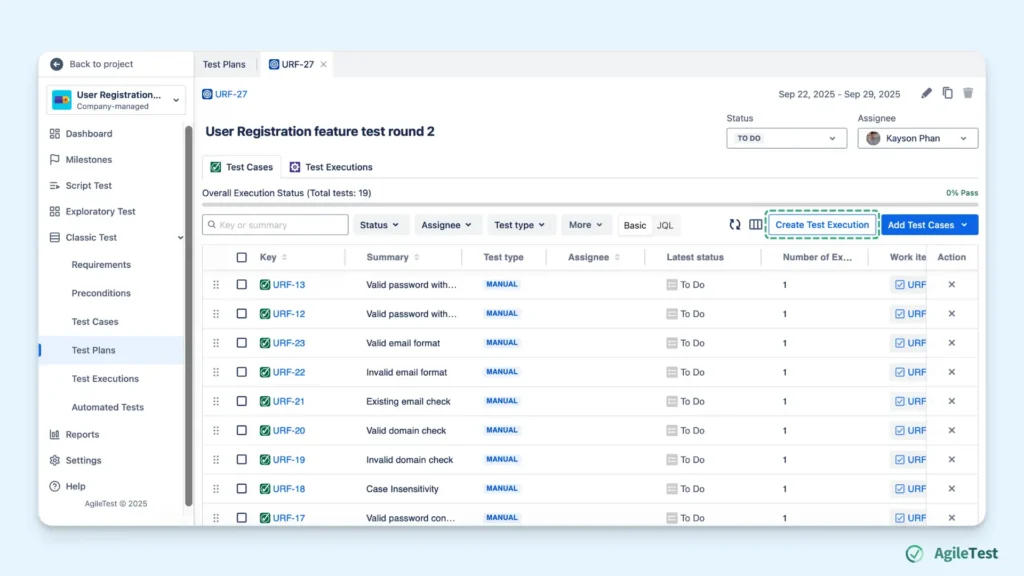
You can have a few executions to run all test cases regarding each aspect of the feature (front-end, back-end, security, etc), some to run all test cases, and some to run just some test cases with high risks of defects.
In case you just want to conduct Selective testing, for example, some previously failed test cases, you can filter them for your desired execution session. AgileTest supports users to filter and select test cases based on the latest Test status, thus saving more time to conduct re-testing activities on some key area features instead of the whole list of test cases.
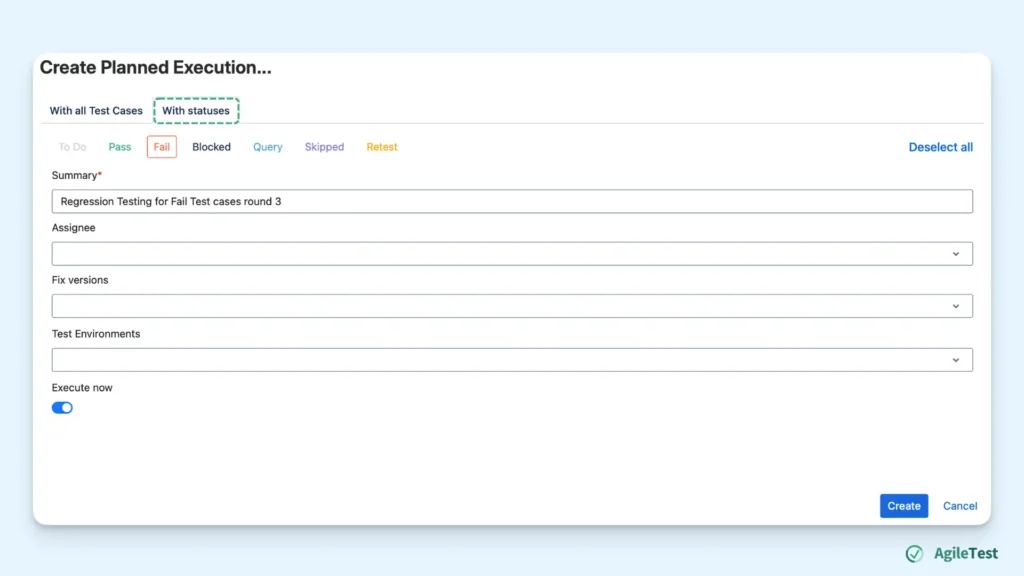
AgileTest also allows you to add all or pick a few test cases for a test execution session. You can have as many test executions with a different number of test cases as you demand.
Step 4: Run Regression Testing
Come to the next step, you can execute all the prepared tests with AgileTest.
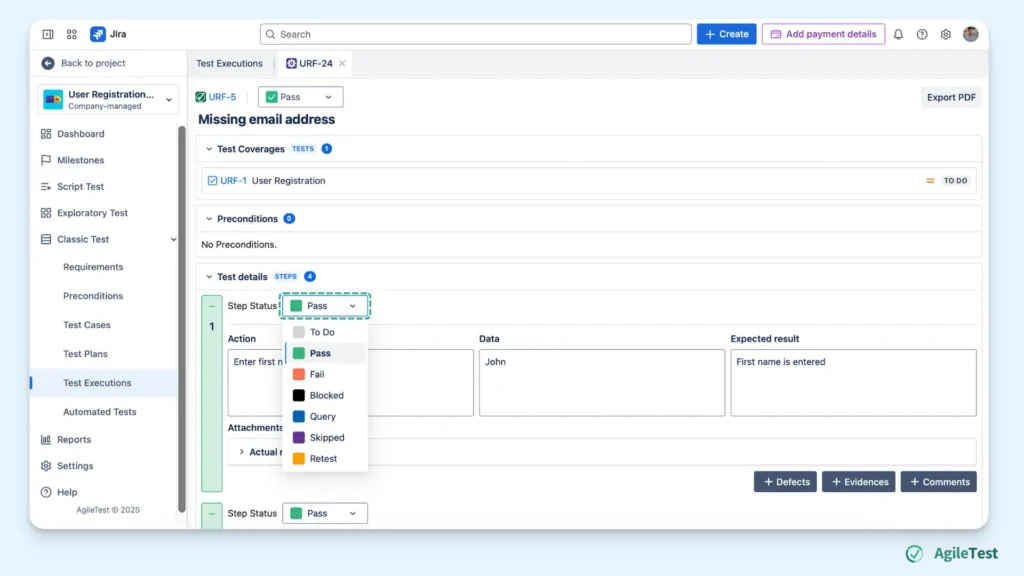
You can run each Execution section, add status to each test step. AgileTest records your Test status and displays the test case percentage of failures, passes, etc of after each execution.
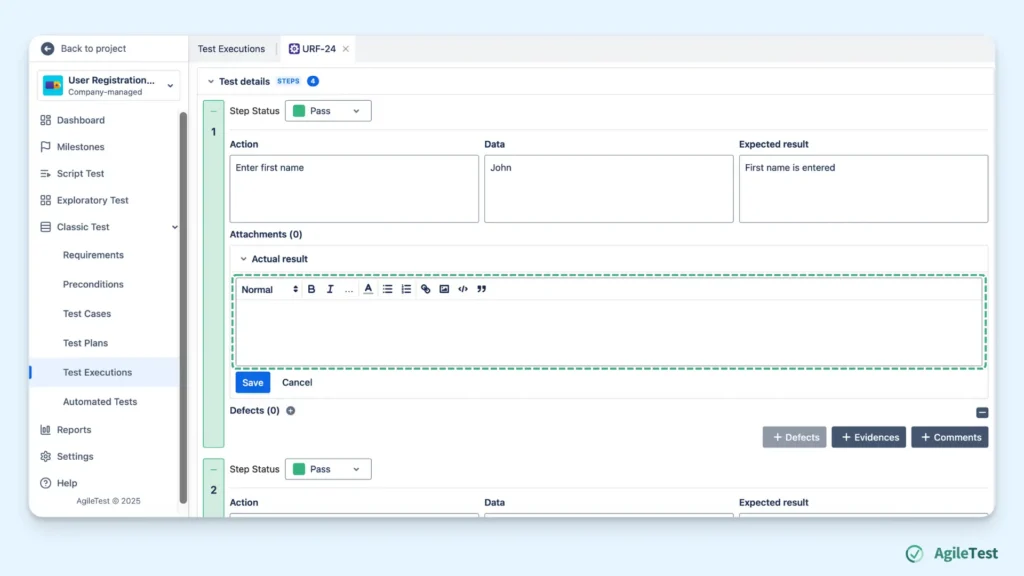
You can also document your findings when testing each step. These documents help your team record what happened during your tests, so that you can reproduce the bugs and make better improvements.
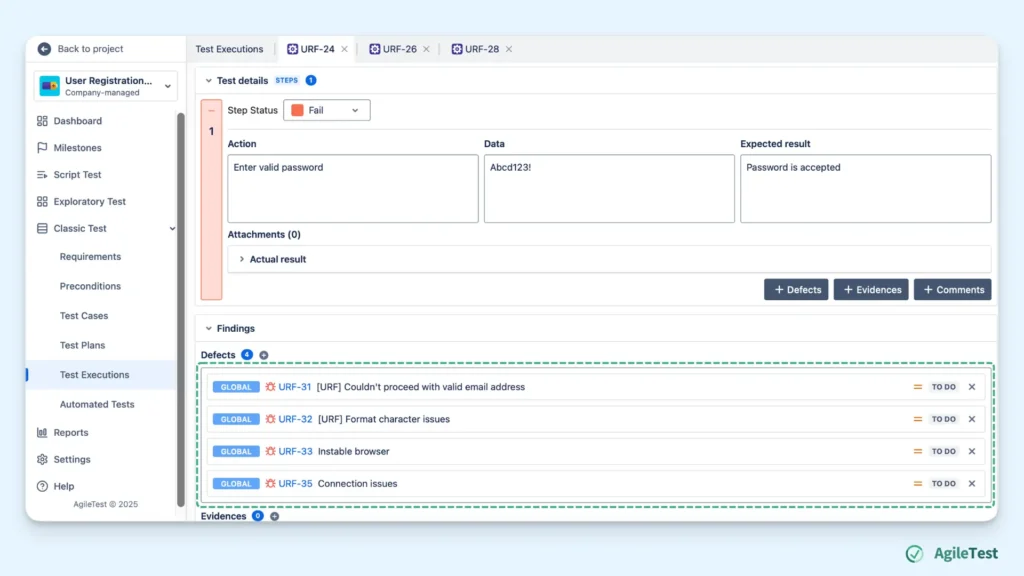
In addition, you can create new defects or link your existing ones for each test step. This helps you track back your bug or story directly, without having to move between sections. Also, by linking your defects to the failed step, the AgileTest report feature could help you generate a Defect summary report.
Step 5: Review your report
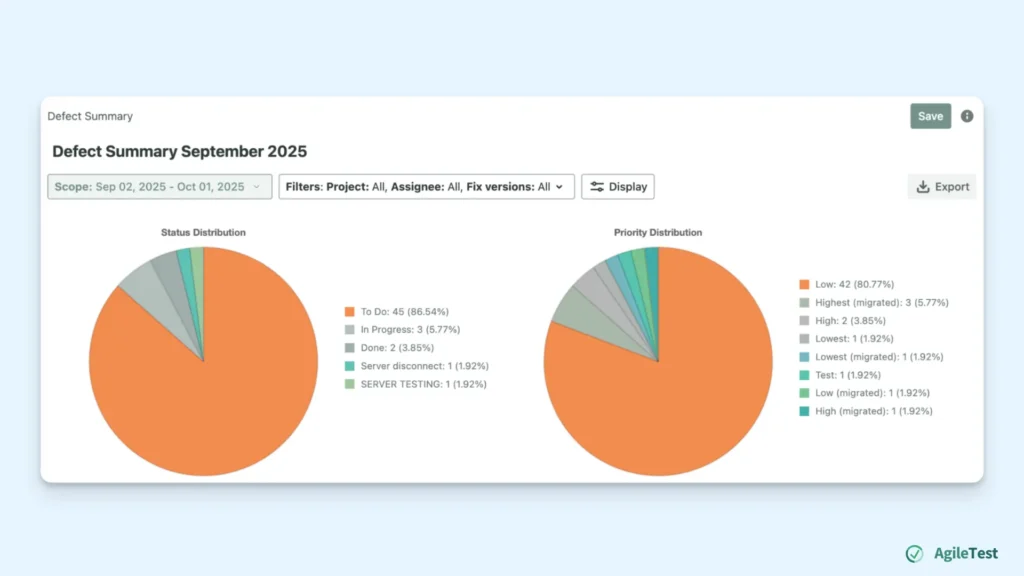
After you have executed your tests, you would like to see the summarized results of your test execution. You can check the Defect Summary to see details of defects linked to your failed test steps.
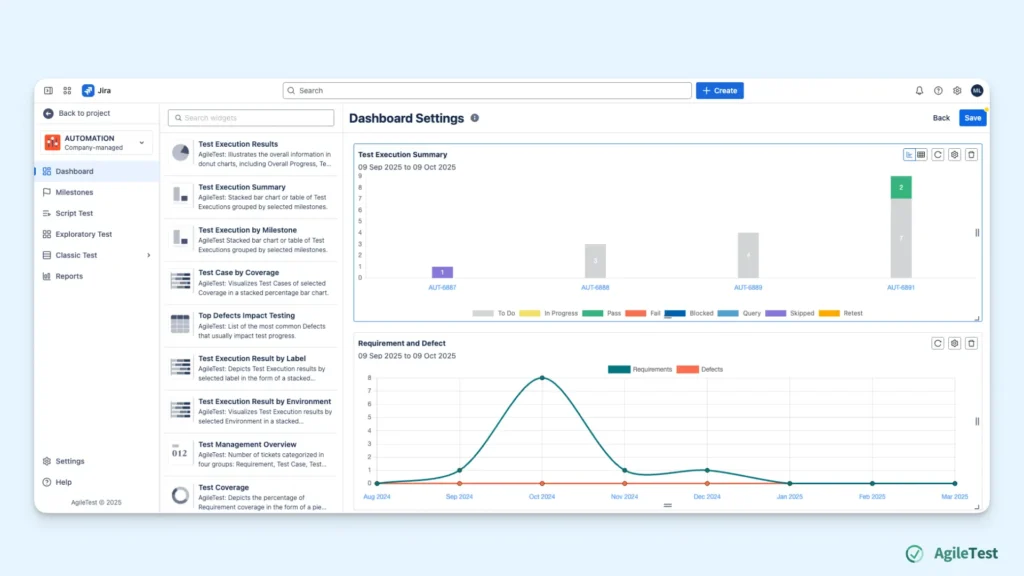
In addition, you can also make use of the widgets in the Dashboard to create a visualization of your test execution summary results.
Automated Regression Execution
Besides the Manual approach, Automation Regression Testing is also another approach that reduces manual workload. Though the initial setup may be a little bit complicated, once established, you can trigger your test run automatically and remotely via multiple pipelines.
Let’s see how it works in AgileTest.
Step 1: Create a Test Plan
With an automation approach, you don’t need to identify every single test case. But you will still need a Test plan to track and manage your test execution. The difference here is that you just need to create a Test plan with a defined timeline, without having to add existing test cases.
Step 2: Set up your Test Execution
AgileTest supports you in conducting your Automated Test setup in two main ways: importing test result files and triggering pipelines.
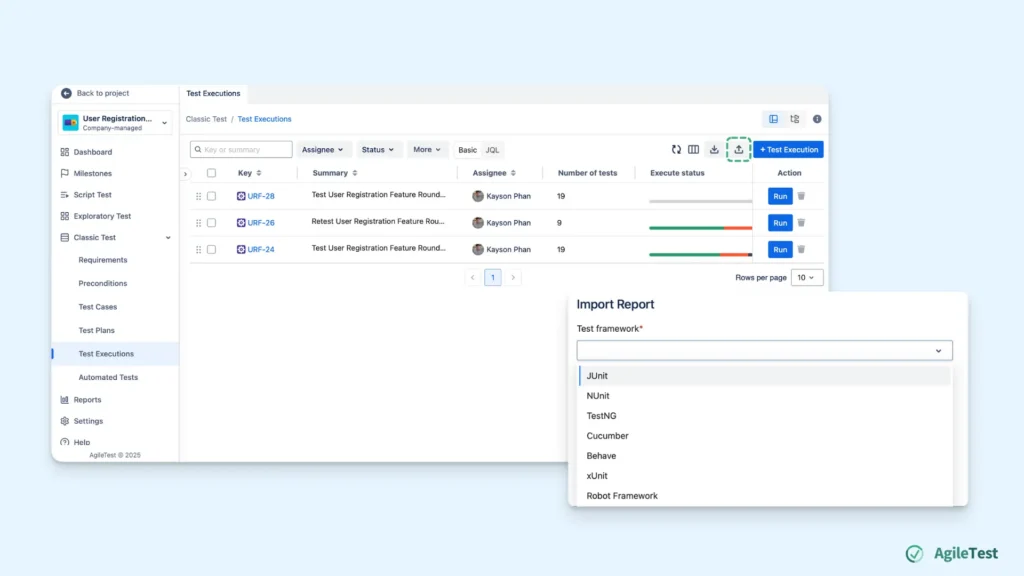
Importing test results
When you have already conducted your test run in your local environment and generated a report, you can import this test report into AgileTest. Once imported, the system automatically reads the results and creates new test executions with the related test cases. AgileTest supports you in importing your test results via file and API options.
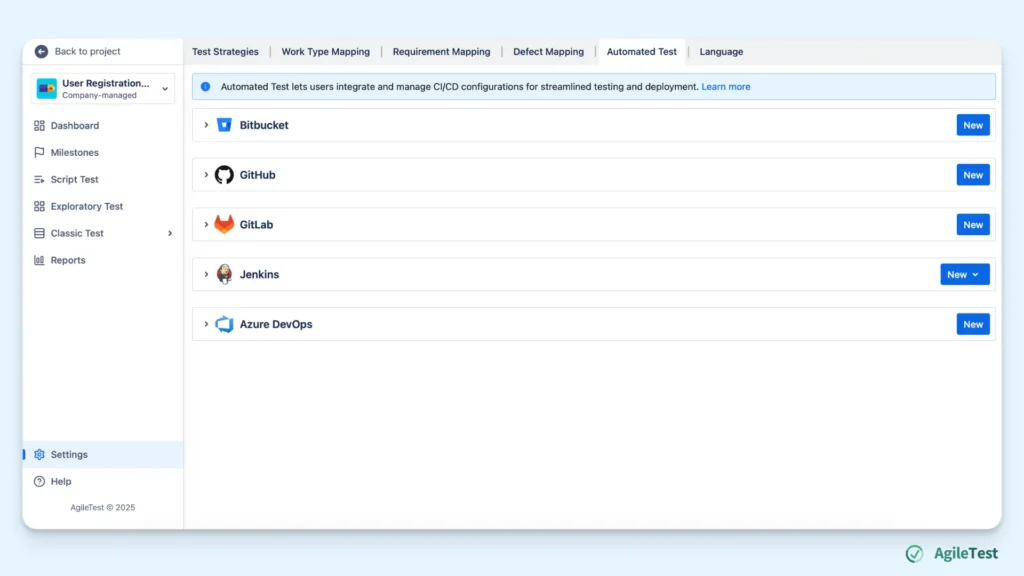
Triggering pipelines
This approach assists you in automatically running tests, generating reports, and uploading to AgileTest.
You need to configure CI/CD settings to make sure that when changes occur in your codebase, these changes automatically take place in AgileTest. AgileTest offers you a wide range of CI/CD tools integration.
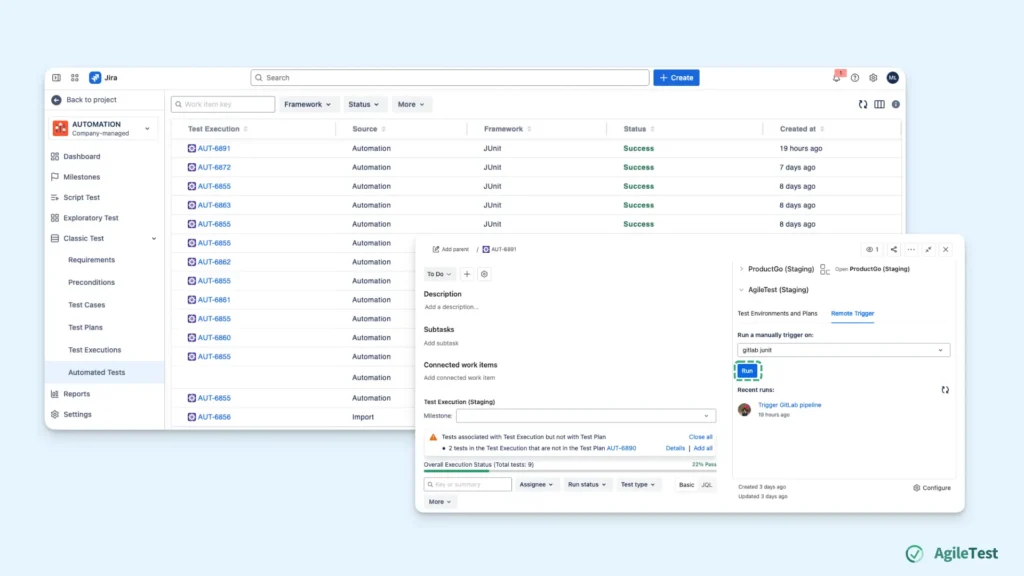
Now, come to the main part of running your tests; you can trigger them remotely, and all your test results will now be updated automatically.
Step 3: Review your report
After conducting your tests, you can make use of the Defect Summary report or other widgets in the Dashboard to check more details of your execution, like the Manual approach.
Using the Script Test feature for Regression Testing
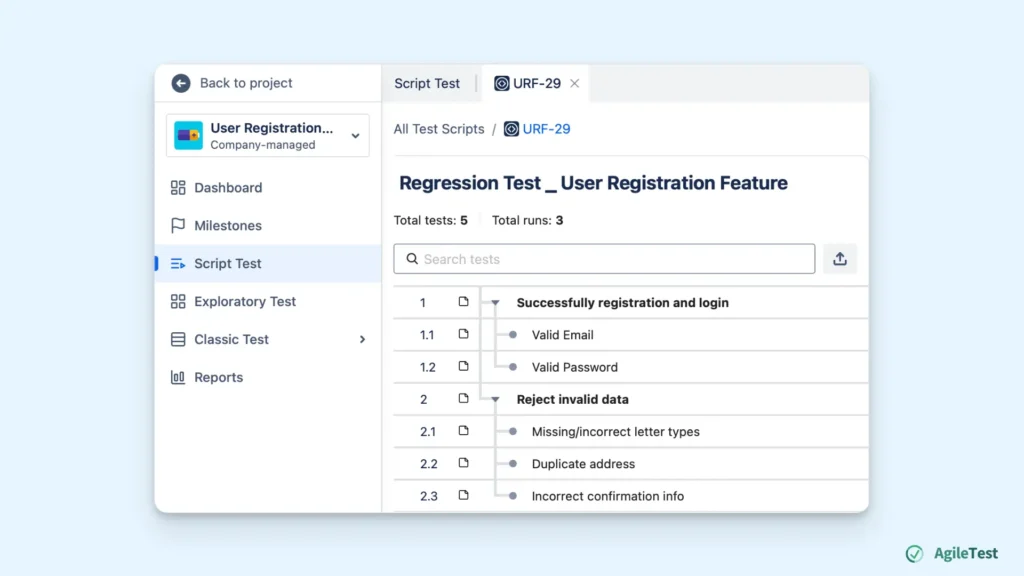
This feature works best when you just focus on speed and simplicity. Script Test feature acts as a quick checklist to conduct regular, simple testing. It does not require any thorough setup like the Test management features, but there is no area to record your findings. Additionally, you can not generate any reports with data from script tests.
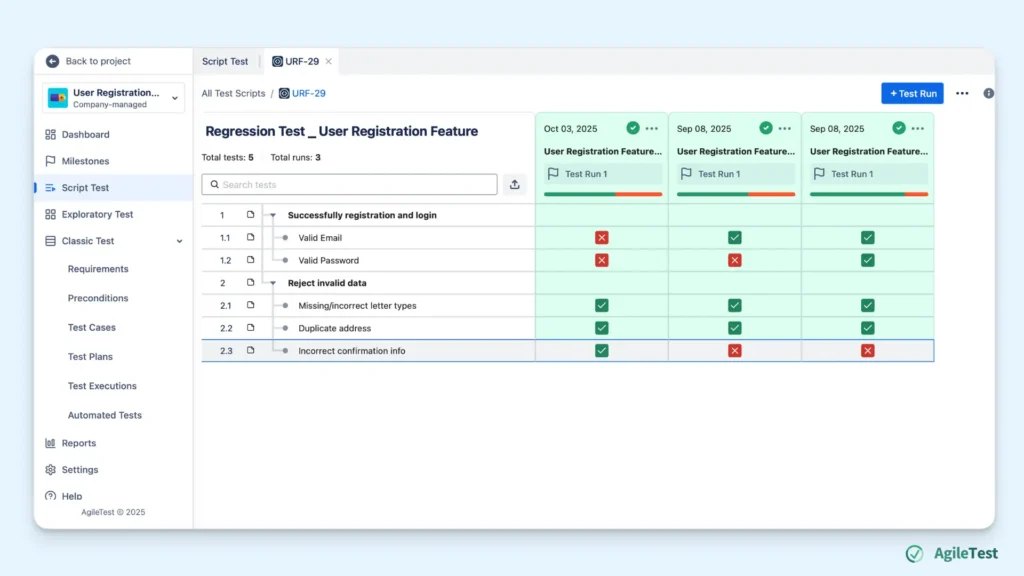
To set up a Test run in the Script Test feature, you just need to go to the Script Test section on the left of the Menu bar, then click on New Test Script.
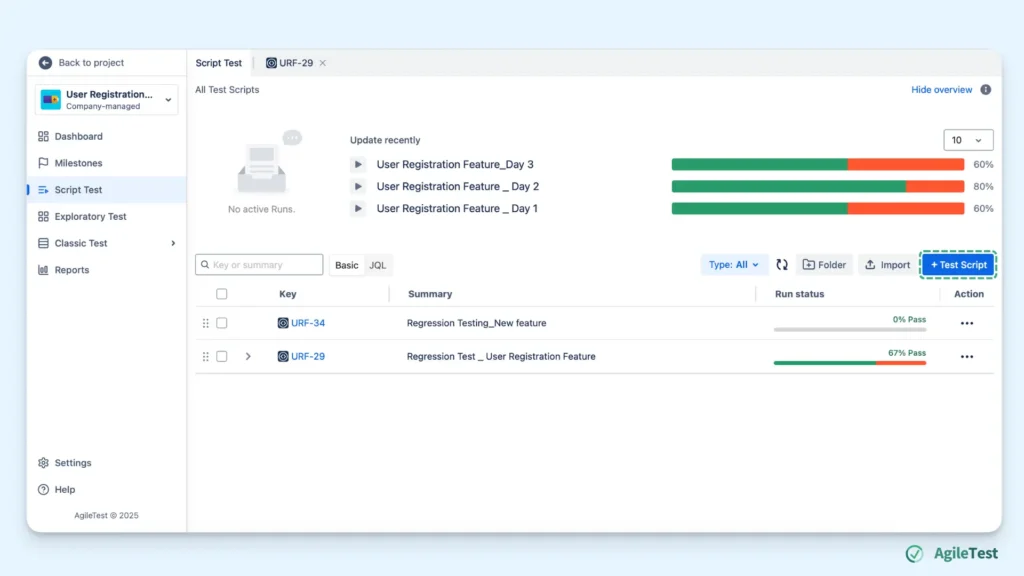
Then you can add new tests to the checklists, reorder, and manage these scripts to your desires.
Final thoughts
With structured frameworks, reusability options, and integration with automation, AgileTest transforms regression testing from a necessary burden into an efficient, repeatable, and scalable activity. Whether your priority is comprehensive data capture and reporting for highly complex projects or rapid, checklist-style validation for quick fixes, AgileTest features ensure that your quality process keeps pace with your development speed.
Ultimately, by formalizing and optimizing your regression strategy, you turn testing from a blocker into the foundation for confident, continuous delivery, ensuring that your product remains stable, reliable, and competitive in the unforgiving digital economy.