
The mobile application landscape has exploded in recent years, with billions of users relying on apps for everything from communication to commerce.
Ensuring these apps work flawlessly across diverse devices, operating systems, and user scenarios is a monumental challenge for development teams. Traditional manual testing struggles to keep pace with the rapid release cycles and complexity of modern mobile apps, making automation a necessity.
Enter Appium, an open-source automation framework that has become a cornerstone for mobile testing.
This article provides a detailed introduction to Appium, exploring its capabilities, its pivotal role in mobile testing, and practical guidance for testers and developers looking to leverage it—particularly in Agile contexts.
What is Appium?
Appium is an open-source, cross-platform automation framework designed for testing mobile applications. First introduced in 2011 by Dan Cuellar as “iOSAuto” and later rebranded as Appium in 2012, it has evolved into a robust tool supported by a vibrant community and companies like Sauce Labs.

Appium enables automation of native, hybrid, and mobile web applications across Android, iOS, and other platforms, using a single API. Its philosophy—“test the app as users experience it”—means no app modifications are needed, preserving the integrity of the production version.
Appium builds on the WebDriver protocol, originally developed for web testing with Selenium, extending its capabilities to mobile devices. It acts as an HTTP server (written in Node.js) that translates test commands into platform-specific actions via native automation frameworks like UIAutomator (Android) and XCUITest (iOS). Key components include:
- Appium Server: The core that manages test sessions and communicates with devices.
- Appium Clients: Libraries in languages like Java, Python, Ruby, and C# for writing test scripts.
- Drivers: Platform-specific modules (e.g., UIAutomator2 for Android, XCUITest for iOS) that execute commands on devices.
This architecture makes Appium highly flexible, scalable, and accessible to teams with diverse technical backgrounds.
Understanding Mobile Testing
Mobile testing ensures that applications function correctly across a fragmented ecosystem of devices, screen sizes, operating systems (e.g., Android 14, iOS 18), and network conditions. It encompasses:
- Functional Testing: Verifying features work as intended (e.g., a login button logs in a user).
- Compatibility Testing: Ensuring consistency across devices and OS versions.
- Performance Testing: Checking speed, responsiveness, and resource usage.
- Usability Testing: Confirming an intuitive user experience.
- Regression Testing: Validating that new changes don’t break existing functionality.
Manual testing, while valuable for exploratory scenarios, is time-consuming and error-prone for repetitive tasks.
Automated mobile testing, like that enabled by Appium, accelerates these processes, making it indispensable in fast-moving development cycles—especially Agile ones.
→ Related content: Performance Testing for Mobile App
Why Appium for Mobile Testing?
Appium stands out among mobile testing tools due to its unique strengths, aligning perfectly with the demands of modern software development:
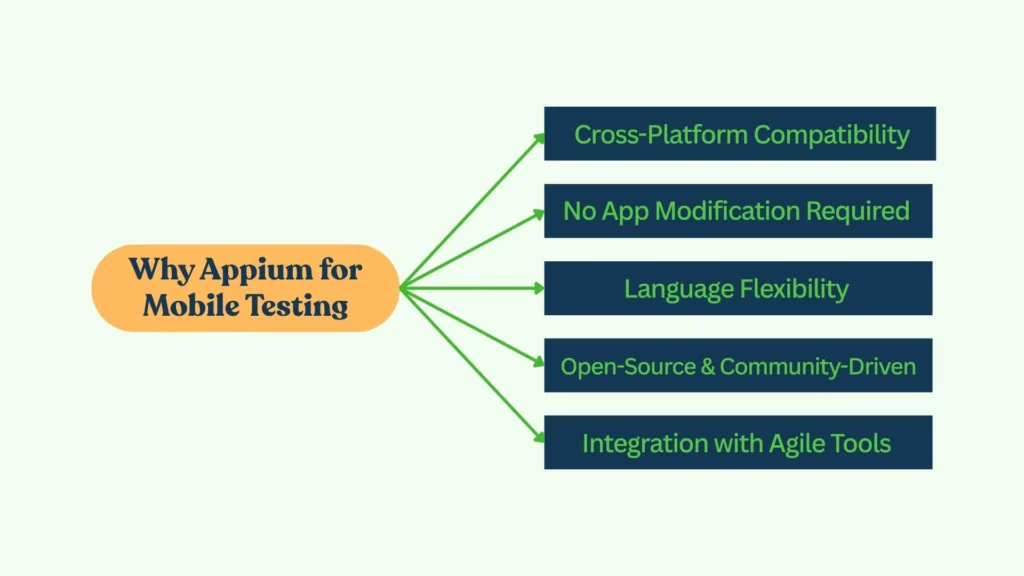
Cross-Platform Compatibility
Appium allows testers to write a single test script that runs on both Android and iOS, reducing duplication and maintenance effort. For example, a login test can be reused across platforms with minimal tweaks.
No App Modification Required
Unlike some tools requiring code instrumentation, Appium tests the app in its native state, ensuring results reflect real user experiences.
Language Flexibility
Supporting languages like Java, Python, and JavaScript, Appium lets teams use their preferred tools, lowering the learning curve for developers and testers familiar with Selenium.
Open-Source and Community-Driven
Free to use and backed by a large community, Appium offers extensive documentation, plugins, and third-party integrations, keeping it adaptable and cost-effective.
Integration with Agile Tools
Appium integrates seamlessly with Continuous Integration/Continuous Deployment (CI/CD) systems like Jenkins, making it ideal for Agile’s iterative workflows.
→ Related content: Optimize Jira test case management with AgileTest
For instance, a team developing a shopping app can use Appium to automate checkout flows on both an iPhone 15 and a Samsung Galaxy S24, integrating tests into a nightly Jenkins build—all with one codebase.
How Appium Works in Mobile Testing
Appium operates on a client-server model:
- Client: A test script (e.g., in Python) sends commands via the WebDriver protocol.
- Server: The Appium server, running on Node.js, receives these commands and translates them into platform-specific instructions.
- Device: The commands execute on a real device, emulator, or simulator using native frameworks (e.g., XCUITest for iOS, UIAutomator2 for Android).
Example Workflow
Consider testing a calculator app:
- Script: A Python test clicks the “2,” “+,” “3,” and “=” buttons, then verifies the result is “5.”
- Execution: Appium launches the app on an Android emulator, performs the actions, and checks the output.
- Result: The test passes or fails, with logs detailing each step.
This process mirrors Agile Testing’s continuous feedback loop, where automation runs alongside development.
Setting Up Appium
Getting started with Appium requires a few prerequisites:
- Node.js and NPM: Appium is built on Node.js; install them first.
- Appium Server: Install globally via
npm install -g appium. - Drivers: Add platform-specific drivers (e.g.,
npm install appium-uiautomator2-driverfor Android). - Development Tools:
- Android: Android SDK, emulator, or real device.
- iOS: Xcode, simulator, or real device (with a developer account).
- IDE: IntelliJ, VS Code, or similar for scripting.
Basic Test Script (Python)
Here’s a simple Android test:
python
from appium import webdriver
desired_caps = {
    "platformName": "Android",
    "platformVersion": "13",
    "deviceName": "emulator-5554",
    "app": "/path/to/calculator.apk",
    "automationName": "UiAutomator2"
}


driver = webdriver.Remote("http://localhost:4723", desired_caps)
driver.find_element_by_id("com.example.calculator:id/two").click()
driver.find_element_by_id("com.example.calculator:id/plus").click()
driver.find_element_by_id("com.example.calculator:id/three").click()
driver.find_element_by_id("com.example.calculator:id/equals").click()
result = driver.find_element_by_id("com.example.calculator:id/result").text
assert result == "5"
driver.quit()
Run appium in a terminal, then execute the script. Appium will launch the emulator, perform the actions, and report the outcome.
Appium in Agile Mobile Testing
Agile Testing demands speed, collaboration, and adaptability—qualities Appium excels at delivering:
Continuous Testing
In a two-week sprint, Appium automates regression tests daily, catching bugs as code evolves. For example, a team adding a payment feature can run Appium tests nightly to ensure existing login flows remain intact.
Collaboration
Testers write Appium scripts alongside developers, using tools like Appium Inspector to identify UI elements collaboratively. This aligns with Agile’s emphasis on teamwork.
CI/CD Integration
Appium tests run in Jenkins or GitLab CI, triggered by commits. A failing test halts the pipeline, ensuring quality gates are met before deployment.
→ AgileTest now integrates with many famous CI/CD tools
Parallel Execution
Using Appium Grid or cloud services (e.g., BrowserStack, Sauce Labs), teams test across multiple devices simultaneously, slashing execution time—a must for Agile’s tight schedules.
Benefits of Appium in Mobile Testing
Appium offers compelling advantages:
- Efficiency: Automates repetitive tasks, freeing testers for exploratory work.
- Scalability: Handles small apps to enterprise-scale projects.
- Real-World Testing: Tests on real devices or emulators, reflecting user conditions.
- Cost Savings: Open-source nature eliminates licensing fees.
- Flexibility: Supports native, hybrid, and web apps across platforms.
For a banking app, Appium can verify transfers on an iPhone 14 and a Pixel 8 in parallel, ensuring broad coverage with minimal effort.
Challenges and Solutions
Appium isn’t without hurdles:
- Setup Complexity: Configuring drivers and devices can be daunting. Solution: Use Appium Desktop or detailed guides to streamline setup.
- Script Maintenance: UI changes break tests. Solution: Adopt the Page Object Model (POM) to centralize element locators.
- Flaky Tests: Timing issues cause failures. Solution: Use explicit waits (e.g.,
WebDriverWait) for reliability. - Limited Non-Mobile Support: Focuses on mobile, not desktop. Solution: Pair with Selenium for broader coverage.
Best Practices for Appium in Mobile Testing
Maximize Appium’s potential with these tips:
- Use POM: Organize tests for maintainability:
python
class LoginPage:
    def __init__(self, driver):
        self.driver = driver
        self.username = driver.find_element_by_id("username")
        self.password = driver.find_element_by_id("password")
        self.login_btn = driver.find_element_by_id("login")


    def login(self, username, password):
        self.username.send_keys(username)
        self.password.send_keys(password)
self.login_btn.click()- Leverage Real Devices: Test on real hardware via clouds like Sauce Labs for accuracy.
- Optimize Waits: Avoid hard-coded sleeps; use dynamic waits for stability.
- Parallelize: Run tests concurrently to save time.
- Integrate with CI: Automate test execution in pipelines.
Case Study: Appium in Action
Imagine an Agile team building a fitness app with a workout logging feature:
- Sprint Goal: Add a “Log Workout” button.
Appium Test: A Java script logs a workout and verifies the entry:
java
WebDriver driver = new AndroidDriver(new URL("http://localhost:4723"), capabilities);
driver.findElement(By.id("log_workout")).click();
driver.findElement(By.id("duration")).sendKeys("30");
driver.findElement(By.id("save")).click();
String log = driver.findElement(By.id("log_entry")).getText();
assert log.contains("30 mins");
driver.quit();- Execution: Runs on an Android emulator and iOS simulator via Jenkins nightly.
- Outcome: A UI bug (button misalignment on iOS) is caught and fixed mid-sprint.
Appium ensures the feature works across platforms, supporting Agile’s rapid delivery.
→ Try out AgileTest – Agile Test: Enterprise QA Testing, Test Management for Jira
Conclusion and Next Steps
Appium transforms mobile testing by offering a flexible, powerful framework that fits seamlessly into Agile workflows. Its cross-platform support, automation capabilities, and integration potential make it a must-have for testers and developers aiming to deliver high-quality mobile apps.
Start by installing Appium, writing a basic test, and exploring resources like the official documentation (appium.io) or courses on Udemy. As mobile usage grows, mastering Appium equips you to meet the challenge head-on—ensuring your apps shine in a competitive market.