
Many teams struggle with prolonged and time-consuming testing processes. This usually results from excessive manual work. In fact, the Global App Testing survey in 2025 brings up the surprising insight that over 75% of work is now conducted manually in the software testing process.
In this article, we’ll explore the key activities that typically slow down testing and show how AgileTest can help improve the whole process by automating repetitive tasks, thus speeding up your entire testing workflow.
1. Sources of Time Consumption in the Testing Process
The fundamental testing process has five main phases: Planning, Designing, Executing, Reporting, and Closing. Among the five phases, some most time-consuming activities take place are: Design Test Cases(Designing), Execute Test Cases (Executing), and Prepare Test Report (Reporting). They are the primary sources of manual and repetitive work that prolong the whole workflow.
Test Analysis and Design: a Repetitive Setup
Under the manual approach, testers need to read through the test requirements again and again to think of any possible test items. Then, they have to validate whether the items can be transformed into test conditions or not. From these conditions, testers need to detail test steps as much as possible to establish test cases. This process could take hours, even days, with large-scale projects.
On average, you can write a test case with detailed test steps in 5 minutes. A medium test project with 200 test cases will take you 2-3 days just to finish the basic setup. You spend half of a week, not including testing or finding bugs, just designing test cases. Multiply that by several projects a month, and it’s easy to see how manual test design becomes a major bottleneck that slows your entire testing cycle.
Test Case Execution: a Fragmented Process
When it comes to test case execution, teams often find themselves in a fragmented process. For example, you may store test cases in one tool, such as Jira or TestRail. Then, you have to maintain and execute the actual automation scripts in other tools like GitHub or Bitbucket. After each test run, you have to manually export, format, and import the results back into the test management platform for tracking and reporting.
Repeating this manual switching action across multiple projects could slow down the testing cycle. Though you can execute most of your test cases automatically, you still need to proceed manually with the test results. Your time is being spent switching between tools, not being utilized effectively in improving quality.
Test Reporting: a Manual Sum up
The reporting phase is another stage where manual effort significantly slows down the process. Testers need to collect raw test data, often from multiple sources, and manually summarize the results. Once you have compiled the test results, the next task is to format them into clear, actionable reports for stakeholders. When your team has conducted any new executions, you will need to update these findings again. Thus, the manual transition from raw data to executive-friendly insights is a labor-intensive process, or can be considered as the final bottleneck that delays the Test Closing activities from taking place.
2. How AgileTest solves the problem: Automating Key Phases of the Testing Process
To speed up the overall Testing Process, the direct and effective way is to solve these time-consuming phases. Let’s see how AgileTest’s features help you reduce manual workload in these three time-consuming phases.
Design Test Cases
During the Designing Test Case process, AgileTest’s AI Generator helps to release two of the most time-consuming activities: writing test cases and detailing test steps.
Test Cases
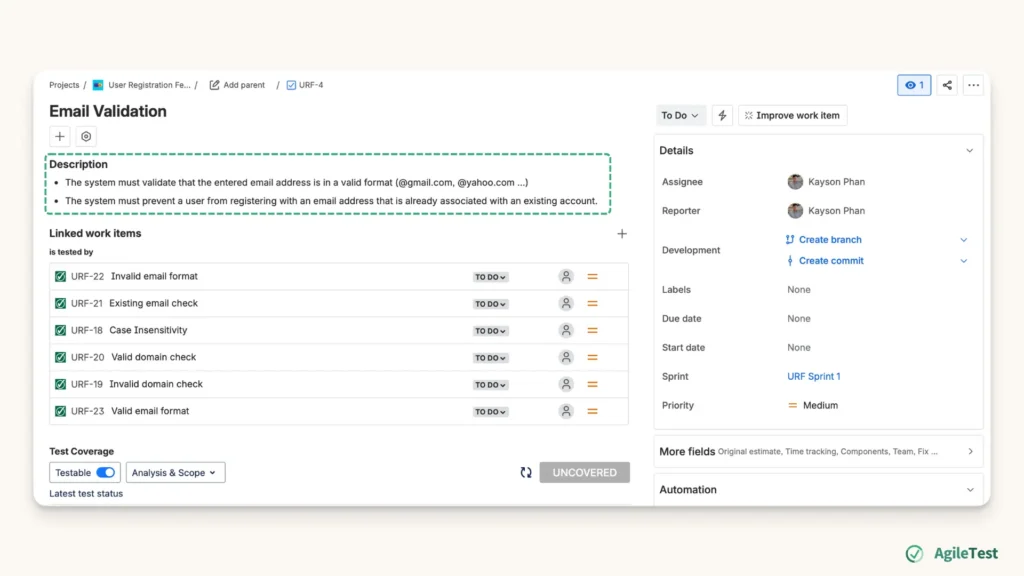
Once you and your team have finalized the testing requirements along with key associate objectives in the Test Planning stage, you can input these details into the description section of the related Requirement Jira tickets.
Based on the details you’ve provided, you can go to the Requirement section → Click on a specific requirement → Choose AI Generator to generate multiple relevant test cases automatically. For example, suppose one of your criteria for the Requirement is “Validate the valid email format”. In that case, the system will list out different use cases such as: Valid email format, Invalid email format, Valid domain check, Invalid domain check, etc. You can then customize or refine these automatically generated test cases to match your specific needs, further reducing the manual work involved.
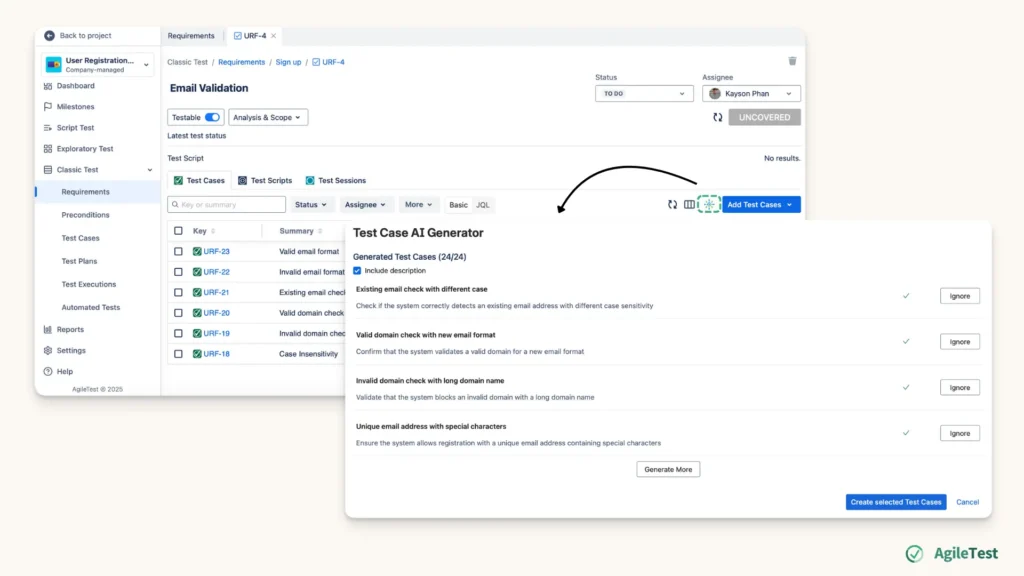
Test Steps
Additionally, AI Generators not only help you generate test cases but also test steps. Each test step can also be quickly filled in with key actions, sample data, and expected results. For instance, in the test case “Valid Email Format” the AI Generator will generate a sequence of actions, such as: entering a correct email format like “test@example.com” as a normal case, while entering an incorrect format like “test!example” as an invalid one.
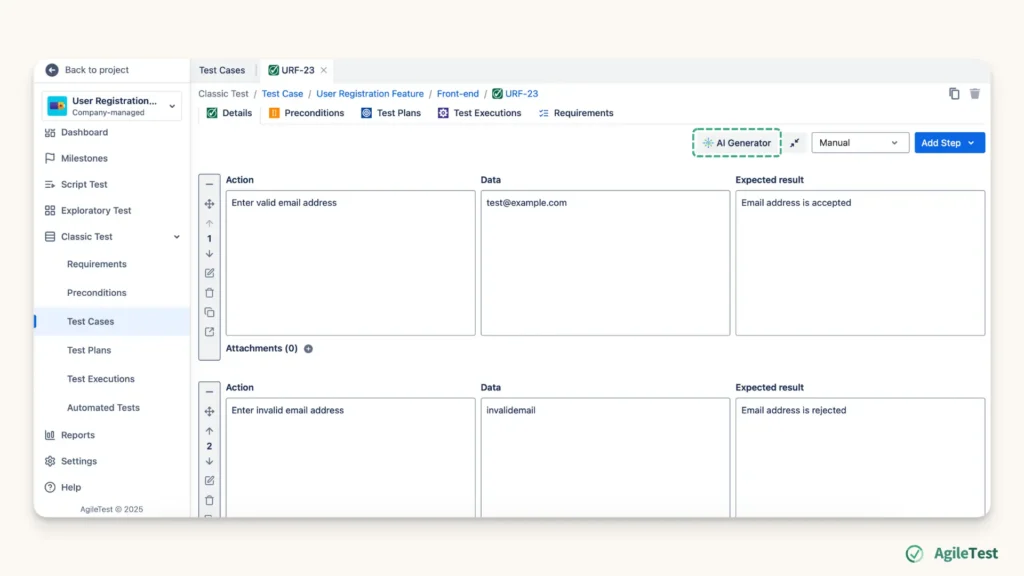
This generating process from requirements to test case and from test case to test step only needs a few seconds. Instead of spending 2 to 3 working days manually designing test cases with detailed test steps, you need only 2 to 3 hours to review the automatically created test cases. AgileTest’s AI Generator helps to reduce manual and repetitive activities in the Test Design stage, so that you and your team can spend more time reviewing the written test cases for necessary adjustments, thus enhancing the overall quality.
Execute Test Cases.
Once you have completed your test case setup the first time in AgileTest and integrated with your CI/CD tools, then you can manage and conduct your automated testing in one place, without moving between platforms. Every time you want to run automated execution, you can choose to run it directly in AgileTests.
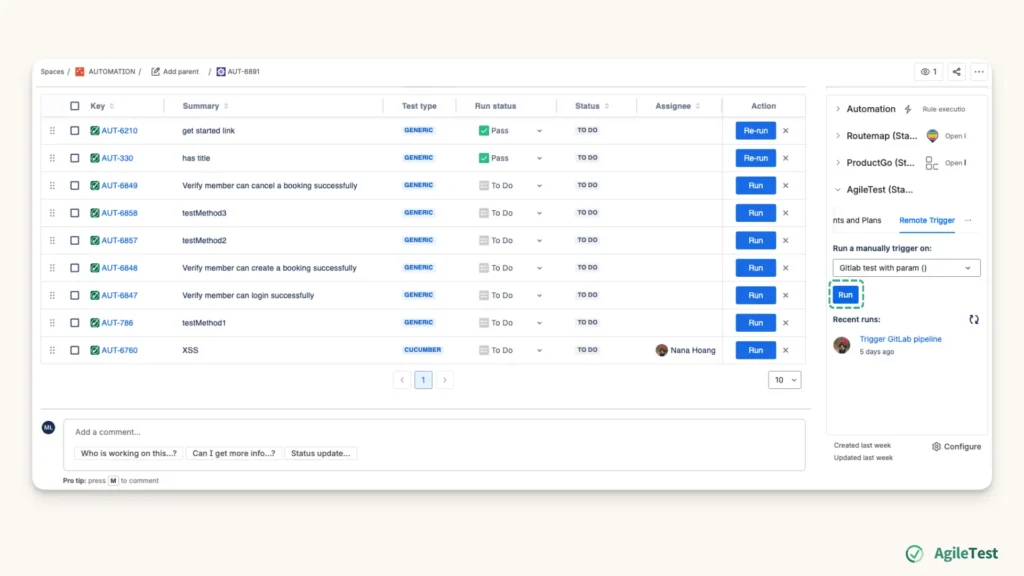
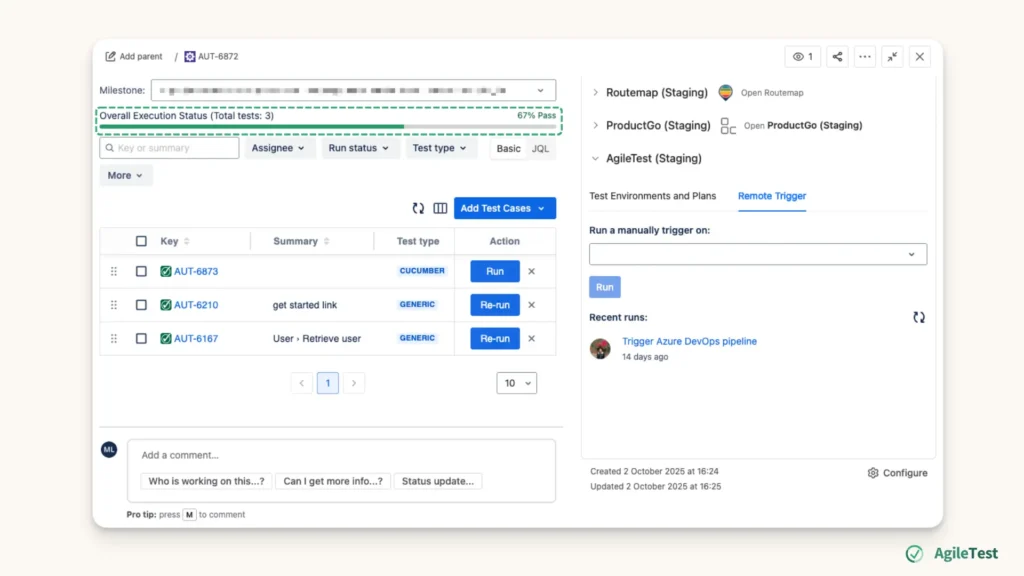
Regardless of which platforms you have executed these tests on, once you run the tests, you will have all the results automatically updated in the Automated Tests section. You no longer have to switch between platforms to run tests, record results, then come back to the testing platform to re-run the failed ones. The test result for each automated execution is available after each run session, and you can access it to see detailed information, such as the test status percentage.
When you gather the test results in one place, you can avoid human errors of moving data between platforms. This centralized process helps shift your focus to identify failed test cases and investigate to find the root cause, rather than being burdened with importing and exporting test data across platforms.
Report Test Results
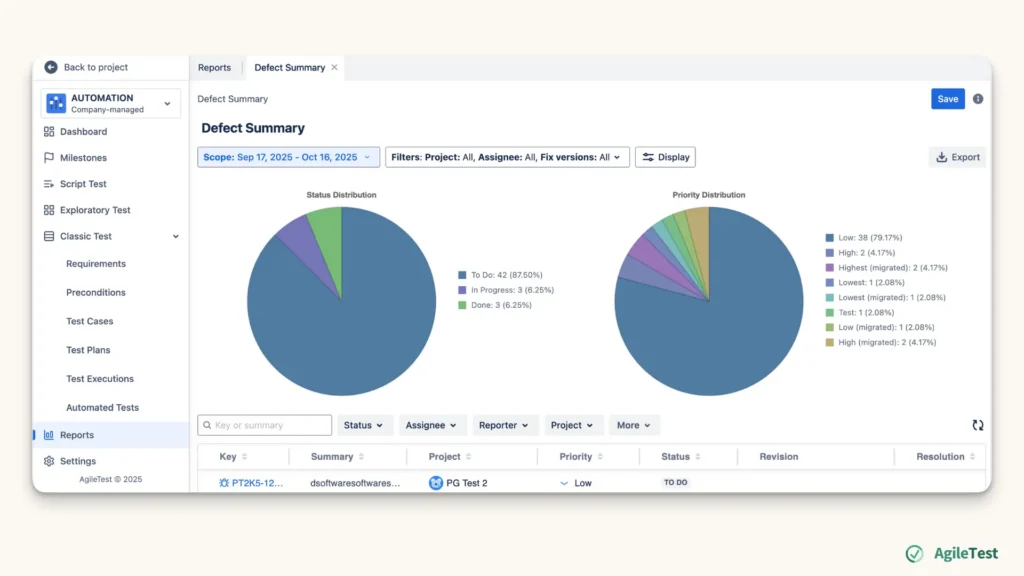
For the reporting activities, your traditional process of using a spreadsheet to count results, then using a visualization tool to create charts, can be simplified. You can access the Report feature, apply the suitable filters to generate these real-time reports. All your defects and test case statuses can be summarized into the Defect Summary and Test Coverage report.
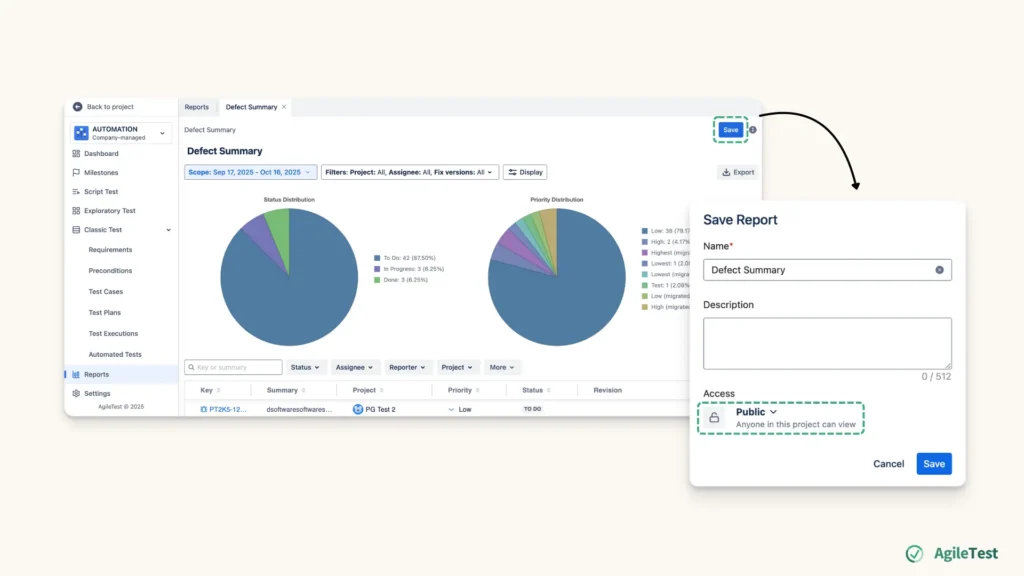
For a more public use of these reports, you can save and share them with your team. This makes these documents more accessible for all your team members instead of just a private view. This approach ensures that all team members are on the same page, keeping everyone updated with real-time testing data. When you can create test reports faster, you can have more time to review and discuss the test results, leading to more efficient workflows and better coordination.
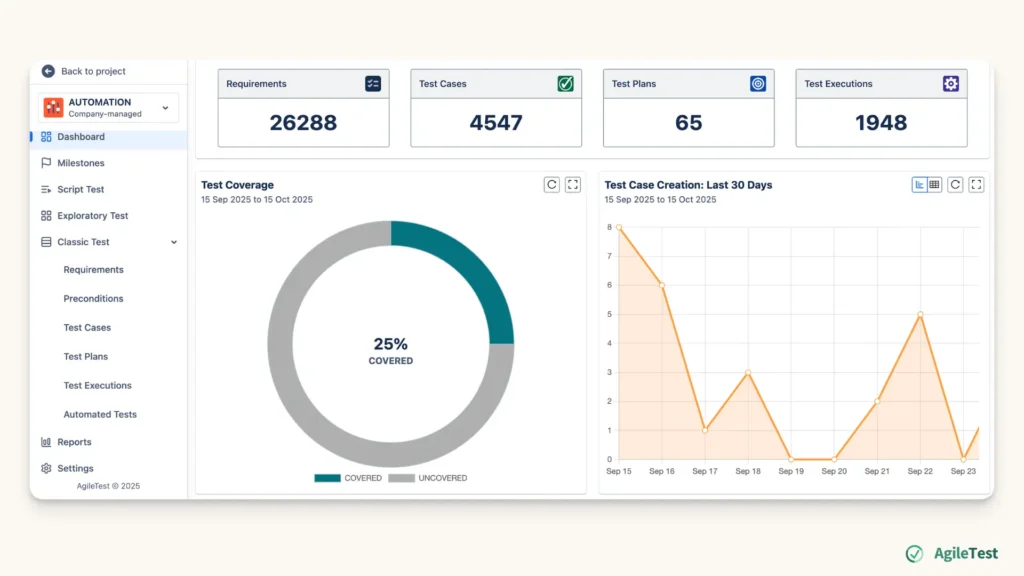
Sometimes, you will need some metrics to control and keep track of your testing activities, rather than waiting until the end to make these reports. In this case, you can also personalize your dashboard with AgileTest widgets, which offer clear insights into your testing progress. These customizable charts and metrics help you track your workload more efficiently, providing a visual overview of key performance indicators.
Final thoughts
Automating key stages like test design, execution, and reporting, you can eliminate manual work, speed up feedback loops, and foster better collaboration within your testing teams. With automation, your team can shift focus to high-value activities, while automation efficiently handles the routine tasks. This balance between human insight and automation enhances productivity, ensuring that your testing process remains both agile and effective.