

The short answer is yes, Jira can support basic testing activities through custom issue types, labels, and dashboards. Many teams use it this way, especially when their test cycles are simple and small in scale. However, Jira was not originally designed as a dedicated test management tool. This article explains what Jira can and cannot do for test case management and shows how a Jira plugin like AgileTest can fill the gaps while keeping all work inside the Jira ecosystem.
1. Key Activities in Test Case Management
Test case management usually involves three main activities. These activities help teams plan their test coverage, run tests in an organized way, and understand the results after execution.
Create Test Cases
This is the first step, where testers create test cases based on defined requirements. A test case typically includes a clear objective, detailed steps to follow, sample input data, and the expected result. Creating test cases ensures that testing is repeatable and that all requirements or user stories are covered.
Organize Test Cases
After test cases are created, they need to be structured so teams can easily find, update, and reuse them. Organizing test cases may involve grouping test cases by feature, release, component, or any relevant category. Proper organization also helps teams plan test cycles, assign work, and track progress across different stages of a project.
See Test Results
Once a team executes the tests, they need a way to view the outcomes. Seeing test results includes checking which tests passed or failed, tracing back defects found, and reviewing progress during a cycle. This activity is critical for decision-making, as it shows whether the product is ready for release or needs additional fixes.
2. How Jira Supports Test Case Management
Jira is primarily designed as a powerful project management and issue-tracking platform that helps teams plan, manage, and deliver work. Let’s see what Jira can help your team manage test cases.
What Can Jira Do Natively
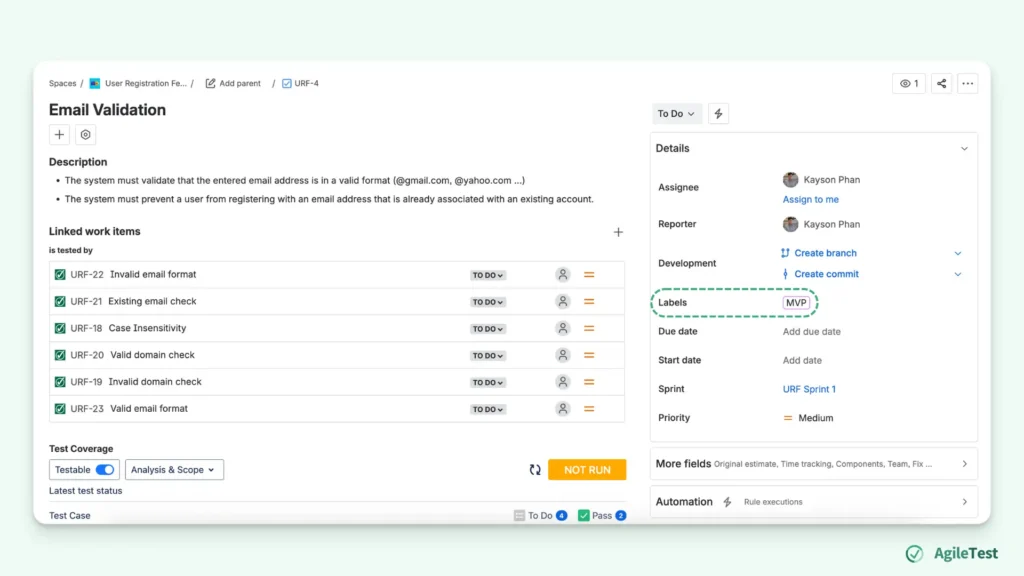
Group Test Cases with Labels: By adding a label to each test issue, teams can group related tests under the same keyword. This makes it easy to filter or search for tests belonging to a feature, release, or component. However, labels rely heavily on consistent naming. If different testers use variations of the same label, such as login, log-in, or login-tests, the grouping becomes fragmented. There is no built-in validation, so teams must maintain their own naming conventions to avoid confusion. For small test sets, labels work well, but as the number of test cases grows, maintaining consistency becomes more challenging.
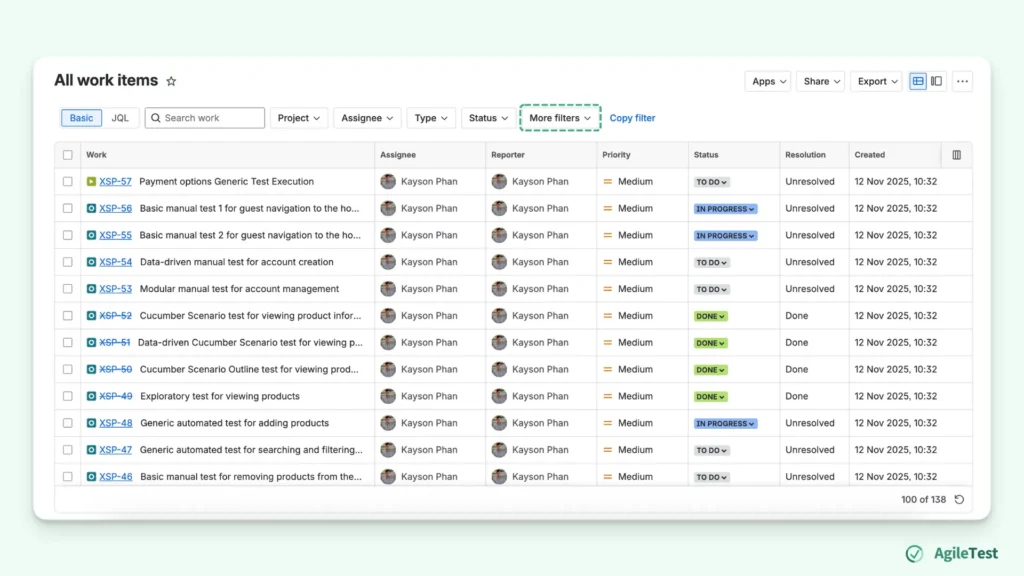
Basic reporting with Dashboard and Filters: Teams can create filters to list test cases, track their status, or find associated defects. These filters can then be added to a dashboard using gadgets such as issue lists, pie charts, or basic statistics. While useful, this process still requires teams to manually create filters, apply them to see visualized charts, and switch between tabs to view all information.
When Jira Alone Might Be Enough
Jira’s native features can be sufficient for teams with simple testing needs. When test cycles are short and the number of test cases is small, teams may not require a full test management structure. Creating test-like issues, tagging them with labels, and monitoring progress through basic dashboards can be effective.
When Jira Alone Becomes Insufficient
However, when testing sizes grow, Jira’s limitations become more noticeable.
Traceability
Complex projects need consistent links between requirements, test cases, executions, and defects. Jira can store these items, but it does not provide a built-in way to track how they relate over cycles. Without structured test entities, it becomes hard to cover all requirements, identify tests to rerun, or trace back defects. Manual linking is possible, but becomes unreliable as the volume of work increases.
For example, your team needs to ensure that every requirement has corresponding test cases. If you create these test cases as regular Jira issues, you must manually link each one to its related story. Over time, as new testers join and the number of tests grows, some links are missed. During some later releases, the team discovers that a critical requirement was never tested because there was no structured view to show which requirements did not have a linked test case.
Long and Structured Cycle
When test cycles become longer and more detailed, teams often need features such as test plans and historical records of previous runs. Jira does not have native support for these activities, so testers must rely on manual processes or external spreadsheets. This makes coordination difficult, especially when multiple testers are working on the same release or when regression suites expand across versions.
Imagine when your team needs to view bugs for the current sprint, so you create a Jira filter with the sprint dates and use it to build a priority chart. Later, you want a view of bugs from the previous sprint, grouped by assignee. Since Jira dashboards depend on saved filters, you must create a new filter with a different date range and conditions. Then, another report is needed, bugs from the last 30 days across two projects, requiring yet another filter. In the end, you have many similar filters just to switch between views. Each new perspective requires manual setup, making reporting slow and repetitive, especially across multiple cycles or projects.
3. As A Jira Plugin, How AgileTest Can Help
AgileTest adds the testing structure that Jira does not provide on its own. It works directly inside Jira projects, so teams can continue using their existing workflows while gaining dedicated testing capabilities.
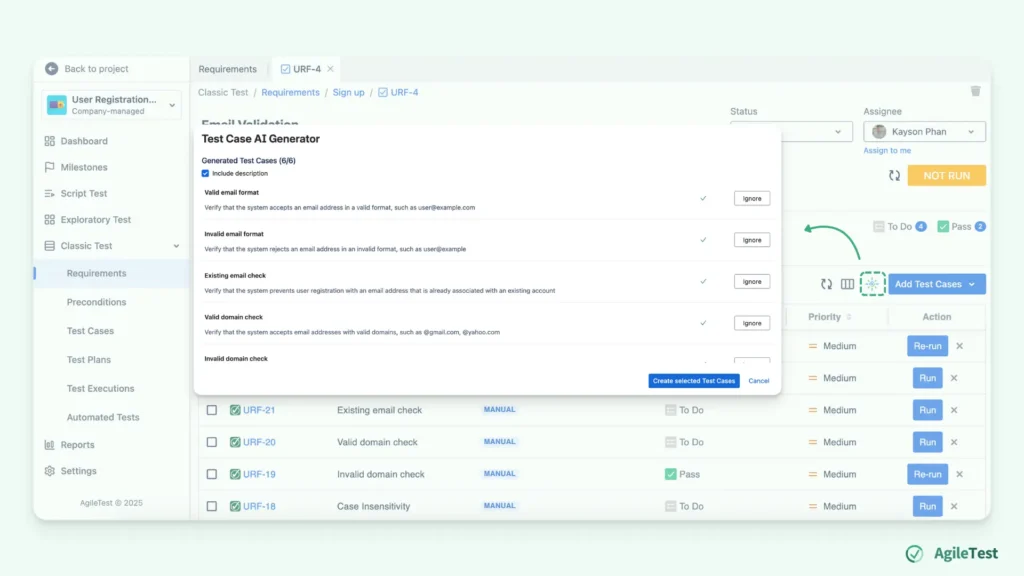
Test Case Generation with AI Generator
AgileTest’s AI generator helps teams create initial test cases directly from requirement descriptions. This speeds up the test design phase and provides a starting point for testers to review and refine. Instead of creating tests from scratch, teams can quickly generate test cases with detailed steps aligned with the requirement descriptions. As a result, part of the manual workload in the testing cycle is reduced, especially with repetitive creation tasks.
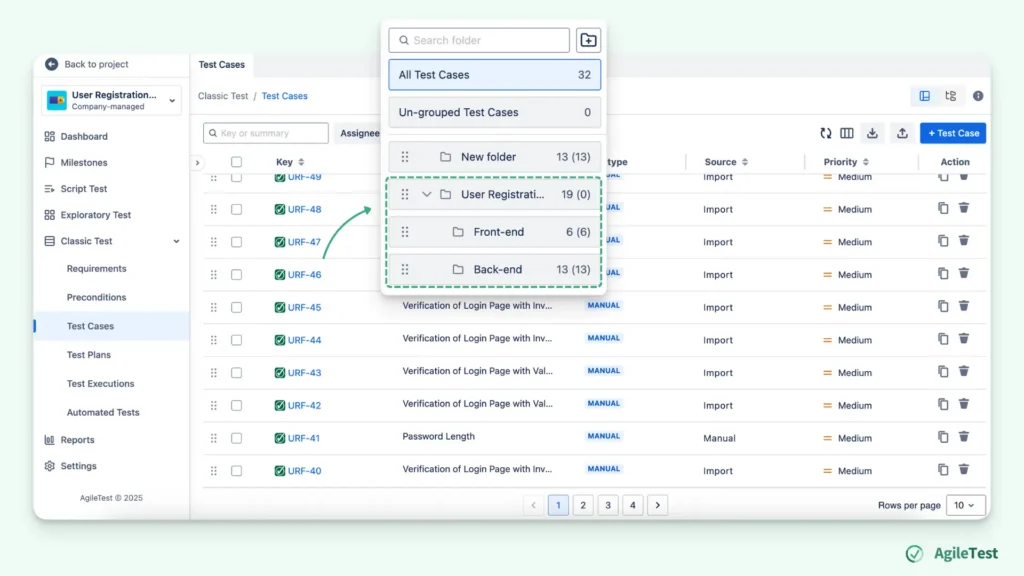
Manage Test Case with Folder and Test Plan
AgileTest provides a folder feature to keep test cases organized. You can categorize test cases into folders by features, modules, or releases. This structure makes it easier to locate and reuse tests over time.
For actual execution, teams can use test plans to group relevant test cases into an execution session. A test plan helps manage test cases to run, view progress, and track the timeline. This is useful for regression cycles, multiple testers, or repeated releases, where controlled organization becomes essential.
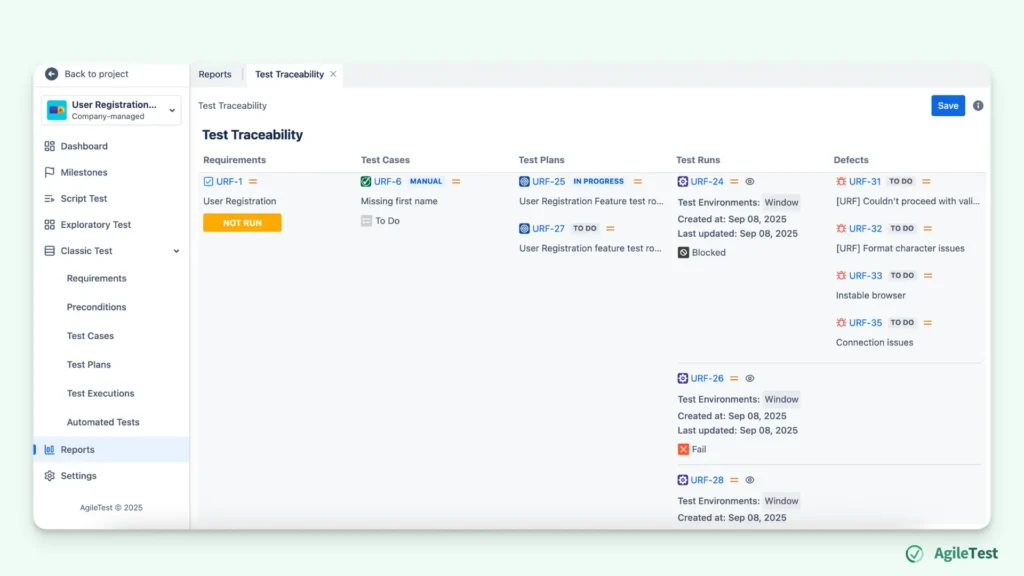
Report with Traceability
AgileTest offers built-in reports that connect requirements, test cases, execution results, and defects. This gives teams a clear view of which requirements are covered by tests, which tests were executed, and where defects were found. It also provides execution summaries that help teams understand release readiness without having to manually combine multiple Jira filters or spreadsheets. This structured traceability is especially helpful in larger or regulated projects where visibility across the test lifecycle is required for audits, reviews, or compliance checks.
Final thoughts
Jira provides enough flexibility to support simple test case management, especially for smaller teams or short testing cycles. But as test coverage grows and projects become more complex, the a need for structured and organized test management. AgileTest addresses these gaps by adding the testing features that Jira does not include by default, allowing teams to manage, execute, and track tests in a more controlled and efficient way, without leaving Jira.
Q&A
1. Do testers need to leave Jira to use AgileTest?
No. AgileTest operates fully inside Jira projects, so teams can manage, execute, and track tests without switching platforms.
2. What signs show that a team has outgrown Jira’s native testing approach?
Teams usually notice extra spreadsheets, inconsistent linking, duplicated issues for test runs, or frequent confusion about which tests belong to which release.
3. What benefits do teams see when moving to a testing plugin inside Jira?
They get test-specific tools while staying within the Jira environment, so their workflows remain familiar and integrated.
4. Does Jira provide built-in test plans or test cycles?
Not natively. Jira does not include structured entities for test plans or execution cycles, so teams must rely on custom issue types or spreadsheets to coordinate test runs. A plugin like AgileTest adds dedicated test plans and execution tracking directly inside Jira, making it easier to organize runs and monitor progress.
5. How does AgileTest improve traceability compared to using only Jira?
Jira can link issues, but it does not provide an end-to-end view across requirements, tests, executions, and defects. AgileTest automatically connects these elements and provides traceability reports that show coverage, execution status, and defect impact—all in one place. This helps teams quickly identify gaps and release risks without building multiple filters or dashboards manually.